NAT Gateway vs PrivateLink vs VPC Endpoints — Cost & Architecture Trade-offs
AWS Networking Series | Part 3 — Building secure, cost-optimised, cloud-native infrastructure on AWS
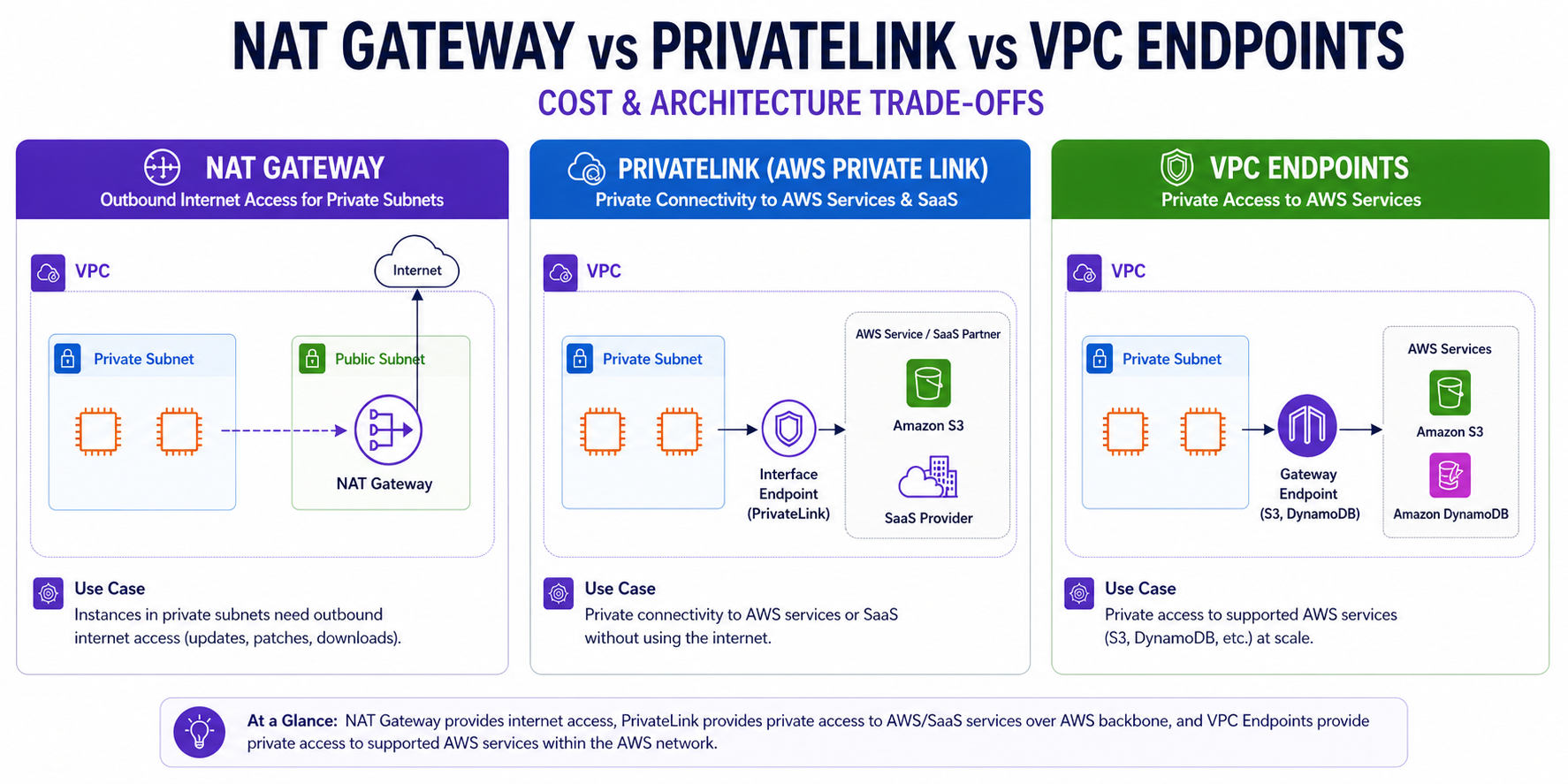
TL;DR Comparison
| Feature | NAT Gateway | PrivateLink | VPC Gateway Endpoint |
|---|---|---|---|
| Traffic path | Private → Internet → AWS service | Private → AWS backbone → AWS/SaaS | Private → AWS backbone → S3/DynamoDB |
| Internet exposure | Yes (outbound only) | None | None |
| Cost model | Hourly + per-GB processed | Hourly per ENI + per-GB processed | Free |
| Use case | General internet egress | Private access to AWS services & SaaS | S3 & DynamoDB at scale |
| Scope | AZ-resilient, cross-AZ charges apply | Per-AZ ENI | Route table, regional |
| Supports SaaS / 3rd party | Yes (via internet) | Yes (PrivateLink-enabled SaaS) | No |
Introduction
One of the most misunderstood areas in AWS networking is knowing when to use a NAT Gateway, when to use PrivateLink, and when to use a VPC Endpoint. Engineers often default to NAT Gateway for everything — and then get a nasty AWS bill at the end of the month.
These three constructs solve different problems. Using the wrong one means either paying too much, exposing traffic unnecessarily, or building overly complex architecture. In this post, we'll break down each option — how they work, when to use them, their cost models, and how to choose the right one for your workload.
1. NAT Gateway — Outbound Internet Access
A NAT Gateway (Network Address Translation Gateway) is an AWS-managed service that allows resources in a private subnet to initiate outbound connections to the internet, without those resources being directly reachable from the internet.
How Traffic Actually Flows:
- Your EC2 in a private subnet sends a packet to PyPI (e.g., 151.101.1.140).
- The subnet's route table has
0.0.0.0/0 → nat-xxxxxxxx. - NAT Gateway translates the source IP to its Elastic IP.
- Packet exits via the Internet Gateway to PyPI.
- Response comes back to the NAT Gateway, which translates back and forwards to your EC2.
# IaC Example — Terraform
resource "aws_nat_gateway" "main" {
  allocation_id = aws_eip.nat.id
  subnet_id     = aws_subnet.public.id
  tags          = { Name = "main-nat-gateway" }
  depends_on    = [aws_internet_gateway.main]
}

    nat_gateway_id = aws_nat_gateway.main.id
  }
}
Real-World Cost Comparison: NAT-Only vs Optimised
Modelling a production ECS cluster: 200 GB/month ECR pulls, 500 GB/month S3 writes, 5 GB/month SSM traffic, across 2 AZs.
Scenario A — NAT Gateway Only
| Component | Calculation | Cost |
|---|---|---|
| NAT Gateway (2 AZs) | 2 × $0.045 × 730h | $65.70 |
| ECR image pulls | 200 GB × $0.045 | $9.00 |
| S3 writes | 500 GB × $0.045 | $22.50 |
| SSM traffic | 5 GB × $0.045 | $0.23 |
| Total | $97.43/month |
Scenario B — Gateway Endpoint + Interface Endpoints + NAT GW for internet only
| Component | Calculation | Cost |
|---|---|---|
| NAT Gateway (2 AZs) | 2 × $0.045 × 730h | $65.70 |
| S3 Gateway Endpoint | FREE | $0.00 |
| ECR Interface Endpoints (2 endpoints × 2 AZs) | 4 × $0.01 × 730h | $29.20 |
| ECR data processed | 200 GB × $0.01 | $2.00 |
| SSM Interface Endpoints (3 endpoints × 2 AZs) | 6 × $0.01 × 730h | $43.80 |
| Total | $140.70/month |
Wait — Scenario B is more expensive?
For this traffic volume, yes. The fixed hourly cost of Interface Endpoints outweighs the data processing savings. The break-even is roughly 200 GB/month per service.
The real ROI: Often security, not cost. In PCI-DSS or HIPAA environments, traffic must never traverse the public internet regardless of volume. S3 via Gateway Endpoint is always a win—free, no trade-offs, saves $22.50/month in this example alone.
The Cost Reality:
| Component | Cost (eu-west-1) |
|---|---|
| Hourly charge | ~$0.045/hour (~$32/month per NAT GW) |
| Data processed (in + out) | ~$0.045/GB |
| Cross-AZ data transfer | $0.01/GB |
# High Availability Per-AZ NAT Gateway Pattern
resource "aws_eip" "nat" {
  for_each = toset(["eu-west-1a", "eu-west-1b", "eu-west-1c"])
  domain   = "vpc"
  tags     = { Name = "nat-eip-${each.key}" }
}

resource "aws_nat_gateway" "az" {
  for_each      = toset(["eu-west-1a", "eu-west-1b", "eu-west-1c"])
  allocation_id = aws_eip.nat[each.key].id
  subnet_id     = aws_subnet.public[each.key].id
  tags          = { Name = "nat-gw-${each.key}" }
}

resource "aws_route" "private_nat" {
  for_each               = toset(["eu-west-1a", "eu-west-1b", "eu-west-1c"])
  route_table_id         = aws_route_table.private[each.key].id
  destination_cidr_block = "0.0.0.0/0"
  nat_gateway_id         = aws_nat_gateway.az[each.key].id
}
Architect's Rule of Thumb
Deploy one NAT Gateway per AZ. While this triples the hourly charge, it avoids the $0.01/GB cross-AZ penalty and removes a single point of failure for your entire region.
Why this matters in production: A single NAT Gateway covering all three AZs does not fail loudly — it fails by introducing cross-AZ latency charges that accumulate silently on your bill, and by becoming a single point of failure that takes down internet egress for the entire region if that AZ has issues. The cross-AZ charge of $0.01/GB each way compounds fast at scale. Deploy one NAT Gateway per AZ and verify route tables point to the local AZ's NAT Gateway — not a shared one.
2. AWS PrivateLink (Interface Endpoints)
AWS PrivateLink provides private connectivity between your VPC and AWS services or SaaS partners — without exposing traffic to the public internet. Traffic flows entirely over the AWS private network backbone.
Real-World Use Cases:
- Private access to SSM, Secrets Manager, ECR, or KMS from private subnets.
- ECS tasks pulling images from ECR without internet access.
- Accessing SaaS partners like Datadog, Snowflake, or Confluent Cloud privately.
# Terraform — Interface Endpoints
resource "aws_vpc_endpoint" "interface" {
  for_each            = local.interface_endpoints
  vpc_id              = aws_vpc.main.id
  service_name        = each.value
  vpc_endpoint_type   = "Interface"
  subnet_ids          = aws_subnet.private[*].id
  security_group_ids  = [aws_security_group.vpc_endpoints.id]
  private_dns_enabled = true # Makes existing DNS names resolve privately
}
Why this matters in production: An ECS cluster in a fully private VPC with Interface Endpoints for ECR but no S3 Gateway Endpoint will fail to pull container images — silently. ECR stores image layers in S3. Tasks get stuck in PENDING with no useful error. The fix takes two minutes to deploy but is impossible to diagnose quickly at 2am without knowing this dependency. Always add the S3 Gateway Endpoint alongside ECR Interface Endpoints.
3. VPC Gateway Endpoints — S3 & DynamoDB
VPC Gateway Endpoints are a specific, older type of VPC endpoint that provide private access to Amazon S3 and Amazon DynamoDB only. Unlike Interface Endpoints, they work via route table entries and are **completely free**.
resource "aws_vpc_endpoint" "s3" {
  vpc_id            = aws_vpc.main.id
  service_name      = "com.amazonaws.${var.region}.s3"
  vpc_endpoint_type = "Gateway"
  route_table_ids   = aws_route_table.private[*].id
}
Practical Security: Enforcement via S3 Bucket Policy
A common compliance requirement is to ensure data never leaves your network. You can enforce this by adding a condition to your S3 bucket policy that only allows access via your specific VPC Endpoint:
{
  "Version": "2012-10-17",
  "Statement": [
    {
      "Sid": "Access-to-specific-VPCE-only",
      "Effect": "Deny",
      "Principal": "*",
      "Action": "s3:*",
      "Resource": ["arn:aws:s3:::my-secure-bucket/*"],
      "Condition": {
        "StringNotEquals": {
          "aws:sourceVpce": "vpce-1a2b3c4d"
        }
      }
    }
  ]
}
Case Study: ECS Fargate in a Private VPC
If you are running ECS Fargate in a VPC with no Internet Gateway (for maximum security), your tasks will fail to start because they can't reach the ECR APIs to pull images. You must create the following **Interface Endpoints**:
com.amazonaws.[region].ecr.dkr(Docker image pull)com.amazonaws.[region].ecr.api(ECR API calls)com.amazonaws.[region].s3(ECR uses S3 to store image layers)com.amazonaws.[region].logs(CloudWatch Logs for task logs)
Expert Tip: Security Enforced via Policy
You can attach an Endpoint Policy to your Gateway Endpoint to restrict access to only specific buckets. For example, denying all access unless it comes through your specific VPC Endpoint ensures your sensitive data stays within your network boundary.
# S3 Bucket Policy enforcing VPC Endpoint access
resource "aws_s3_bucket_policy" "enforce_vpce" {
  bucket = aws_s3_bucket.sensitive_data.id
  policy = jsonencode({
    Version = "2012-10-17"
    Statement = [{
      Sid       = "Access-to-specific-VPCE-only"
      Effect    = "Deny"
      Principal = "*"
      Action    = "s3:*"
      Resource  = ["${aws_s3_bucket.sensitive_data.arn}/*"]
      Condition = {
        StringNotEquals = {
          "aws:sourceVpce" = aws_vpc_endpoint.s3.id
        }
      }
    }]
  })
}
Pro Tip: Even a valid IAM user with s3:GetObject cannot access this bucket from outside your VPC—the explicit Deny overrides all Allow statements. This is standard control for PCI-DSS and HIPAA environments.
Why this matters in production: S3 Gateway Endpoints are free and eliminate data processing charges on all S3 traffic that previously routed through your NAT Gateway. For a cluster running 10 TB/month of S3 reads via NAT Gateway, that is $450/month disappearing from your bill with zero downside. If you are not using a Gateway Endpoint for S3 today, you are paying for traffic that could be free.
The Decision Framework
How do you choose? Follow this simple logic:
- Need general internet? → NAT Gateway.
- Need S3 or DynamoDB? → Gateway Endpoint (It's free!).
- Need other AWS services (ECR, SSM, etc)? → Interface Endpoint (PrivateLink).
- Need a supported SaaS partner? → PrivateLink.
Common Mistakes & Anti-Patterns
- Using NAT Gateway for S3: This is a major "bill shock" waiting to happen. S3 traffic is high-volume; routing it through a NAT Gateway is throwing money away.
- Forgetting endpoints in fully private accounts: Engineers consistently fail ECS Fargate deployments in private subnets because of this gap.
locals {
  required_endpoints = {
    ecr_api = "com.amazonaws.${var.region}.ecr.api"
    ecr_dkr = "com.amazonaws.${var.region}.ecr.dkr"
    logs    = "com.amazonaws.${var.region}.logs"
    ssm     = "com.amazonaws.${var.region}.ssm"
    # ... and others like secretsmanager, kms, sts
  }
}

resource "aws_vpc_endpoint" "interface" {
  for_each            = local.required_endpoints
  vpc_id              = aws_vpc.main.id
  service_name        = each.value
  vpc_endpoint_type   = "Interface"
  subnet_ids          = aws_subnet.private[*].id
  private_dns_enabled = true
}
Critical Gotcha: ECR stores image layers in S3. Without the S3 Gateway Endpoint, ECS tasks will fail to pull images even if the ECR Interface Endpoints are present. This is the most common works-in-dev, fails-in-prod architect error.
- Forgetting
private_dns_enabled: Without this, your application code needs to be modified to use the endpoint's unique DNS name. With it, the standard SDK resolution just works. - No Endpoint Policies: By default, an endpoint allows all actions. Always scope your policies to the minimum required resources.
The Golden Rule
"Use Gateway Endpoints for S3 and DynamoDB — always, it's free. Use Interface Endpoints for all other AWS services in security-sensitive or high-throughput environments. Use NAT Gateway only for traffic that genuinely needs to reach the public internet."