Advanced VPC Concepts: Scaling & High Performance
AWS Networking Series | Part 2 — Building secure, cost-optimised, cloud-native infrastructure on AWS
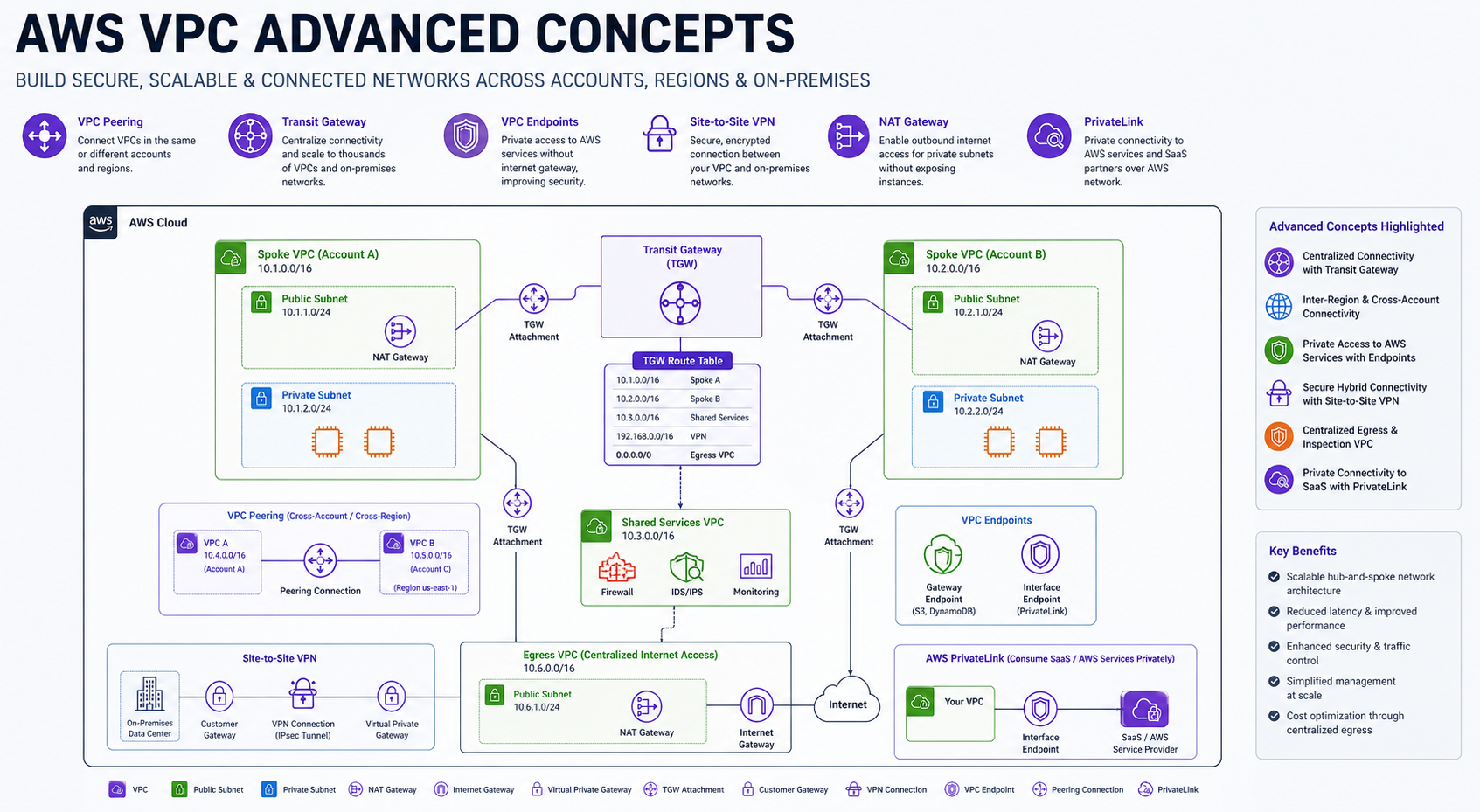
Taking the Network to the Next Level
Once you've mastered the basics of subnets and firewalls, enterprise-scale cloud architecture demands more complex connectivity patterns. In this post, we explore how to scale, connect, and optimize VPCs for global workloads.
1. VPC Peering: The Private Highway
VPC Peering is a direct network connection between two VPCs. While it is highly performant (no bottlenecks), it requires manual management that doesn't scale for large organizations.
- Manual Routing: Routing is not automatic. You must add routes manually to the route tables on both sides of the peering connection.
- Cross-Region Costs: Traffic over cross-region peering is charged at standard data transfer rates (typically $0.01/GB). In-region peering is free.
- The 50-Peering Limit: AWS imposes a soft limit of 50 active peering connections per VPC. Attempting a "full mesh" (where every VPC talks to every other VPC) becomes mathematically impossible beyond ~10 VPCs.
- Security Group Referencing: You can reference Security Groups from a peered VPC (in the same region) to allow specific traffic, which is a powerful security feature.
Why this matters in production: A missing route table entry on either side of a VPC peering connection causes asymmetric routing — traffic goes out but cannot return. The symptom is a TCP connection that hangs rather than failing immediately, which makes it look like a firewall issue, not a routing issue. Always add routes on both sides and test bidirectionally with traceroute before marking the peering setup complete.
2. Transit Gateway (TGW): The Central Hub
AWS Transit Gateway acts as a regional network hub. For enterprise-scale management, we combine TGW with AWS RAM for multi-account sharing and dedicated route tables for isolation.
# Create the Gateway
resource "aws_ec2_transit_gateway" "main" {
  description = "Organization Central Hub"
}

# Create an Isolated Route Table
resource "aws_ec2_transit_gateway_route_table" "isolated" {
  transit_gateway_id = aws_ec2_transit_gateway.main.id
}

# Share via Resource Access Manager (RAM)
resource "aws_ram_resource_share" "tgw_share" {
  name                      = "tgw-share"
  allow_external_principals = false
}

resource "aws_ram_resource_association" "tgw" {
  resource_arn       = aws_ec2_transit_gateway.main.arn
  resource_share_arn = aws_ram_resource_share.tgw_share.arn
}
Association vs Propagation — The Most Confused Concept
Every TGW attachment (VPC, VPN, Direct Connect) interacts with a TGW Route Table in two distinct ways. Mixing them up is the #1 reason for unexpected connectivity (or lack thereof):
- Association (The GPS): "Which route table does this attachment use to make forwarding decisions?" When traffic arrives from a VPC, the TGW looks at that attachment's associated route table to decide where to send the packet. One attachment = one association.
- Propagation (The Announcement): "Which route tables should automatically learn this attachment's CIDR?" Think of this as the attachment announcing its address. When a VPC is propagated into a route table, that table automatically gets a route pointing to that VPC's range.
# Prod VPC: Associated with Prod RT (read), Propagated into Prod RT (write)
resource "aws_ec2_transit_gateway_route_table_association" "prod_vpc" {
  transit_gateway_attachment_id  = aws_ec2_transit_gateway_vpc_attachment.prod.id
  transit_gateway_route_table_id = aws_ec2_transit_gateway_route_table.prod.id
}

resource "aws_ec2_transit_gateway_route_table_propagation" "prod_vpc" {
  transit_gateway_attachment_id  = aws_ec2_transit_gateway_vpc_attachment.prod.id
  transit_gateway_route_table_id = aws_ec2_transit_gateway_route_table.prod.id
}

# Isolation: Non-prod will never learn the prod CIDR unless we propagate it there.
# Traffic is blocked at the TGW layer—Security Groups never even see the packet.
The Mental Model:
Association = "I read from this table." | Propagation = "I write into this table."
A Shared Services VPC is a classic example of propagating into both Prod and Non-Prod tables. This allows both environments to reach shared tools (AD, Logging) while keeping Prod and Non-Prod completely isolated from each other.
- Inter-Region TGW Peering: You can peer Transit Gateways in different regions. This allows you to build a global hub-and-spoke network where a VPC in London can talk to a VPC in New York over the AWS private backbone.
- Route Table Isolation: You can create multiple TGW route tables to segment traffic. For example, preventing your "Dev" VPC spoke from ever reaching the "Prod" VPC spoke at the hub level.
- Resource Access Manager (RAM): As shown above, you use RAM to share a single TGW across your entire AWS Organization, allowing different accounts to attach their VPCs to your hub.
Why this matters in production: A TGW with default_route_table_association = "enable" and a missing explicit route table assignment means new VPC attachments automatically inherit the default route table — potentially routing dev traffic into prod subnets. Disable the default association from the start and enforce explicit route table assignments for every attachment. Route leaks between environments are the hardest class of TGW incident to diagnose.
3. Hybrid Connectivity: VPN vs. Direct Connect
Connecting your data center to AWS requires balancing speed, reliability, and cost. Modern architectures often use Direct Connect (DX) Gateway to reach multiple VPCs across different regions from a single connection.
| Feature | Site-to-Site VPN | Direct Connect |
|---|---|---|
| Path | Public Internet (IPsec) | Private Dedicated Line |
| Performance | Variable Latency | Consistent & Low Latency |
| Setup Time | Minutes | Weeks / Months |
| Reliability | Medium (Internet-dependent) | High (SLA-backed) |
BGP & Dynamic Propagation: BGP automatically advertises routes between your data center and AWS. When your Direct Connect path fails, BGP withdraws those routes and your VPN backup begins advertising them — failover happens without any manual intervention.
Pro Architect Pattern: Use Direct Connect as your primary path and a Site-to-Site VPN as a cost-effective backup, with BGP weightings set to prefer the DX line. #HighAvailability
4. PrivateLink: Secure Cross-Account Connectivity
While standard VPC Endpoints give you access to AWS services, PrivateLink allows you to expose your own services (Endpoint Services) to other VPCs—even across different AWS accounts—without peering. For a deep dive on this vs NAT Gateway, see our comparison guide.
- Architecture: Your service must be behind a Network Load Balancer (NLB). The consumer creates an Interface Endpoint that connects to your NLB privately.
- Acceptance Required: Unlike peering, you can require explicit acceptance of each connection request, giving you granular control over who accesses your service.
5. AWS Global Accelerator & Anycast Routing
AWS Global Accelerator improves application performance by routing traffic through the nearest AWS edge location.
- Anycast IPs: You get two static IP addresses that are broadcast globally via BGP. This eliminates the "DNS caching" problem where clients take hours to point to a new IP during a failover.
- Global Accelerator vs. CloudFront: GA is for non-HTTP traffic (gaming, VoIP, IoT) or scenarios where you need fixed IPs. CloudFront is for caching static/dynamic HTTP content.
6. Advanced Security: Mirroring & Inspection
- Traffic Mirroring: Copy network traffic from an ENI and send it to security appliances for inspection (IDS/IPS). This is critical for meeting strict compliance (PCI-DSS/HIPAA) without installing agents on every instance.
- Gateway Load Balancer (GWLB): Transparently route all your VPC traffic through a fleet of 3rd-party firewalls (like Palo Alto or Fortinet) for deep packet inspection.
- Egress-Only Internet Gateway: The IPv6 version of a NAT Gateway. It allows your IPv6-enabled resources to reach the internet while remaining protected from unsolicited inbound connections.
Why this matters in production: Traffic Mirroring is the difference between guessing what payload caused an incident and knowing. Without it, you are reconstructing attacks from application logs that may themselves be incomplete. Enable mirroring to a dedicated inspection instance in your security VPC before you have an incident — setting it up under pressure is slow and error-prone.
Advanced Connectivity Decision Matrix
| Solution | Performance | Management | Best Use Case |
|---|---|---|---|
| VPC Peering | Highest (1:1) | High Effort | High traffic between 2-3 VPCs |
| Transit Gateway | High (Hub-Spoke) | Low (Centralized) | Managing 10+ VPCs & Hub-Spoke |
| PrivateLink | Predictable | Moderate | Exposing specific SaaS or API |
| Direct Connect | Fixed Bandwidth | Professional Setup | Stable Enterprise Hybrid Cloud |
Expert Architect Tip: The Overlap Nightmare
Overlapping CIDR blocks are a common headache during company mergers. Standard Peering or TGW will fail because of routing conflicts. You have two primary architect paths:
- Path A: PrivateLink (Service-Level) — Best if you only need to expose specific APIs or services. The overlap doesn't matter because PrivateLink works via ENIs with IPs from the destination's range.
- Path B: Private NAT Gateway (Network-Level) — Best for full connectivity. It translates your traffic into a non-overlapping internal range before it hits the Transit Gateway, allowing overlapping VPCs to talk without a full re-IP project.
The Golden Rule
"VPC design is not set in stone, but it's hard to change later. Use VPC Flow Logs for visibility, implement secondary CIDRs only when necessary, and always prefer PrivateLink or VPC Endpoints over NAT Gateways for internal AWS service communication to save costs and improve security."