Demystifying AWS VPC: From Layman to Cloud Architect
AWS Networking Series | Part 1 — Building secure, cost-optimised, cloud-native infrastructure on AWS
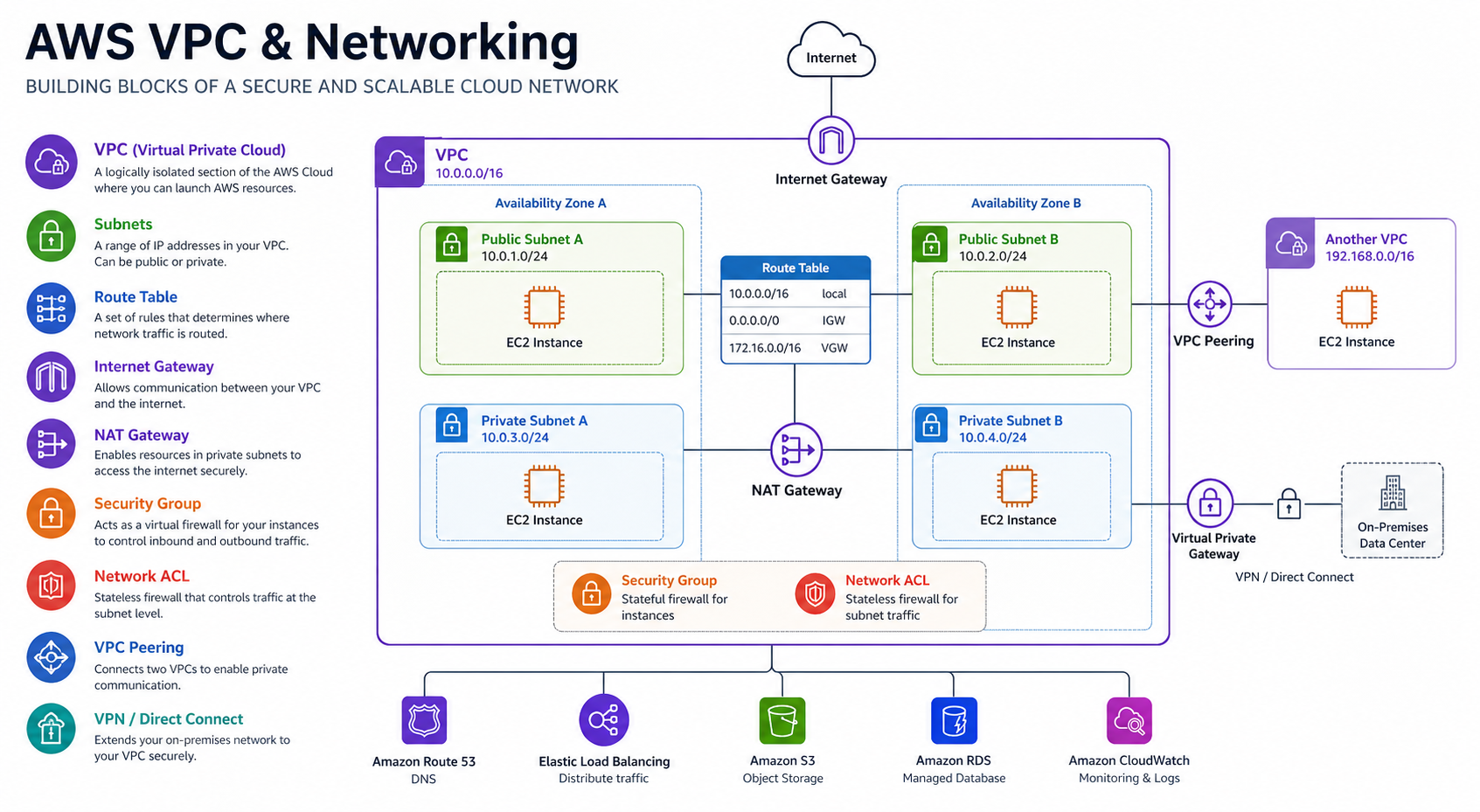
Why Do We Need a VPC?
Think of a VPC as your own private data center in the cloud. Without it, your resources would be floating in a shared space. A VPC gives you isolation, security, and complete control over your virtual networking environment, including your own IP address range, subnets, and route tables.
IP Addressing & The "Rule of 5"
Every VPC has a primary IPv4 CIDR block. As seen in our architecture diagram above, we are using the 10.0.0.0/16 network address block, which supports 65,536 IP addresses.
Crucial Architect Fact: AWS reserves 5 IP addresses in every subnet!
From any CIDR range you define (for example, a 10.0.0.0/24 subnet), you lose the first 4 and the very last IP address:
- 10.0.0.0: Network Address.
- 10.0.0.1: Reserved for the VPC Router.
- 10.0.0.2: Reserved for the Amazon Provided DNS server.
- 10.0.0.3: Reserved for future use.
- 10.0.0.255: The network broadcast address. Since VPCs do not support broadcast, AWS reserves this address.
Strategic CIDR Planning: Beyond the /16
While many engineers default to a 10.0.0.0/16, high-level architecture requires more nuance. If you are part of a large organization, you must avoid overlapping with corporate data centers (often using RFC 1918 ranges like 10.x.x.x).
- Secondary CIDRs: If you run out of space, you can associate additional CIDR blocks with your VPC.
- The /17 Split: A common enterprise pattern is splitting a /16 into two /17s—one for production and one for non-production—ensuring clear separation while staying within a manageable range.
- Non-Routable Ranges: Consider using the
100.64.0.0/10range (CGNAT) for internal VPC resources that don't need to be routable from your corporate network.
Why this matters in production: A /24 VPC that runs out of IPs does not give you a warning — it silently fails to launch new EC2 instances, ECS tasks, and Lambda functions in VPC mode. The first symptom is usually a failed Auto Scaling event during peak traffic. You cannot resize the primary CIDR block after creation — only add secondary CIDRs, which introduce routing complexity. Plan for 3× your expected pod and instance count from Day 1.
The Silent Killer: VPC DNS Attributes
Two often-overlooked attributes are critical for connectivity: enableDnsSupport and enableDnsHostnames. If these are disabled, your resources won't resolve AWS service endpoints privately. This is a common "day 1" troubleshooting issue when PrivateLink or Interface Endpoints fail to work as expected.
Why this matters in production: DisablingenableDnsSupportbreaks SSM Session Manager, CodeDeploy agents, and Interface Endpoint resolution — silently. Services appear running but cannot reach AWS APIs. The failure mode is a timeout with no DNS error in the logs, because the resolver itself is gone. Always verify both attributes aretruebefore deploying any workload into a new VPC.
The Foundational Components
- Subnets: Segments of your VPC's IP range. You use them to group resources (like Web, App, and DB tiers) based on security needs.
- Availability Zones (AZs): Data centers within a region. Always spread subnets across multiple AZs to achieve High Availability (HA).
- Route Tables: The "GPS" of your VPC. They contain a set of rules that determine where network traffic is directed.
Provisioning with Infrastructure as Code (Terraform)
In modern cloud engineering, we never create VPCs via the console. Here is the standard "Golden Template" for a multi-AZ VPC using Terraform:
module "vpc" {
  source  = "terraform-aws-modules/vpc/aws"
  version = "5.0.0"

  name = "production-vpc"
  cidr = "10.0.0.0/16"

  azs             = ["eu-west-1a", "eu-west-1b", "eu-west-1c"]
  private_subnets = ["10.0.1.0/24", "10.0.2.0/24", "10.0.3.0/24"]
  public_subnets  = ["10.0.101.0/24", "10.0.102.0/24", "10.0.103.0/24"]

  enable_nat_gateway     = true
  single_nat_gateway     = false
  one_nat_gateway_per_az = true # Provisions one NAT Gateway per AZ, eliminating cross-AZ charges and single points of failure
  enable_dns_hostnames = true
  enable_dns_support   = true

  tags = {
    Environment = "production"
    Owner       = "Architecture-Team"
  }
} # End of Module Block
Under the Hood: While modules are great, an architect should understand the raw resources. Here is the manual breakdown of what that module is doing:
resource "aws_vpc" "main" {
  cidr_block           = "10.0.0.0/16"
  enable_dns_support   = true
  enable_dns_hostnames = true
}

resource "aws_subnet" "private" {
  vpc_id            = aws_vpc.main.id
  cidr_block        = "10.0.1.0/24"
  availability_zone = "eu-west-1a"
}

resource "aws_internet_gateway" "igw" {
  vpc_id = aws_vpc.main.id
}
Public vs. Private Subnets: The "Internet Gateway" Rule
A subnet is Public if its route table has a path to an Internet Gateway (IGW). A Private Subnet has no direct path to the IGW and must use a NAT Gateway located in a public subnet to reach the outside world securely.
Two Layers of Firewalls
AWS provides a layered defense approach to network security:
- Security Groups (Stateful): These act at the Instance level. They are "smart"—if you allow traffic in, the response is automatically allowed out.
- Network ACLs (Stateless): These act at the Subnet level. They are "rigid"—you must explicitly allow both inbound and outbound traffic separately.
Visibility & Troubleshooting: VPC Flow Logs
For high-authority environments, VPC Flow Logs are non-negotiable. They capture information about the IP traffic going to and from network interfaces in your VPC.
- Athena for Querying: Send your logs to S3 and use Amazon Athena to run SQL queries. A classic "Top Talkers" query to find bandwidth hogs looks like this:
SELECT srcaddr, dstaddr, sum(bytes) as total_bytes
FROM vpc_flow_logs
WHERE action = 'ACCEPT'
GROUP BY srcaddr, dstaddr
ORDER BY total_bytes DESC
LIMIT 10;

-- Top talkers by source IP (useful for detecting noisy or compromised instances)
SELECT srcaddr, COUNT(*) as request_count
FROM flow_logs
GROUP BY srcaddr
ORDER BY request_count DESC
LIMIT 10;Why this matters in production: Flow Logs disabled during a security incident means you have no evidence of what traffic reached your instances before and after a compromise. Retroactively enabling them gives you data from that point forward — not the hours before. Enable Flow Logs on Day 1, send to S3 with a 90-day retention policy, and verify the Athena table is queryable before you need it.
VPC Sharing (Resource Access Manager)
In large enterprises, we often use **VPC Sharing** via AWS RAM. Instead of every team creating their own VPC (leading to a networking mess), a central Cloud Platform team manages a single VPC and "shares" specific subnets with different accounts. This centralizes control over IP space and connectivity while letting teams remain autonomous.
VPC Architecture Decision Matrix
| Need | Solution | Best Practice |
|---|---|---|
| Isolation | Subnets | Web / App / DB tiering |
| Internet Access | NAT Gateway | Deploy one per AZ |
| Private AWS Access | VPC Endpoints | Gateway for S3/Dynamo (Free) |
| Compliance | Flow Logs | Log to S3 + Athena |
Architect's Tips & Best Practices:
- Sizing: Choose a CIDR block that is large enough (e.g., /16) to accommodate future growth.
- Avoid Overlap: Ensure your IP ranges don't conflict with on-prem networks or peer VPCs.
- Flow Logs: Enable VPC Flow Logs for every critical environment to ensure full visibility for debugging.
Common Pitfalls & Production Lessons Learned
These are the mistakes that appear repeatedly in real AWS environments — including during migrations, audits, and post-incident reviews.
Starting with a /24 or /23 feels sufficient early on. Six months later you're out of IPs and scrambling to add secondary CIDRs — which don't work with all services and create routing complexity. Always start with at least a /16 for production VPCs. You can't resize the primary CIDR, only add secondary ones.
Using 10.0.0.0/16 for dev, 10.0.0.0/16 for staging, and 10.0.0.0/16 for prod is extremely common and completely blocks you from ever peering those environments or connecting them via TGW. Plan your IP space org-wide from Day 1 — a simple spreadsheet tracking which CIDR belongs to which account/environment saves enormous pain later.
Setting enable_dns_support = false breaks all AWS service endpoint resolution inside your VPC. Setting enable_dns_hostnames = false means your EC2 instances get no DNS names — SSM Session Manager, CodeDeploy, and many other services silently fail. Both should always be true.
A common shortcut to avoid NAT Gateway costs. Databases, application servers, and internal APIs should never have public IPs. If cost is the concern — use VPC Gateway Endpoints for S3/DynamoDB (free) and Interface Endpoints for other AWS services rather than routing everything via NAT or, worse, exposing it publicly.
Deploying a single NAT Gateway to save the ~$32/month per AZ introduces two problems: cross-AZ data transfer charges ($0.01/GB each way) that can exceed the savings at scale, and a single point of failure that takes down internet egress for your entire VPC if that AZ has issues. Always use one_nat_gateway_per_az = true in production.
Flow Logs feel optional until you're debugging a mysterious connectivity failure at 2am or responding to a security incident. Retroactively enabling them doesn't give you the history you need. Enable them from Day 1, send to S3 for long-term retention, and use Athena for querying. The cost is minimal — typically under $5/month for a standard workload.
The Golden Rule
"Build your VPC with the future in mind. Always use non-overlapping CIDRs, design for multi-AZ high availability from day one, and keep your public subnets as small as possible. The most secure VPC is the one where your resources have no direct route to the internet unless absolutely necessary."