Transit Gateway vs VPC Peering — When Your VPCs Need to Talk
AWS Networking Series | Part 4 — Scaling enterprise connectivity and high-performance network orchestration
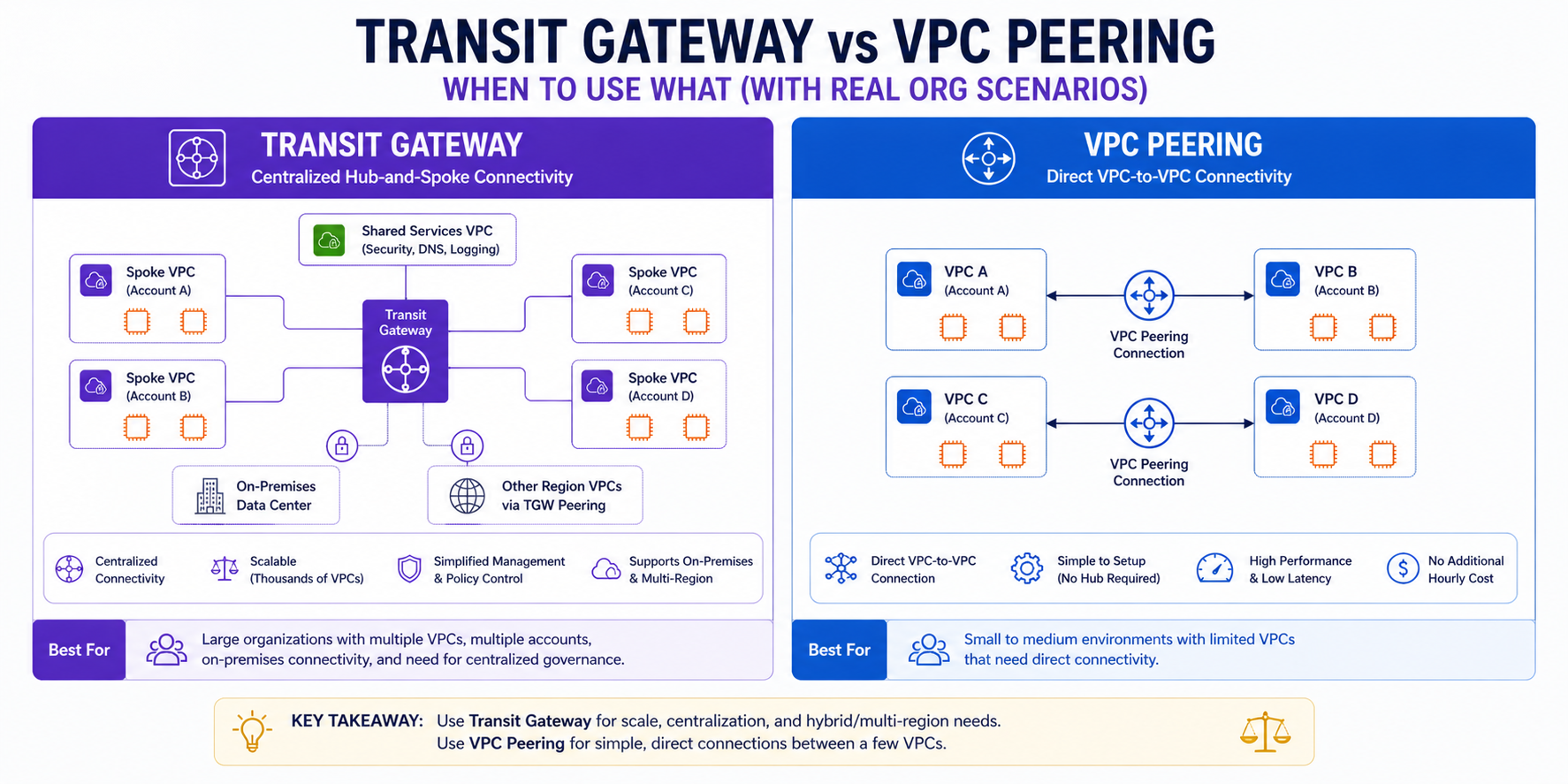
TL;DR Comparison
| Feature | VPC Peering | Transit Gateway |
|---|---|---|
| Topology | Point-to-point (1:1) | Hub-and-spoke (1:many) |
| Max connections | 50 per VPC (soft limit) | 5,000 attachments per TGW |
| Transitive routing | ❌ Not supported | ✅ Supported |
| Cross-region | ✅ Supported ($0.01/GB) | ✅ Supported (TGW peering) |
| Cross-account | ✅ Supported | ✅ Via AWS RAM |
| Route management | Manual, both sides | Centralised route tables |
| Traffic isolation | Security Groups only | Dedicated route tables per segment |
| Bandwidth | No limit | 50 Gbps burst per AZ |
| Cost | Free (in-region) + data transfer | $0.05/GB + $0.07/attachment/hour |
| Best for | 2-3 high-traffic VPCs | 10+ VPCs, complex routing |
Introduction
In Part 2 of this series we introduced VPC Peering and Transit Gateway as concepts. In this post we go significantly deeper — because choosing the wrong one at scale is one of the most expensive, hardest-to-undo architectural decisions you can make in AWS.
The surface-level answer is simple: small number of VPCs → Peering, large number → TGW. But the reality is far more nuanced. There are workloads where Peering is the right answer at 50 VPCs, and workloads where TGW is the right answer at 3. Understanding why requires understanding transitive routing, route table isolation, centralized egress, and inspection architectures — all of which we cover in detail here.
1. VPC Peering — Direct, Non-Transitive, Fast
How It Works
VPC Peering creates a direct network link between exactly two VPCs. Traffic flows privately over the AWS backbone — no internet, no gateway, no bandwidth bottleneck. The connection is symmetric: both VPCs can initiate traffic to each other.
VPC A (10.0.0.0/16) ←——————→ VPC B (10.1.0.0/16)
         VPC Peering Connection (pcx-xxxxxxxx)
The key operational requirement: routing is not automatic. After creating the peering connection, you must add routes on both sides:
# VPC Peering Connection
resource "aws_vpc_peering_connection" "app_to_data" {
  vpc_id        = aws_vpc.app.id
  peer_vpc_id   = aws_vpc.data.id
  peer_region   = "eu-west-1"   # Same region — omit for cross-region
  auto_accept   = true

  tags = { Name = "app-to-data-peering" }
}

# Route on VPC A side — traffic to VPC B goes via peering
resource "aws_route" "app_to_data" {
  route_table_id            = aws_route_table.app_private.id
  destination_cidr_block    = "10.1.0.0/16"   # VPC B CIDR
  vpc_peering_connection_id = aws_vpc_peering_connection.app_to_data.id
}

# Route on VPC B side — traffic to VPC A goes via peering
resource "aws_route" "data_to_app" {
  route_table_id            = aws_route_table.data_private.id
  destination_cidr_block    = "10.0.0.0/16"   # VPC A CIDR
  vpc_peering_connection_id = aws_vpc_peering_connection.app_to_data.id
}
The Transitivity Problem — The #1 Peering Mistake
This is the most critical concept to understand about VPC Peering. Peering is non-transitive. If VPC A peers with VPC B, and VPC B peers with VPC C, VPC A cannot reach VPC C through VPC B.
VPC A ←——→ VPC B ←——→ VPC C
     ✅ A↔B works    ✅ B↔C works
     ❌ A↔C does NOT work — traffic cannot transit through VPC B
This is not a bug — it is a deliberate design decision by AWS. If you need A to reach C, you must create a direct peering between A and C. This is why full-mesh peering falls apart at scale:
| VPCs | Peering connections needed for full mesh |
|---|---|
| 3 | 3 |
| 5 | 10 |
| 10 | 45 |
| 20 | 190 |
| 50 | 1,225 |
At 20 VPCs you need 190 peering connections, 380 route table entries, and a spreadsheet to track it all. This is the point where TGW becomes not just preferable but necessary.
Cross-Account Peering
Peering works across AWS accounts. The accepter account must explicitly accept the connection:
# In the requester account
resource "aws_vpc_peering_connection" "cross_account" {
  vpc_id      = aws_vpc.requester.id
  peer_vpc_id = var.accepter_vpc_id
  peer_owner_id = var.accepter_account_id
  peer_region = var.accepter_region
  auto_accept = false   # Must be accepted by the other account

  tags = { Name = "cross-account-peering" }
}

# In the accepter account (separate Terraform workspace/provider)
resource "aws_vpc_peering_connection_accepter" "cross_account" {
  vpc_peering_connection_id = var.peering_connection_id
  auto_accept               = true

  tags = { Name = "cross-account-peering-accepter" }
}
Security Group Referencing Across Peers
One powerful but underused feature: within the same region, you can reference a Security Group from a peered VPC directly in your Security Group rules — no need to use CIDR blocks:
resource "aws_security_group_rule" "allow_peered_app" {
  type                     = "ingress"
  from_port                = 5432
  to_port                  = 5432
  protocol                 = "tcp"
  source_security_group_id = "sg-xxxxxxxxx"   # SG from peered VPC
  security_group_id        = aws_security_group.rds.id
}
This is far more precise than allowing an entire CIDR block — if the peered VPC's CIDR is 10.1.0.0/16, referencing the SG means only resources in that specific Security Group can connect, not any resource in the entire VPC.
When Peering IS the Right Answer
- You have 2-5 VPCs that need direct, high-throughput connectivity
- The VPCs are in the same region (in-region peering is free)
- You don't need transitive routing — point-to-point is sufficient
- You want zero data processing cost — unlike TGW, in-region peering has no per-GB charge
- You need maximum throughput — peering has no bandwidth cap, TGW bursts to 50 Gbps per AZ
Why this matters in production: Engineers who build full-mesh peering for 10 VPCs and then add an 11th VPC discover the problem immediately — 10 new peering connections, 20 new route table entries, and a change request for each one. The first time this happens under pressure, usually because a new environment was needed yesterday, is when teams decide to migrate to TGW. Build the TGW-first if you expect more than 5 VPCs.
2. Transit Gateway — The Enterprise Hub
Architecture Overview
Transit Gateway is a regional network hub that your VPCs and on-premises networks attach to. Instead of point-to-point connections, every VPC connects once to the TGW — the TGW handles all routing decisions from there.
Full TGW Infrastructure — Terraform
# The Transit Gateway itself
resource "aws_ec2_transit_gateway" "main" {
  description                     = "Organization Central Hub"
  amazon_side_asn                 = 64512
  default_route_table_association = "disable"   # We manage route tables manually
  default_route_table_propagation = "disable"   # We manage propagation manually
  auto_accept_shared_attachments  = "enable"    # Auto-accept RAM-shared attachments

  tags = { Name = "org-tgw-eu-west-1" }
}

# Attach Prod VPC
resource "aws_ec2_transit_gateway_vpc_attachment" "prod" {
  subnet_ids         = aws_subnet.prod_private[*].id
  transit_gateway_id = aws_ec2_transit_gateway.main.id
  vpc_id             = aws_vpc.prod.id
  appliance_mode_support = "enable"   # Required for stateful inspection via GWLB

  tags = { Name = "tgw-attach-prod" }
}

# Attach Non-Prod VPC
resource "aws_ec2_transit_gateway_vpc_attachment" "non_prod" {
  subnet_ids         = aws_subnet.non_prod_private[*].id
  transit_gateway_id = aws_ec2_transit_gateway.main.id
  vpc_id             = aws_vpc.non_prod.id

  tags = { Name = "tgw-attach-non-prod" }
}

# Attach Shared Services VPC
resource "aws_ec2_transit_gateway_vpc_attachment" "shared" {
  subnet_ids         = aws_subnet.shared_private[*].id
  transit_gateway_id = aws_ec2_transit_gateway.main.id
  vpc_id             = aws_vpc.shared.id

  tags = { Name = "tgw-attach-shared" }
}
Route Table Isolation — The Core TGW Power
This is where TGW fundamentally outperforms Peering. You create separate route tables per environment and control exactly what each attachment can reach:
# Prod Route Table — Prod VPCs only see each other + Shared Services
resource "aws_ec2_transit_gateway_route_table" "prod" {
  transit_gateway_id = aws_ec2_transit_gateway.main.id
  tags               = { Name = "tgw-rt-prod" }
}

# Non-Prod Route Table — Non-Prod VPCs only see each other + Shared Services
resource "aws_ec2_transit_gateway_route_table" "non_prod" {
  transit_gateway_id = aws_ec2_transit_gateway.main.id
  tags               = { Name = "tgw-rt-non-prod" }
}

# ASSOCIATION — Each attachment reads from one route table (its GPS)
resource "aws_ec2_transit_gateway_route_table_association" "prod" {
  transit_gateway_attachment_id  = aws_ec2_transit_gateway_vpc_attachment.prod.id
  transit_gateway_route_table_id = aws_ec2_transit_gateway_route_table.prod.id
}

resource "aws_ec2_transit_gateway_route_table_association" "non_prod" {
  transit_gateway_attachment_id  = aws_ec2_transit_gateway_vpc_attachment.non_prod.id
  transit_gateway_route_table_id = aws_ec2_transit_gateway_route_table.non_prod.id
}

# PROPAGATION — Each attachment writes its CIDR into specific route tables
# Prod VPC announces itself to the Prod RT only
resource "aws_ec2_transit_gateway_route_table_propagation" "prod_to_prod_rt" {
  transit_gateway_attachment_id  = aws_ec2_transit_gateway_vpc_attachment.prod.id
  transit_gateway_route_table_id = aws_ec2_transit_gateway_route_table.prod.id
}

# Shared Services announces itself to BOTH Prod and Non-Prod RTs
# This allows both environments to reach AD, logging, monitoring — but not each other
resource "aws_ec2_transit_gateway_route_table_propagation" "shared_to_prod_rt" {
  transit_gateway_attachment_id  = aws_ec2_transit_gateway_vpc_attachment.shared.id
  transit_gateway_route_table_id = aws_ec2_transit_gateway_route_table.prod.id
}

resource "aws_ec2_transit_gateway_route_table_propagation" "shared_to_non_prod_rt" {
  transit_gateway_attachment_id  = aws_ec2_transit_gateway_vpc_attachment.shared.id
  transit_gateway_route_table_id = aws_ec2_transit_gateway_route_table.non_prod.id
}
The Mental Model:
Association = "I read from this table." | Propagation = "I write into this table."
Sharing TGW Across Accounts — AWS RAM
In a multi-account AWS Organisation, you create one TGW in a central Networking account and share it with all other accounts via Resource Access Manager:
# In the Networking account
resource "aws_ram_resource_share" "tgw" {
  name                      = "org-tgw-share"
  allow_external_principals = false   # Restrict to AWS Organisation only

  tags = { Name = "tgw-ram-share" }
}

resource "aws_ram_resource_association" "tgw" {
  resource_arn       = aws_ec2_transit_gateway.main.arn
  resource_share_arn = aws_ram_resource_share.tgw.arn
}

# Share with the entire AWS Organisation
resource "aws_ram_principal_association" "org" {
  principal          = data.aws_organizations_organization.main.arn
  resource_share_arn = aws_ram_resource_share.tgw.arn
}

# In any spoke account — attaches to the shared TGW
resource "aws_ec2_transit_gateway_vpc_attachment" "spoke" {
  subnet_ids         = aws_subnet.private[*].id
  transit_gateway_id = var.shared_tgw_id   # ID from Networking account
  vpc_id             = aws_vpc.main.id

  tags = { Name = "spoke-attachment-${var.account_name}" }
}
3. Advanced Pattern: Centralised Egress via TGW
This is the enterprise-standard pattern for controlling and auditing all outbound internet traffic from multiple VPCs through a single NAT Gateway in a dedicated Egress VPC.
Full Egress VPC Terraform
# Egress VPC — the only VPC with an IGW
resource "aws_vpc" "egress" {
  cidr_block = "10.255.0.0/24"
  tags       = { Name = "egress-vpc" }
}

resource "aws_internet_gateway" "egress" {
  vpc_id = aws_vpc.egress.id
}

resource "aws_nat_gateway" "egress" {
  for_each      = toset(["eu-west-1a", "eu-west-1b", "eu-west-1c"])
  allocation_id = aws_eip.egress[each.key].id
  subnet_id     = aws_subnet.egress_public[each.key].id
  tags          = { Name = "nat-gw-egress-${each.key}" }
}

# Attach Egress VPC to TGW
resource "aws_ec2_transit_gateway_vpc_attachment" "egress" {
  subnet_ids         = aws_subnet.egress_private[*].id
  transit_gateway_id = aws_ec2_transit_gateway.main.id
  vpc_id             = aws_vpc.egress.id
  appliance_mode_support = "enable"   # Critical for asymmetric flows
  tags               = { Name = "tgw-attach-egress" }
}

# In each spoke VPC's route table — default route points to TGW
resource "aws_route" "spoke_default_via_tgw" {
  route_table_id         = aws_route_table.spoke_private.id
  destination_cidr_block = "0.0.0.0/0"
  transit_gateway_id     = aws_ec2_transit_gateway.main.id
}

# In the TGW route table — default route points to Egress VPC attachment
resource "aws_ec2_transit_gateway_route" "default_to_egress" {
  destination_cidr_block         = "0.0.0.0/0"
  transit_gateway_attachment_id  = aws_ec2_transit_gateway_vpc_attachment.egress.id
  transit_gateway_route_table_id = aws_ec2_transit_gateway_route_table.prod.id
}

# In Egress VPC — route internet-bound traffic via NAT GW, return traffic via TGW
resource "aws_route" "egress_return_to_spokes" {
  route_table_id         = aws_route_table.egress_private.id
  destination_cidr_block = "10.0.0.0/8"   # All spoke CIDRs
  transit_gateway_id     = aws_ec2_transit_gateway.main.id
}
Why this matters in production: Without centralised egress, every new spoke VPC needs its own NAT Gateway — and every team that provisions a VPC without one raises a security finding. Centralised egress through a dedicated Egress VPC gives your security team a single choke point for DNS filtering, traffic logging, and anomaly detection. The cost saving from consolidating NAT Gateways is secondary to having one place where all outbound traffic can be inspected.
4. Advanced Pattern: Centralised Inspection via GWLB
For high-security workloads, all traffic may need to be inspected by a third-party firewall fleet. Gateway Load Balancer (GWLB) enables this transparently.
Full GWLB Infrastructure
# Inspection VPC with GWLB
resource "aws_lb" "inspection" {
  name               = "inspection-gwlb"
  load_balancer_type = "gateway"
  subnets            = aws_subnet.inspection[*].id

  tags = { Name = "gwlb-inspection" }
}

resource "aws_lb_target_group" "firewalls" {
  name        = "firewall-targets"
  port        = 6081    # GENEVE protocol — GWLB uses this for encapsulation
  protocol    = "GENEVE"
  vpc_id      = aws_vpc.inspection.id
  target_type = "instance"

  health_check {
    port     = 80
    protocol = "HTTP"
  }
}

# VPC Endpoint Service — exposes GWLB to other VPCs via PrivateLink
resource "aws_vpc_endpoint_service" "inspection" {
  acceptance_required        = false
  gateway_load_balancer_arns = [aws_lb.inspection.arn]

  tags = { Name = "gwlb-endpoint-service" }
}

# In each spoke VPC — a GWLB endpoint that redirects traffic to inspection
resource "aws_vpc_endpoint" "gwlb_spoke" {
  vpc_id            = aws_vpc.spoke.id
  service_name      = aws_vpc_endpoint_service.inspection.service_name
  vpc_endpoint_type = "GatewayLoadBalancer"
  subnet_ids        = aws_subnet.spoke_private[*].id

  tags = { Name = "gwlb-endpoint-spoke" }
}
5. Inter-Region TGW Peering — Global Hub-and-Spoke
To connect VPCs across regions, you peer Transit Gateways together. Traffic flows entirely over the AWS private backbone.
# In eu-west-1
resource "aws_ec2_transit_gateway_peering_attachment" "eu_to_us" {
  transit_gateway_id      = aws_ec2_transit_gateway.eu.id
  peer_transit_gateway_id = var.us_east_1_tgw_id
  peer_region             = "us-east-1"

  tags = { Name = "tgw-peer-eu-to-us" }
}

# In us-east-1 — must be accepted
resource "aws_ec2_transit_gateway_peering_attachment_accepter" "us" {
  transit_gateway_attachment_id = var.peering_attachment_id

  tags = { Name = "tgw-peer-us-accepter" }
}

# Static routes required — no propagation across TGW peering
resource "aws_ec2_transit_gateway_route" "eu_to_us_cidrs" {
  destination_cidr_block         = "10.100.0.0/16"   # US VPC CIDRs
  transit_gateway_attachment_id  = aws_ec2_transit_gateway_peering_attachment.eu_to_us.id
  transit_gateway_route_table_id = aws_ec2_transit_gateway_route_table.prod.id
}
6. Cost Deep-Dive — When Does TGW Actually Save Money?
The most honest part of this post. TGW has two cost components that stack up fast:
| Component | Cost (eu-west-1) |
|---|---|
| TGW hourly | $0.073/attachment/hour |
| Data processed | $0.02/GB |
| Inter-region peering | $0.02/GB (each side) |
Scenario: 10 VPCs, All Needing Full-Mesh Connectivity
Option A — VPC Peering (full mesh, same region):
- Peering connections needed: 45
- Route table entries needed: ~900
- Hourly cost: $0
- Data transfer (in-region): $0
- Operational overhead: Very High
Option B — Transit Gateway:
- TGW attachments: 10 VPCs
- Hourly cost: 10 × $0.073 × 730h = $532.90/month
- Data processed (est 1TB/mo): 1,000 GB × $0.02 = $20.00/month
- Total: ~$552.90/month
- Operational overhead: Low (centralised)
7. The Decision Framework
├── 2-5 VPCs
│ ├── Same region + high throughput (>1TB/month)?
│ │ └── VPC Peering (free data transfer, no bottleneck)
│ └── Need transitive routing or centralized control?
│ └── Transit Gateway
└── 6+ VPCs
└── Transit Gateway (always — operational complexity of peering is too high)
Do you need traffic inspection / centralized security?
└── YES → TGW + Inspection VPC (GWLB + firewall fleet)
Do you need centralized egress?
└── YES → TGW + Egress VPC (single NAT GW per AZ for all spokes)
Are CIDRs overlapping?
└── YES → TGW + Private NAT Gateway
8. Common Mistakes & Anti-Patterns
- Full-Mesh Peering Beyond 5 VPCs: Managing 45+ peering connections manually is an operational nightmare.
- Forgetting
appliance_mode_support: Without this, stateful NAT will drop return traffic when packets enter and exit through different AZs. - Expecting Propagation to Work Across TGW Peering: Route propagation only works within a single TGW. Across a peering connection, all routes must be static.
- Not Disabling Defaults: Always disable
default_route_table_associationto prevent all new attachments from leaking routes across environments. - Using TGW for Latency-Sensitive HPC: TGW adds a small hop. For ultra-low-latency financial trading or HPC, direct Peering is faster.
Why this matters in production: Asymmetric routing through a TGW without appliance_mode_support on stateful attachments produces connection drops that look completely random — some requests succeed, others fail, with no pattern in the application logs. The root cause is stateful NAT or firewall state existing in AZ-a while return traffic arrives through AZ-b. This is one of the hardest TGW issues to reproduce in a lab and diagnose in production. Enable it at attachment creation — you cannot add it later without destroying and recreating the attachment.
| Requirement | VPC Peering | Transit Gateway |
|---|---|---|
| 2-3 VPCs, same region | ✅ Best choice | ❌ Overkill |
| 10+ VPCs | ❌ Unmanageable | ✅ Best choice |
| Zero data transfer cost | ✅ In-region free | ❌ $0.02/GB |
| Transitive routing | ❌ Not supported | ✅ Native |
| Centralized egress | ❌ Not possible | ✅ Egress VPC pattern |
| Multi-account (AWS Org) | ✅ Manual per-pair | ✅ Single TGW via RAM |
The Golden Rule
"Use VPC Peering for direct, high-throughput connectivity between 2-5 VPCs. Use Transit Gateway for centralized control, multi-account scale, and advanced inspection. When in doubt — if you're asking if you need TGW, you probably need TGW."