Terraform at Scale: Structuring IaC for Enterprise AWS Environments
AWS Series | Part 14 — Building secure, cost-optimised, cloud-native infrastructure on AWS. How to structure Terraform for enterprise scale — layered repos, remote state, opinionated modules, CI/CD with approval gates, and daily drift detection grounded in production at Rabobank.
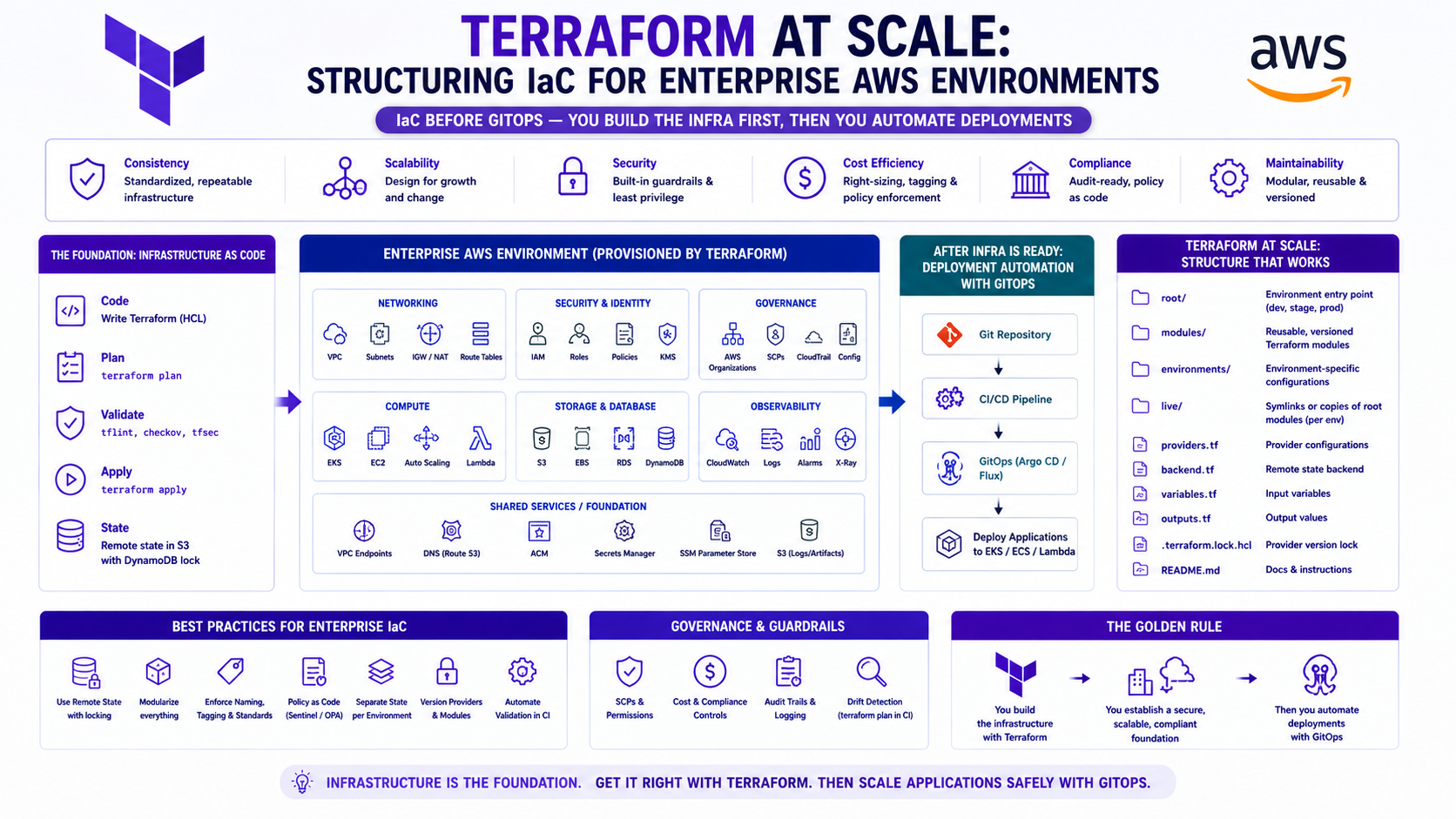
TL;DR
| Decision | Wrong Approach | Right Approach |
|---|---|---|
| Repository structure | Everything in one repo | Layered repos — networking, platform, apps |
| State management | Local state | Remote state — S3 + DynamoDB locking |
| Module design | Copy-paste between envs | Reusable modules with variable inputs |
| Environment separation | if environment == "prod" in one config |
Separate workspaces or directories per env |
| Secrets | Hardcoded in .tfvars |
AWS Secrets Manager or SSM, never in state |
| CI/CD | terraform apply from laptop |
Pipeline with plan approval gate in prod |
| Drift detection | Manual | Automated scheduled terraform plan |
| Team access | Everyone applies everything | Role-based — devs plan, platform approves prod |
Introduction — Why Terraform Structure Matters More Than Terraform Syntax
Most engineers learn Terraform by writing a main.tf that creates a VPC and an EC2 instance. It
works. It feels clean. Then the team grows, the infrastructure grows, and six months later there are 47
resources in one file, a state file that takes 4 minutes to refresh, three engineers who are afraid to run
terraform apply in case it breaks something they do not understand, and a
prod.tfvars committed to the repository with a database password in it.
The Terraform syntax is the easy part. The hard part is the structure — how you organise modules, how you manage state across accounts and environments, how you control who can apply what, and how you build a CI/CD pipeline that lets engineers move fast without breaking production.
On the EKS platform I run in production, every resource — VPCs, subnets, EKS cluster, node groups, Karpenter, ArgoCD, IAM roles, security groups, Route 53 records, KMS keys, CloudWatch log groups — is managed in Terraform. These are the patterns that worked, and the anti-patterns that caused incidents before we fixed them.
1. Repository Structure — The Foundation of Everything
The Wrong Way — The Monorepo Trap
terraform/
└── main.tf          ← VPC, EKS, IAM, RDS, all in here
    variables.tf
    outputs.tf
    terraform.tfvars ← dev values
    prod.tfvars      ← prod values (committed to Git)
This works for one environment. It breaks for three reasons as you scale:
- State blast radius — one state file for everything means a
terraform planlocks the entire infrastructure. Two engineers cannot work in parallel. A failed apply during VPC changes blocks an urgent EKS fix. - No environment isolation —
terraform apply -var-file=prod.tfvarsis the only thing separating dev from prod. One wrong argument on the CLI is a production incident. - No layer separation — VPC changes and EKS changes share a state file. A networking change requires a full plan that evaluates every EKS resource, ECS service, and RDS instance — thousands of resources, 10-minute refresh times.
The Right Way — Layered Repository Structure
infrastructure/
├── modules/                     # Reusable building blocks
│   ├── vpc/
│   ├── eks-cluster/
│   ├── eks-nodegroup/
│   ├── ecs-cluster/
│   ├── rds/
│   ├── iam-role/
│   └── eks-namespace/
│
├── layers/                      # Ordered by dependency
│   ├── 00-accounts/             # AWS account-level config (SCPs, OU structure)
│   ├── 01-networking/           # VPCs, subnets, TGW, Route 53
│   ├── 02-security/             # KMS keys, IAM boundaries, Security Hub
│   ├── 03-platform/             # EKS cluster, node groups, Karpenter
│   ├── 04-addons/               # Helm releases, cert-manager, ArgoCD
│   └── 05-applications/         # ECS services, RDS, application-level resources
│
├── environments/
│   ├── dev/
│   │   ├── networking/          # Calls layer 01 module with dev variables
│   │   ├── platform/            # Calls layer 03 module with dev variables
│   │   └── backend.hcl          # Dev state backend config
│   ├── staging/
│   │   └── backend.hcl
│   └── prod/
│       ├── networking/
│       ├── platform/
│       └── backend.hcl          # Prod state — different bucket, different account
│
└── ci/
    ├── plan.yaml                # CI pipeline — runs terraform plan on PR
    └── apply.yaml               # CD pipeline — applies on merge, with approval gate
Why layers matter: Layer 01 (networking) changes rarely — maybe once a month. Layer 05
(applications) changes daily. By separating them, a daily application deployment runs
terraform plan against 50 resources, not 5,000. The networking layer's state file is untouched
and unlocked.
Why environments matter: dev/platform/ and prod/platform/ both
call the same modules/eks-cluster/ module with different variable values. The module code is
identical — the inputs differ. A change to the module is tested in dev before it ever reaches prod.
Why this matters in production: On the EKS fraud detection platform at Rabobank, the networking layer (VPCs, subnets, Transit Gateway) and the platform layer (EKS, Karpenter, node groups) are in separate state files. A cluster upgrade — which touches hundreds of resources — runs against the platform state only. It does not lock the networking state, so the network team can work in parallel. Before this separation, every plan took 8+ minutes because a single state file held everything. After splitting, platform plans run in under 90 seconds.
2. Remote State — S3 + DynamoDB
Local state is fine for learning. It is never acceptable in a team environment — state conflicts, lost state files, and no audit trail of who applied what are all guaranteed outcomes.
Backend Configuration
# backend.hcl — per environment, per layer
terraform {
  backend "s3" {
    bucket         = "org-terraform-state-prod"
    key            = "prod/platform/eks-cluster.tfstate"
    region         = "eu-west-1"
    encrypt        = true
    kms_key_id     = "arn:aws:kms:eu-west-1:123456789012:key/terraform-state-key"
    dynamodb_table = "terraform-state-lock"
  }
}
State Bucket — Hardened Configuration
resource "aws_s3_bucket" "terraform_state" {
  bucket = "org-terraform-state-prod"

  lifecycle {
    prevent_destroy = true   # Prevent accidental deletion of state bucket
  }

  tags = { Name = "terraform-state-prod", Sensitivity = "critical" }
}

resource "aws_s3_bucket_versioning" "state" {
  bucket = aws_s3_bucket.terraform_state.id
  versioning_configuration { status = "Enabled" }
}

resource "aws_s3_bucket_server_side_encryption_configuration" "state" {
  bucket = aws_s3_bucket.terraform_state.id

  rule {
    apply_server_side_encryption_by_default {
      sse_algorithm     = "aws:kms"
      kms_master_key_id = aws_kms_key.terraform_state.arn
    }
    bucket_key_enabled = true
  }
}

resource "aws_s3_bucket_public_access_block" "state" {
  bucket                  = aws_s3_bucket.terraform_state.id
  block_public_acls       = true
  block_public_policy     = true
  ignore_public_acls      = true
  restrict_public_buckets = true
}

resource "aws_s3_bucket_policy" "state" {
  bucket = aws_s3_bucket.terraform_state.id

  policy = jsonencode({
    Version = "2012-10-17"
    Statement = [
      {
        Sid    = "DenyNonTerraformAccess"
        Effect = "Deny"
        Principal = { AWS = "*" }
        Action = "s3:*"
        Resource = [
          aws_s3_bucket.terraform_state.arn,
          "${aws_s3_bucket.terraform_state.arn}/*"
        ]
        Condition = {
          StringNotEquals = {
            "aws:PrincipalArn" = [
              aws_iam_role.terraform_ci.arn,
              aws_iam_role.platform_engineer.arn
            ]
          }
        }
      }
    ]
  })
}

resource "aws_dynamodb_table" "terraform_lock" {
  name         = "terraform-state-lock"
  billing_mode = "PAY_PER_REQUEST"
  hash_key     = "LockID"

  attribute {
    name = "LockID"
    type = "S"
  }

  server_side_encryption {
    enabled     = true
    kms_key_arn = aws_kms_key.terraform_state.arn
  }

  point_in_time_recovery { enabled = true }

  tags = { Name = "terraform-state-lock" }
}
State Separation by Layer and Environment
S3 bucket: org-terraform-state-prod
├── prod/networking/vpc.tfstate
├── prod/networking/tgw.tfstate
├── prod/security/kms.tfstate
├── prod/security/iam.tfstate
├── prod/platform/eks-cluster.tfstate
├── prod/platform/karpenter.tfstate
└── prod/applications/ecs-services.tfstate

S3 bucket: org-terraform-state-dev
├── dev/networking/vpc.tfstate
├── dev/platform/eks-cluster.tfstate
└── dev/applications/ecs-services.tfstate
Why separate buckets per account: A misconfigured IAM policy in the dev account cannot accidentally access the prod state file. Prod state lives in the prod account's S3 bucket — only the prod CI/CD role and platform team can read it.
Reading State from Another Layer
# In prod/platform/eks-cluster — reads VPC outputs from the networking layer
data "terraform_remote_state" "networking" {
  backend = "s3"

  config = {
    bucket  = "org-terraform-state-prod"
    key     = "prod/networking/vpc.tfstate"
    region  = "eu-west-1"
  }
}

resource "aws_eks_cluster" "main" {
  vpc_config {
    subnet_ids = data.terraform_remote_state.networking.outputs.private_subnet_ids
    # No hardcoding of subnet IDs — pulled directly from networking state
  }
}
Why remote state references matter: Hardcoding subnet IDs or VPC IDs between layers means a networking change requires manually updating every downstream layer. Remote state references update automatically — when the networking layer adds a new subnet and outputs its ID, the platform layer picks it up on the next plan with no manual change.
3. Module Design — Reusable, Versioned, Opinionated
The Module Contract
A good Terraform module has three characteristics:
- Single responsibility — one module does one thing. An
eks-clustermodule creates the EKS cluster. It does not also create node groups, install Helm charts, or configure Route 53. Each of those is a separate module. - Opinionated defaults — the module encodes your organisation's standards.
enable_dns_supportis alwaystrue. The state bucket is always encrypted. CloudWatch log retention is always 90 days in prod. Engineers using the module cannot accidentally violate standards. - Explicit interface — inputs are documented, typed, and validated. Outputs expose everything downstream modules need.
Module Structure
modules/
└── eks-cluster/
    ├── main.tf          # Resources
    ├── variables.tf     # Input definitions with types, defaults, validation
    ├── outputs.tf       # Output definitions
    ├── versions.tf      # Required provider versions
    └── README.md        # Usage examples — non-negotiable
Well-Designed Module — eks-cluster
# modules/eks-cluster/variables.tf
variable "cluster_name" {
  description = "EKS cluster name — used for resource naming and tags"
  type        = string

  validation {
    condition     = can(regex("^[a-z][a-z0-9-]{2,38}[a-z0-9]$", var.cluster_name))
    error_message = "Cluster name must be lowercase, 4-40 chars, alphanumeric and hyphens only."
  }
}

variable "cluster_version" {
  description = "Kubernetes version — must be a supported EKS version"
  type        = string
  default     = "1.30"

  validation {
    condition     = contains(["1.28", "1.29", "1.30", "1.31"], var.cluster_version)
    error_message = "Cluster version must be a currently supported EKS version."
  }
}

variable "environment" {
  description = "Environment — drives defaults for log retention, endpoint access, etc."
  type        = string

  validation {
    condition     = contains(["dev", "staging", "prod"], var.environment)
    error_message = "Environment must be dev, staging, or prod."
  }
}

variable "vpc_id" {
  description = "VPC ID for the EKS cluster"
  type        = string
}

variable "subnet_ids" {
  description = "Private subnet IDs — must span at least 2 AZs"
  type        = list(string)

  validation {
    condition     = length(var.subnet_ids) >= 2
    error_message = "At least 2 subnets required for multi-AZ node deployment."
  }
}

variable "endpoint_public_access" {
  description = "Allow public kubectl access — should be false in prod"
  type        = bool
  default     = false   # Secure by default
}

variable "tags" {
  description = "Additional tags applied to all resources"
  type        = map(string)
  default     = {}
}

# modules/eks-cluster/main.tf
locals {
  log_retention_days = var.environment == "prod" ? 90 : 14
  kms_deletion_days  = var.environment == "prod" ? 30 : 7

  common_tags = merge(var.tags, {
    Environment = var.environment
    ManagedBy   = "terraform"
    Module      = "eks-cluster"
    Cluster     = var.cluster_name
  })
}

resource "aws_eks_cluster" "this" {
  name     = var.cluster_name
  role_arn = aws_iam_role.cluster.arn
  version  = var.cluster_version

  vpc_config {
    subnet_ids              = var.subnet_ids
    endpoint_private_access = true
    endpoint_public_access  = var.endpoint_public_access
    security_group_ids      = [aws_security_group.cluster.id]
  }

  encryption_config {
    provider  { key_arn = aws_kms_key.secrets.arn }
    resources = ["secrets"]
  }

  enabled_cluster_log_types = var.environment == "prod" ? [
    "api", "audit", "authenticator", "controllerManager", "scheduler"
  ] : ["api", "audit"]

  access_config {
    authentication_mode                         = "API_AND_CONFIG_MAP"
    bootstrap_cluster_creator_admin_permissions = false
  }

  tags = local.common_tags
}

resource "aws_cloudwatch_log_group" "cluster" {
  name              = "/aws/eks/${var.cluster_name}/cluster"
  retention_in_days = local.log_retention_days
  kms_key_id        = aws_kms_key.secrets.arn

  tags = local.common_tags
}

# modules/eks-cluster/outputs.tf
output "cluster_name" {
  value = aws_eks_cluster.this.name
}

output "cluster_endpoint" {
  value = aws_eks_cluster.this.endpoint
}

output "cluster_certificate_authority" {
  value     = aws_eks_cluster.this.certificate_authority[0].data
  sensitive = true
}

output "cluster_oidc_issuer_url" {
  value = aws_eks_cluster.this.identity[0].oidc[0].issuer
}

output "cluster_security_group_id" {
  value = aws_eks_cluster.this.vpc_config[0].cluster_security_group_id
}
Calling the Module from an Environment
# environments/prod/platform/eks-cluster/main.tf
module "eks" {
  source = "../../../../modules/eks-cluster"

  cluster_name    = "prod-eks-cluster"
  cluster_version = "1.30"
  environment     = "prod"

  vpc_id     = data.terraform_remote_state.networking.outputs.vpc_id
  subnet_ids = data.terraform_remote_state.networking.outputs.private_subnet_ids

  endpoint_public_access = false

  tags = {
    CostCentre  = "RISK-001"
    Team        = "platform"
    Application = "fraud-detection"
  }
}

# environments/dev/platform/eks-cluster/main.tf
module "eks" {
  source = "../../../../modules/eks-cluster"

  cluster_name    = "dev-eks-cluster"
  cluster_version = "1.30"
  environment     = "dev"   # Module automatically uses 14-day log retention

  vpc_id     = data.terraform_remote_state.networking.outputs.vpc_id
  subnet_ids = data.terraform_remote_state.networking.outputs.private_subnet_ids

  endpoint_public_access = true   # Dev — public endpoint for developer kubectl access

  tags = {
    CostCentre = "PLATFORM-DEV"
    Team       = "platform"
  }
}
4. Variable Management — The Right Hierarchy
Variables in Terraform have a loading order. Understanding it prevents the most common configuration mistakes:
Priority (highest to lowest):
1. -var flag on CLI                    → terraform apply -var="region=eu-west-1"
2. -var-file flag on CLI               → terraform apply -var-file="prod.tfvars"
3. terraform.tfvars in module dir      → auto-loaded
4. terraform.tfvars.json in module dir → auto-loaded
5. *.auto.tfvars in module dir         → auto-loaded
6. Environment variables (TF_VAR_*)   → TF_VAR_region=eu-west-1
7. Default values in variable blocks   → variable "region" { default = "eu-west-1" }
What Goes Where
# dev.tfvars — non-sensitive dev values, committed to Git
environment     = "dev"
cluster_version = "1.30"
min_node_count  = 1
max_node_count  = 5

# prod.tfvars — non-sensitive prod values, committed to Git
environment     = "prod"
cluster_version = "1.30"
min_node_count  = 2
max_node_count  = 20

# NEVER in tfvars — sensitive values come from data sources
# Bad:
db_password = "MyS3cretPassword"   # ❌ Ends up in state file AND Git

# Good — retrieved at apply time, not stored in state:
data "aws_secretsmanager_secret_version" "db_password" {
  secret_id = "prod/rds/password"   # ✅ ARN stored in state, not the value
}
Why this matters in production: Terraform state is JSON. If your state is unencrypted — or if someone with state bucket access runsterraform show— every sensitive value passed as a variable is visible in plaintext. At Rabobank, a state audit during onboarding found three legacy modules passing RDS passwords viatfvars. Those were visible in state for 14 months before discovery. The fix wasdata "aws_secretsmanager_secret_version"across every module that touched credentials. The ARN appears in state, never the value.
5. CI/CD Pipeline — Plan on PR, Apply on Merge
This is the pattern that separates teams that use Terraform confidently from teams that are afraid of it.
The Two-Stage Pipeline
Developer pushes branch
    ↓
Pull Request opened
    ↓
[CI — automatic]
  terraform fmt -check          → Fail if formatting is wrong
  terraform validate            → Fail if syntax is invalid
  terraform init                → Initialise with remote backend
  terraform plan                → Generate plan, post as PR comment
  infracost diff                → Post cost estimate as PR comment
  tfsec / checkov               → Security and compliance scan
    ↓
Code review + plan review
    ↓
PR approved and merged to main
    ↓
[CD — automatic for dev/staging, manual approval for prod]
  terraform init
  terraform plan -out=tfplan    → Save plan artifact
  [Manual approval gate — prod only]
  terraform apply tfplan        → Apply the saved plan (not a new plan)
GitHub Actions Pipeline
# .github/workflows/terraform.yaml
name: Terraform CI/CD

on:
  pull_request:
    paths:
      - 'environments/**'
      - 'modules/**'
  push:
    branches: [main]

permissions:
  id-token: write
  contents: read
  pull-requests: write

jobs:
  terraform-plan:
    name: Plan
    runs-on: ubuntu-latest
    if: github.event_name == 'pull_request'
    strategy:
      matrix:
        environment: [dev, staging, prod]
        layer: [networking, platform, applications]

    steps:
      - uses: actions/checkout@v4

      - name: Configure AWS credentials via OIDC
        uses: aws-actions/configure-aws-credentials@v4
        with:
          role-to-assume: arn:aws:iam::${{ vars[format('{0}_ACCOUNT_ID', matrix.environment)] }}:role/terraform-plan-role
          aws-region: eu-west-1

      - name: Setup Terraform
        uses: hashicorp/setup-terraform@v3
        with:
          terraform_version: "1.9.0"

      - name: Terraform Format Check
        run: terraform fmt -check -recursive
        working-directory: environments/${{ matrix.environment }}/${{ matrix.layer }}

      - name: Terraform Init
        run: terraform init -backend-config=backend.hcl
        working-directory: environments/${{ matrix.environment }}/${{ matrix.layer }}

      - name: Terraform Validate
        run: terraform validate
        working-directory: environments/${{ matrix.environment }}/${{ matrix.layer }}

      - name: Terraform Plan
        id: plan
        run: |
          terraform plan -no-color \
            -var-file="${{ matrix.environment }}.tfvars" \
            -out=tfplan 2>&1 | tee plan_output.txt
        working-directory: environments/${{ matrix.environment }}/${{ matrix.layer }}

      - name: Post Plan as PR Comment
        uses: actions/github-script@v7
        with:
          script: |
            const fs = require('fs');
            const plan = fs.readFileSync(
              'environments/${{ matrix.environment }}/${{ matrix.layer }}/plan_output.txt', 'utf8'
            );
            github.rest.issues.createComment({
              issue_number: context.issue.number,
              owner: context.repo.owner,
              repo: context.repo.repo,
              body: `## Terraform Plan — ${{ matrix.environment }}/${{ matrix.layer }}\n\`\`\`\n${plan}\n\`\`\``
            });

      - name: Security Scan — tfsec
        uses: aquasecurity/tfsec-action@v1.0.0
        with:
          working_directory: environments/${{ matrix.environment }}/${{ matrix.layer }}

  terraform-apply-prod:
    name: Apply Prod
    runs-on: ubuntu-latest
    needs: terraform-apply-dev
    if: github.ref == 'refs/heads/main'
    environment: prod   # GitHub Environment — requires manual approval from platform team

    steps:
      - uses: actions/checkout@v4

      - name: Configure AWS credentials
        uses: aws-actions/configure-aws-credentials@v4
        with:
          role-to-assume: arn:aws:iam::${{ vars.PROD_ACCOUNT_ID }}:role/terraform-apply-role
          aws-region: eu-west-1

      - name: Terraform Plan — Save artifact
        run: |
          terraform init -backend-config=backend.hcl
          terraform plan -out=tfplan -var-file="prod.tfvars"
        working-directory: environments/prod/platform

      - name: Terraform Apply — Prod
        run: terraform apply tfplan
        # Applies the SAVED plan — what was reviewed is what gets applied
        working-directory: environments/prod/platform
Why apply the saved plan, not a new plan: Betweenterraform planandterraform apply, another engineer may have merged a different change. If you run a fresh plan at apply time, you may apply something different from what was reviewed and approved. Always save the plan with-out=tfplanand apply that exact artifact. This is the Terraform equivalent of "what you see is what you get."
6. IAM Roles for Terraform — Plan vs Apply Separation
Never use the same IAM role for planning and applying. A plan role reads but cannot modify. An apply role can modify but only through the CI/CD pipeline.
# Plan role — read-only, used in PR checks
resource "aws_iam_role" "terraform_plan" {
  name = "terraform-plan-role"

  assume_role_policy = jsonencode({
    Version = "2012-10-17"
    Statement = [{
      Effect = "Allow"
      Principal = {
        Federated = aws_iam_openid_connect_provider.github.arn
      }
      Action = "sts:AssumeRoleWithWebIdentity"
      Condition = {
        StringEquals = {
          "token.actions.githubusercontent.com:aud" = "sts.amazonaws.com"
        }
        StringLike = {
          "token.actions.githubusercontent.com:sub" = "repo:org/infrastructure:pull_request"
        }
      }
    }]
  })
}

resource "aws_iam_role_policy_attachment" "plan_readonly" {
  role       = aws_iam_role.terraform_plan.name
  policy_arn = "arn:aws:iam::aws:policy/ReadOnlyAccess"
}

# Apply role — full permissions, only from main branch
resource "aws_iam_role" "terraform_apply" {
  name = "terraform-apply-role"

  assume_role_policy = jsonencode({
    Version = "2012-10-17"
    Statement = [{
      Effect = "Allow"
      Principal = {
        Federated = aws_iam_openid_connect_provider.github.arn
      }
      Action = "sts:AssumeRoleWithWebIdentity"
      Condition = {
        StringEquals = {
          "token.actions.githubusercontent.com:aud" = "sts.amazonaws.com"
          # CRITICAL: Only main branch can assume the apply role
          "token.actions.githubusercontent.com:sub" = "repo:org/infrastructure:ref:refs/heads/main"
        }
      }
    }]
  })

  max_session_duration = 3600
}
7. Drift Detection — Knowing When Reality Diverges from Code
Drift happens when someone makes a manual change in the AWS Console or via CLI without updating Terraform. In
regulated environments, drift is a compliance finding. In all environments, drift is a ticking time bomb —
the next terraform apply will revert the manual change, potentially breaking something.
# .github/workflows/drift-detection.yaml
name: Drift Detection

on:
  schedule:
    - cron: '0 6 * * MON-FRI'   # Every weekday at 6am

jobs:
  detect-drift:
    runs-on: ubuntu-latest
    strategy:
      matrix:
        environment: [prod]
        layer: [networking, platform, security, applications]

    steps:
      - uses: actions/checkout@v4

      - name: Configure AWS credentials
        uses: aws-actions/configure-aws-credentials@v4
        with:
          role-to-assume: arn:aws:iam::${{ vars.PROD_ACCOUNT_ID }}:role/terraform-plan-role
          aws-region: eu-west-1

      - name: Terraform Plan — Detect Drift
        id: drift
        run: |
          terraform init -backend-config=backend.hcl
          terraform plan -detailed-exitcode \
            -var-file="prod.tfvars" \
            -no-color 2>&1 | tee drift_output.txt
          echo "exit_code=$?" >> $GITHUB_OUTPUT
        working-directory: environments/${{ matrix.environment }}/${{ matrix.layer }}
        continue-on-error: true

      - name: Alert on Drift
        if: steps.drift.outputs.exit_code == '2'   # Exit code 2 = changes detected
        uses: actions/github-script@v7
        with:
          script: |
            const fs = require('fs');
            const drift = fs.readFileSync('drift_output.txt', 'utf8');
            console.log('DRIFT DETECTED in prod/${{ matrix.layer }}');
            console.log(drift);
Why this matters in production: Drift detection runs every weekday morning on the EKS platform. If an engineer made a console change the previous day — even a small one, like adjusting a security group rule — the 6am plan catches it and alerts the platform team before anyone applies Terraform and silently reverts it. At Rabobank, this caught a manual KMS key alias change made during an incident response before it was overwritten by the next Terraform apply. The alert is the difference between a 5-minute investigation and a 2-hour incident caused by an unexpected revert.
8. A Production Terraform Structure — Real Example
For context, this is how the EKS fraud detection platform infrastructure is actually organised:
infrastructure/
├── modules/
│   ├── vpc/                      # VPC, subnets, IGW, NAT GW, routes
│   ├── eks-cluster/              # EKS control plane, encryption, logging
│   ├── eks-nodegroup/            # Managed node groups (system, on-demand)
│   ├── karpenter/                # Karpenter IAM, SQS, Helm release
│   ├── eks-addons/               # VPC CNI, CoreDNS, kube-proxy, EBS CSI
│   ├── iam-role/                 # Reusable IAM role with trust policy
│   ├── eks-namespace/            # Namespace + ResourceQuota + LimitRange
│   ├── argocd/                   # ArgoCD Helm release + SSO config
│   └── monitoring/               # CloudWatch agent, Container Insights
│
├── environments/
│   ├── dev/
│   │   ├── 01-networking/
│   │   ├── 03-platform/
│   │   └── backend.hcl
│   └── prod/
│       ├── 01-networking/
│       ├── 02-security/
│       ├── 03-platform/
│       ├── 04-addons/
│       └── backend.hcl
│
└── .github/workflows/
    ├── terraform-plan.yaml       # Runs on every PR
    ├── terraform-apply.yaml      # Runs on merge to main
    └── drift-detection.yaml      # Runs every weekday morning
The EKS cluster, Karpenter, ArgoCD, all IAM roles, all security groups, all CloudWatch log groups — every resource is in Terraform. Nothing in the platform was clicked into existence in the AWS Console. When a new engineer joins, they read the Terraform code to understand the infrastructure — not a wiki that may be out of date.
9. Common Mistakes & Anti-Patterns
One state file for 500 resources means a 10-minute plan refresh, no parallel work, and a blast radius spanning your entire infrastructure on every apply. Split by layer and environment — the networking state never needs to be locked when deploying an application change.
db_password = "prod_password_123" in
prod.tfvars means it is in Git history forever, even after deletion. And it ends up in the
Terraform state file. Use data "aws_secretsmanager_secret_version" — retrieved at plan time,
not stored anywhere you manage.
Local applies mean no audit trail, no plan review, no CI checks, and credentials stored locally rather than via OIDC. A junior engineer with misconfigured local credentials can accidentally apply to production. All applies go through the pipeline. No exceptions.
Without validation blocks, a typo in
environment = "production" (instead of "prod") silently creates resources with
wrong tags and wrong retention policies. Add validation to every variable that has a constrained value set.
Terraform will fail fast at plan time.
A module that creates a VPC, subnets, route tables, NAT Gateway, security groups, and an EKS cluster in one go is not a module — it is a monolith. It cannot be tested independently and creates enormous state dependencies. One module, one responsibility.
Apply lifecycle { prevent_destroy = true } to
your state bucket, KMS keys, RDS databases, and EKS clusters. A terraform destroy run with
the wrong workspace selected cannot accidentally delete your production database if
prevent_destroy = true is set.
Without a pinned version range, the next
terraform init may pull a breaking major provider version. Always use
version = "~> 5.50" to allow patch updates while blocking major version bumps. Pin the
Terraform CLI version with required_version = "~> 1.9" too.
Architecture Decision Matrix
| Decision | Single tfvars | Workspace per env | Directory per env |
|---|---|---|---|
| State isolation | ❌ Shared | ⚠️ Separate but same backend | ✅ Fully separate |
| Role-based apply | ❌ Impossible | ⚠️ Complex | ✅ Different IAM roles per dir |
| Blast radius | ❌ Entire infra | ⚠️ Per workspace | ✅ Per layer per environment |
| CI/CD clarity | ❌ Confusing | ⚠️ Workspace switching | ✅ Explicit path |
| Compliance (audit trail) | ❌ Hard | ⚠️ Possible | ✅ Clear state per env |
| Recommended for | Learning | Small teams | Production enterprise |
The Golden Rule
"Terraform at scale is not about learning more Terraform syntax — it is about structure, discipline, and automation. Separate state by layer and environment. Write modules with a single responsibility and opinionated defaults. Never apply from a laptop. Always plan in CI, always gate prod applies with human review, always apply the saved plan artifact. Run drift detection every morning. And treat the state file like the most sensitive infrastructure asset you own — because it is."