Karpenter vs Cluster Autoscaler — How We Run Both in Production to Maximise EKS Cost Efficiency
AWS Series | Part 13 — Building secure, cost-optimised, cloud-native infrastructure on AWS.
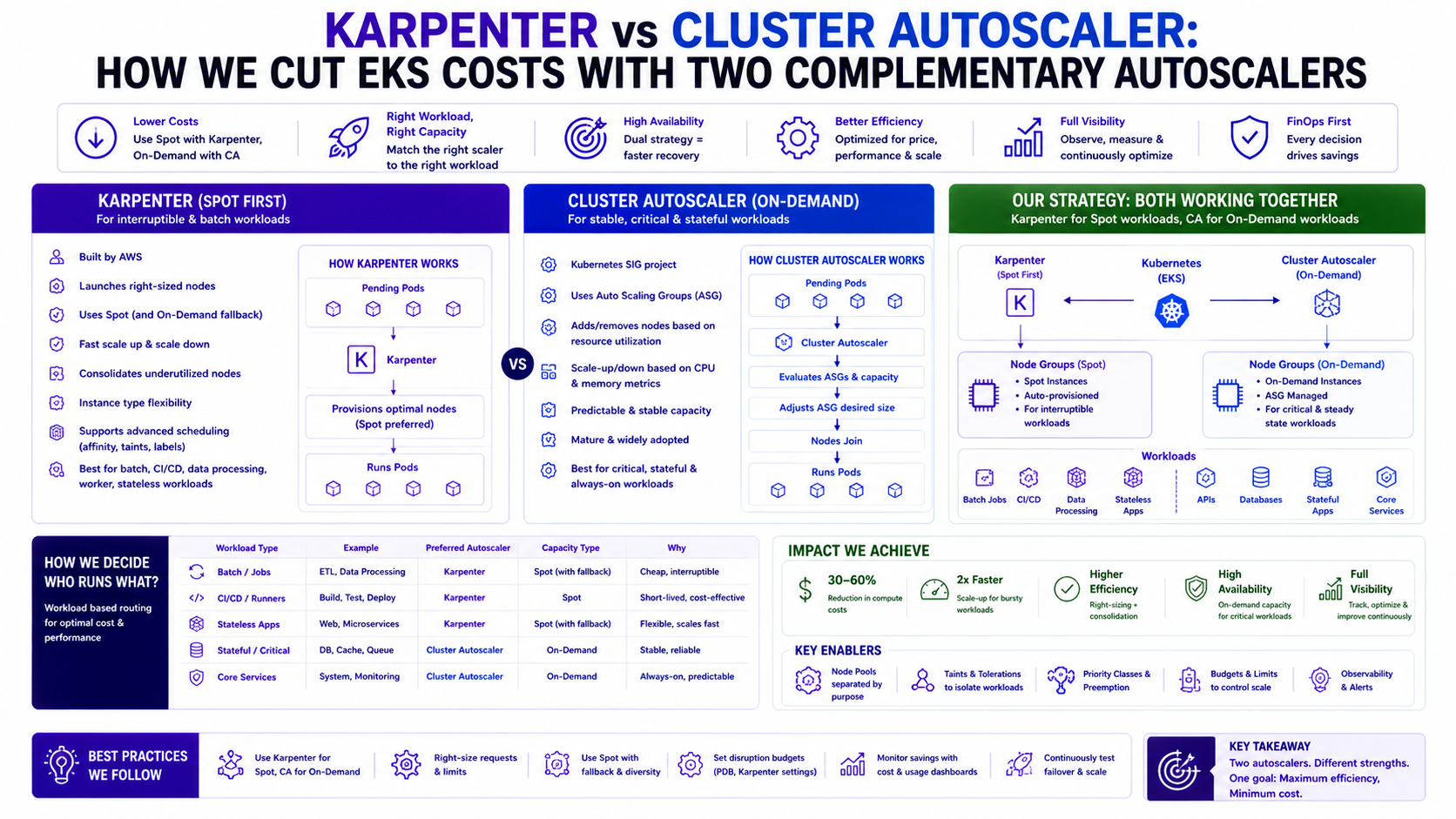
TL;DR Comparison
| Feature | Cluster Autoscaler | Karpenter |
|---|---|---|
| What it scales | Node Groups (pre-defined) | Individual nodes (directly via EC2 API) |
| Instance selection | Fixed — whatever the node group uses | Dynamic — picks best available instance |
| Spot support | Via separate Spot node groups | Native — diversifies across families |
| Scale-to-zero | ❌ Min 1 node per group | ✅ Full scale-to-zero |
| Provisioning speed | 3–5 minutes | 30–60 seconds |
| Bin packing | ❌ Node group level only | ✅ Per-pod, right-sized nodes |
| Graviton support | Manual node group per arch | ✅ Automatic amd64 + arm64 |
| Consolidation | ❌ Threshold-based only | ✅ Active bin-packing |
| Configuration | Annotations + ASG config | NodePool + EC2NodeClass CRDs |
| Fallback to On-Demand | ✅ Via dedicated node group | ✅ Via NodePool capacity-type |
| Best for | Stable On-Demand baseline | Dynamic Spot + cost optimisation |
Introduction — The Honest Architecture
Most blog posts about Karpenter frame it as a Cluster Autoscaler replacement. That is not always true — and it was not true for us.
At Rabobank, the fraud detection platform runs both. Cluster Autoscaler manages a stable On-Demand Managed Node Group that acts as the guaranteed baseline. Karpenter manages two Spot NodePools that handle the majority of the workload. When Spot capacity is unavailable in our AZs — which happens — Karpenter falls back to On-Demand provisioning within its own NodePool. The Cluster Autoscaler On-Demand group is the last resort for system-critical workloads that must never land on Spot.
The result: a meaningful reduction in EC2 spend — driven by Spot discounts, scale-to-zero overnight on Karpenter NodePools, and continuous bin-packing consolidation — with full resilience when Spot is unavailable.
This post documents the complete architecture — how both tools work, why they complement rather than replace each other, the exact Helm and YAML configuration, and the lessons from running this in a regulated production environment.
Why this matters in production: In a regulated financial environment, cost and compliance are not opposites. The three-tier model gives you Spot economics on 80% of workloads while keeping the compliance-critical path on guaranteed On-Demand capacity — documented, auditable, and isolated from Karpenter's disruption policies.
1. The Architecture — Three Compute Tiers
Before diving into either tool, understand the three-tier model this architecture implements:
Tier 1: System MNG (Managed Node Group — On-Demand, fixed)
  Managed by: Nothing — fixed size, always-on
  Hosts: DaemonSets, CloudWatch agent, Karpenter itself, Cluster Autoscaler itself
  Why: System components cannot tolerate Spot interruption or Karpenter eviction

Tier 2: On-Demand MNG (Managed Node Group — Cluster Autoscaler)
  Managed by: Cluster Autoscaler
  Hosts: Latency-sensitive fraud scoring pods + workloads tainted for On-Demand
  Why: Guaranteed capacity, no interruption risk, predictable baseline

Tier 3: Spot NodePools (Karpenter — two pools)
  Managed by: Karpenter
  Hosts: 80% of workloads — batch processors, enrichment services, general APIs
  Why: 60–70% cost saving vs On-Demand, Karpenter handles diversification + fallback
Traffic → EKS Cluster
├── [System MNG] kube-system, karpenter, cluster-autoscaler
├── [On-Demand MNG] fraud-scoring, payments-critical (Cluster Autoscaler)
└── [Spot NodePools] everything else (Karpenter)
↓
Spot unavailable?
↓
Karpenter falls back to On-Demand within NodePool constraintsWhy keep Cluster Autoscaler at all? Karpenter's On-Demand fallback is fast and reliable. But in a regulated environment, having a dedicated Cluster Autoscaler-managed On-Demand group for the most critical workloads provides an additional isolation layer — those pods are explicitly tainted to only land on On-Demand MNG nodes, and no Karpenter disruption policy can touch them.
2. Cluster Autoscaler — The On-Demand Baseline
Our On-Demand Node Group Configuration
# System Node Group — always-on, fixed size, Karpenter and CA run here
resource "aws_eks_node_group" "system" {
  cluster_name    = aws_eks_cluster.main.name
  node_group_name = "system"
  node_role_arn   = aws_iam_role.node.arn
  subnet_ids      = var.private_subnet_ids

  instance_types = ["m5.large"]   # 2 vCPU, 8 GB — sized for DaemonSets only

  scaling_config {
    desired_size = 2   # One per AZ — never changes
    min_size     = 2
    max_size     = 4   # Small burst for cluster events
  }

  taint {
    key    = "node-role"
    value  = "system"
    effect = "NO_SCHEDULE"
  }

  labels = { "node-role" = "system" }

  update_config { max_unavailable = 1 }

  tags = {
    Name                                              = "system-node-group"
    "k8s.io/cluster-autoscaler/enabled"             = "true"
    "k8s.io/cluster-autoscaler/${var.cluster_name}" = "owned"
  }
}

# On-Demand Application Node Group — managed by Cluster Autoscaler
resource "aws_eks_node_group" "on_demand_app" {
  cluster_name    = aws_eks_cluster.main.name
  node_group_name = "on-demand-app"
  node_role_arn   = aws_iam_role.node.arn
  subnet_ids      = var.private_subnet_ids

  instance_types = ["m5.xlarge", "m5a.xlarge", "m5n.xlarge"]

  scaling_config {
    desired_size = 2   # Two On-Demand nodes always warm for critical path
    min_size     = 2   # Never scale below 2 — one per AZ for HA
    max_size     = 10
  }

  taint {
    key    = "workload-type"
    value  = "on-demand-critical"
    effect = "NO_SCHEDULE"
  }

  labels = {
    "node-role"     = "on-demand-app"
    "workload-type" = "on-demand-critical"
  }

  update_config { max_unavailable = 1 }

  tags = {
    Name                                              = "on-demand-app-node-group"
    "k8s.io/cluster-autoscaler/enabled"             = "true"
    "k8s.io/cluster-autoscaler/${var.cluster_name}" = "owned"
    "karpenter.sh/managed"                          = "false"
  }
}
Why this matters in production: Setting
min_size = 2 on the On-Demand MNG is non-negotiable in a regulated environment. It ensures one
node per AZ survives any single-AZ failure — Cluster Autoscaler will never scale below this floor, giving you
a guaranteed HA baseline for the critical path regardless of what Karpenter is doing on the Spot pools.
Cluster Autoscaler Deployment via Helm
resource "helm_release" "cluster_autoscaler" {
  name       = "cluster-autoscaler"
  repository = "https://kubernetes.github.io/autoscaler"
  chart      = "cluster-autoscaler"
  version    = "9.37.0"
  namespace  = "kube-system"

  values = [yamlencode({
    autoDiscovery = {
      clusterName = aws_eks_cluster.main.name
    }

    awsRegion = var.region

    rbac = {
      serviceAccount = {
        annotations = {
          "eks.amazonaws.com/role-arn" = aws_iam_role.cluster_autoscaler.arn
        }
      }
    }

    extraArgs = {
      "scale-down-delay-after-add"       = "10m"
      "scale-down-unneeded-time"         = "15m"
      "scale-down-utilization-threshold" = "0.5"
      "skip-nodes-with-system-pods"      = "true"
      "expander"                         = "least-waste"
      "balance-similar-node-groups"      = "true"
      "scan-interval"                    = "30s"

      # CRITICAL: Tell CA to ignore nodes managed by Karpenter
      "node-group-auto-discovery" = "asg:tag=k8s.io/cluster-autoscaler/enabled=true,k8s.io/cluster-autoscaler/${var.cluster_name}=owned"
    }

    tolerations = [{
      key      = "node-role"
      value    = "system"
      operator = "Equal"
      effect   = "NoSchedule"
    }]

    affinity = {
      nodeAffinity = {
        requiredDuringSchedulingIgnoredDuringExecution = {
          nodeSelectorTerms = [{
            matchExpressions = [{
              key      = "node-role"
              operator = "In"
              values   = ["system"]
            }]
          }]
        }
      }
    }
  })]
}
Cluster Autoscaler IAM Policy
resource "aws_iam_policy" "cluster_autoscaler" {
  name = "cluster-autoscaler-policy"

  policy = jsonencode({
    Version = "2012-10-17"
    Statement = [
      {
        Effect = "Allow"
        Action = [
          "autoscaling:DescribeAutoScalingGroups",
          "autoscaling:DescribeAutoScalingInstances",
          "autoscaling:DescribeLaunchConfigurations",
          "autoscaling:DescribeScalingActivities",
          "autoscaling:DescribeTags",
          "autoscaling:SetDesiredCapacity",
          "autoscaling:TerminateInstanceInAutoScalingGroup",
          "ec2:DescribeImages",
          "ec2:DescribeInstanceTypes",
          "ec2:DescribeLaunchTemplateVersions",
          "ec2:GetInstanceTypesFromInstanceRequirements",
          "eks:DescribeNodegroup"
        ]
        Resource = "*"
      }
    ]
  })
}

resource "aws_iam_role" "cluster_autoscaler" {
  name = "cluster-autoscaler"

  assume_role_policy = jsonencode({
    Version = "2012-10-17"
    Statement = [{
      Effect = "Allow"
      Principal = {
        Federated = aws_iam_openid_connect_provider.eks.arn
      }
      Action = "sts:AssumeRoleWithWebIdentity"
      Condition = {
        StringEquals = {
          "${aws_iam_openid_connect_provider.eks.url}:sub" = "system:serviceaccount:kube-system:cluster-autoscaler"
          "${aws_iam_openid_connect_provider.eks.url}:aud" = "sts.amazonaws.com"
        }
      }
    }]
  })
}

resource "aws_iam_role_policy_attachment" "cluster_autoscaler" {
  role       = aws_iam_role.cluster_autoscaler.name
  policy_arn = aws_iam_policy.cluster_autoscaler.arn
}
3. Karpenter — Spot NodePools with On-Demand Fallback
Karpenter Installation via Helm
# SQS queue for Spot interruption handling
resource "aws_sqs_queue" "karpenter_interruption" {
  name                      = "karpenter-interruption-${var.cluster_name}"
  message_retention_seconds = 300
  tags                      = { Name = "karpenter-interruption" }
}

# EventBridge rules — feed Spot interruption events to SQS
resource "aws_cloudwatch_event_rule" "karpenter_spot_interruption" {
  for_each = {
    spot_interruption  = "EC2 Spot Instance Interruption Warning"
    instance_rebalance = "EC2 Instance Rebalance Recommendation"
    instance_state     = "EC2 Instance State-change Notification"
  }

  name          = "karpenter-${each.key}"
  event_pattern = jsonencode({
    source      = ["aws.ec2"]
    detail-type = [each.value]
  })
}

resource "aws_cloudwatch_event_target" "karpenter_interruption" {
  for_each = aws_cloudwatch_event_rule.karpenter_spot_interruption

  rule = each.value.name
  arn  = aws_sqs_queue.karpenter_interruption.arn
}

# Pod Identity association — Karpenter controller auth
resource "aws_eks_pod_identity_association" "karpenter" {
  cluster_name    = aws_eks_cluster.main.name
  namespace       = "karpenter"
  service_account = "karpenter"
  role_arn        = aws_iam_role.karpenter_controller.arn
}

# Karpenter Helm release
resource "helm_release" "karpenter" {
  name                = "karpenter"
  repository          = "oci://public.ecr.aws/karpenter"
  repository_username = data.aws_ecrpublic_authorization_token.token.user_name
  repository_password = data.aws_ecrpublic_authorization_token.token.password
  chart               = "karpenter"
  version             = "1.0.6"
  namespace           = "karpenter"
  create_namespace    = true

  values = [yamlencode({
    settings = {
      clusterName       = aws_eks_cluster.main.name
      clusterEndpoint   = aws_eks_cluster.main.endpoint
      interruptionQueue = aws_sqs_queue.karpenter_interruption.name
    }

    serviceAccount = {
      name        = "karpenter"
      annotations = {}   # Pod Identity handles auth — no IRSA annotation needed
    }

    replicas = 2   # HA — two Karpenter controller pods

    podDisruptionBudget = { maxUnavailable = 1 }

    controller = {
      resources = {
        requests = { cpu = "100m", memory = "256Mi" }
        limits   = { cpu = "1000m", memory = "1Gi" }
      }
    }

    # Karpenter MUST run on the system node group
    # If it runs on a Karpenter-managed node, it can evict itself
    affinity = {
      nodeAffinity = {
        requiredDuringSchedulingIgnoredDuringExecution = {
          nodeSelectorTerms = [{
            matchExpressions = [{
              key      = "node-role"
              operator = "In"
              values   = ["system"]
            }]
          }]
        }
      }
    }

    tolerations = [{
      key      = "node-role"
      value    = "system"
      operator = "Equal"
      effect   = "NoSchedule"
    }]
  })]

  depends_on = [aws_eks_pod_identity_association.karpenter]
}
Why this matters in production: The SQS interruption queue is the single most impactful Karpenter config decision. Without it, Karpenter only detects Spot termination when the node disappears — after the 2-minute warning has already elapsed. With the queue, Karpenter receives the warning immediately and begins graceful drain before the instance is reclaimed, giving your pods the full 2-minute window to shut down cleanly.
EC2NodeClass — Shared Node Configuration
apiVersion: karpenter.k8s.aws/v1
kind: EC2NodeClass
metadata:
  name: default
spec:
  amiFamily: AL2023   # Amazon Linux 2023 — IMDSv2 enforced by default

  role: karpenter-node-role

  subnetSelectorTerms:
    - tags:
        karpenter.sh/discovery: prod-eks-cluster

  securityGroupSelectorTerms:
    - tags:
        karpenter.sh/discovery: prod-eks-cluster

  blockDeviceMappings:
    - deviceName: /dev/xvda
      ebs:
        volumeSize: 50Gi
        volumeType: gp3
        iops: 3000
        throughput: 125
        encrypted: true

  # IMDSv2 — containers cannot reach instance metadata
  metadataOptions:
    httpEndpoint:            enabled
    httpPutResponseHopLimit: 1        # Blocks container access to IMDS
    httpTokens:              required  # IMDSv2 required — no v1 fallback

  tags:
    Environment:       production
    ManagedBy:         karpenter
    kubernetes.io/cluster/prod-eks-cluster: owned
NodePool 1 — Spot General Purpose (80% of workloads)
apiVersion: karpenter.sh/v1
kind: NodePool
metadata:
  name: spot-general
spec:
  template:
    metadata:
      labels:
        node-pool: spot-general
    spec:
      nodeClassRef:
        apiVersion: karpenter.k8s.aws/v1
        kind: EC2NodeClass
        name: default

      requirements:
        # Spot first — fall back to On-Demand if no Spot available
        - key: karpenter.sh/capacity-type
          operator: In
          values: ["spot", "on-demand"]   # Ordered: Spot preferred, OD fallback

        - key: karpenter.k8s.aws/instance-category
          operator: In
          values: ["c", "m", "r"]   # Compute, General, Memory

        - key: karpenter.k8s.aws/instance-cpu
          operator: In
          values: ["2", "4", "8", "16"]

        # Include Graviton (arm64) for better Spot availability + price
        - key: kubernetes.io/arch
          operator: In
          values: ["amd64", "arm64"]

        - key: karpenter.k8s.aws/instance-generation
          operator: Gt
          values: ["2"]

      startupTaints:
        - key: node.cloudprovider.kubernetes.io/uninitialized
          effect: NoSchedule

  disruption:
    consolidationPolicy: WhenEmptyOrUnderutilized
    consolidateAfter: 30s
    budgets:
      - nodes: "20%"

  limits:
    cpu:    "500"
    memory: "2000Gi"

  weight: 10
NodePool 2 — On-Demand Latency-Sensitive (via Karpenter)
apiVersion: karpenter.sh/v1
kind: NodePool
metadata:
  name: on-demand-latency
spec:
  template:
    metadata:
      labels:
        node-pool: on-demand-latency
    spec:
      nodeClassRef:
        apiVersion: karpenter.k8s.aws/v1
        kind: EC2NodeClass
        name: default

      requirements:
        - key: karpenter.sh/capacity-type
          operator: In
          values: ["on-demand"]

        - key: karpenter.k8s.aws/instance-category
          operator: In
          values: ["c", "m"]

        - key: karpenter.k8s.aws/instance-cpu
          operator: In
          values: ["4", "8", "16"]

        - key: kubernetes.io/arch
          operator: In
          values: ["amd64", "arm64"]

      taints:
        - key: workload-type
          value: latency-sensitive-karpenter
          effect: NoSchedule

  disruption:
    consolidationPolicy: WhenEmpty
    consolidateAfter: 5m
    budgets:
      - nodes: "10%"

  limits:
    cpu:    "200"
    memory: "800Gi"

  weight: 20
4. Preventing Conflicts — The Critical Configuration
Running Cluster Autoscaler and Karpenter in parallel requires careful configuration to prevent them from interfering with each other. This is where most dual-autoscaler setups go wrong.
Rule 1 — Cluster Autoscaler Must Not Touch Karpenter Nodes
Cluster Autoscaler uses ASG tags for node group discovery. Karpenter-managed nodes are NOT in any ASG — they are standalone EC2 instances. CA will not see them. But you must ensure CA only manages the tagged node groups:
# In the CA Helm values — explicit node group auto-discovery filter
extraArgs = {
  "node-group-auto-discovery" = "asg:tag=k8s.io/cluster-autoscaler/enabled=true,k8s.io/cluster-autoscaler/${cluster_name}=owned"
}
# Only ASGs with BOTH tags are managed by CA
# Karpenter nodes have neither tag — CA ignores them completely
Rule 2 — Karpenter Must Not Consolidate MNG Nodes
Tag your Managed Node Group instances to signal Karpenter should not consolidate them:
resource "aws_eks_node_group" "on_demand_app" {
  labels = {
    "node-role"            = "on-demand-app"
    "karpenter.sh/managed" = "false"   # Karpenter reads this and skips consolidation
  }
}
Additionally, the pods on the On-Demand MNG have a taint (workload-type: on-demand-critical)
that Karpenter's NodePools do not tolerate. Even if Karpenter tried to consolidate, it could not reschedule
those pods.
Rule 3 — Karpenter Must Run on System MNG, Not Its Own Nodes
affinity:
  nodeAffinity:
    requiredDuringSchedulingIgnoredDuringExecution:
      nodeSelectorTerms:
        - matchExpressions:
            - key: node-role
              operator: In
              values: ["system"]
tolerations:
  - key: node-role
    value: system
    operator: Equal
    effect: NoSchedule
If Karpenter runs on a node it manages, it can evict itself during consolidation — taking down the autoscaler and leaving the cluster unable to scale. This is a catastrophic failure mode that is easy to prevent and hard to recover from.
Rule 4 — Set Pod Priorities to Guide Scheduling
# High priority — latency-sensitive scoring pods
apiVersion: scheduling.k8s.io/v1
kind: PriorityClass
metadata:
  name: high-priority
value: 1000000
description: "Fraud scoring and payment-critical services"
---
# Default — general workloads on Spot
apiVersion: scheduling.k8s.io/v1
kind: PriorityClass
metadata:
  name: default-priority
value: 0
globalDefault: true
description: "Default priority — Spot NodePool workloads"
Why this matters in production: Pod priority is the mechanism that ensures fraud-scoring pods survive Spot interruption events. When Karpenter drains a Spot node, high-priority pods are rescheduled first — they get new nodes before lower-priority batch workloads. Without explicit PriorityClasses, all pods compete equally during mass eviction and the scoring path can go down.
5. Pod Assignment — Who Goes Where
Critical Path Pods → On-Demand MNG (Cluster Autoscaler)
# values-prod.yaml for fraud scoring service
# This pod ONLY lands on the Cluster Autoscaler On-Demand MNG
tolerations:
  - key: "workload-type"
    value: "on-demand-critical"
    operator: Equal
    effect: NoSchedule

nodeSelector:
  node-role: on-demand-app

priorityClassName: high-priority
Batch and General Pods → Spot NodePool (Karpenter)
# values-prod.yaml for enrichment service
# No special toleration — lands on Karpenter Spot NodePool by default
priorityClassName: default-priority

resources:
  requests:
    cpu: "500m"
    memory: "512Mi"
  limits:
    cpu: "2000m"
    memory: "2Gi"
Latency-Sensitive but Not MNG Critical → Karpenter On-Demand NodePool
# values-prod.yaml for real-time feature service
tolerations:
  - key: "workload-type"
    value: "latency-sensitive-karpenter"
    operator: Equal
    effect: NoSchedule

nodeSelector:
  node-pool: on-demand-latency

priorityClassName: high-priority
6. The Cost Story — Where the Savings Come From
I will not put specific percentage savings in this section — every cluster is different, and a number I cannot stand behind is worse than no number at all. What I can tell you is where the savings mechanism is and how to calculate it for your own workload.
The Three Saving Levers
Lever 1 — Spot discount vs On-Demand
Spot instances typically run at 60–70% discount vs On-Demand for the same instance type. Karpenter's
diversification across instance families and sizes increases Spot availability — reducing interruptions and
allowing more workloads to run on Spot consistently.
Example calculation for your cluster:
On-Demand price (m5.xlarge, eu-west-1): $0.192/hr
Spot price (same, approximate):          $0.058/hr
Discount:                                ~70%

If 70% of your node-hours move from On-Demand to Spot:
Monthly saving per node = ($0.192 - $0.058) × 730h = $97.82/month
For 10 Spot nodes:                                   = $978/month
Lever 2 — Scale to zero overnight
Cluster Autoscaler cannot scale below min_size. If your min_size is 3 across two
On-Demand node groups, you pay for 3 nodes 24/7 regardless of demand. Karpenter NodePools have no floor —
they scale to zero when no pods need them.
Example: 3 × m5.xlarge On-Demand idling overnight (8pm–8am, weekends):
  Hours idle per month ≈ 12h/day × 22 weekdays + 48h weekend = 312h/month
  Cost of idle baseline: 3 × $0.192 × 312h = $179.71/month saved
Lever 3 — Bin-packing via consolidation
Cluster Autoscaler removes underutilised nodes but does not actively consolidate. Two nodes at 30%
utilisation stay as two nodes. Karpenter runs continuous consolidation — it detects that all pods from Node A
can fit on Node B, evicts Node A, and terminates it. This is the lever that is hardest to quantify upfront but
often produces the largest saving in practice.
How to Measure Your Own Saving
Before enabling Karpenter, run this for two weeks with Cluster Autoscaler:
# Average node CPU utilisation across the cluster
kubectl top nodes | awk 'NR>1 {sum+=$3; count++} END {print sum/count "%"}'

# Count nodes by type
kubectl get nodes -L karpenter.sh/capacity-type,node.kubernetes.io/instance-type \
  --no-headers | awk '{print $6, $7}' | sort | uniq -c

# Total EC2 spend — use AWS Cost Explorer filtered by:
# Service: EC2, Tag: kubernetes.io/cluster/your-cluster-name
The honest framing: The cost saving from this architecture is real and significant — Spot discounts alone justify the operational investment for most clusters above 5 nodes. But the exact number depends on your workload shape, your AZ Spot availability, and how aggressively you tune the consolidation policy. Measure before and after. The tooling is free.
7. Spot Interruption Handling — How Karpenter Protects Workloads
When AWS sends a Spot interruption warning (2-minute notice), Karpenter:
- Receives the event via SQS (from EventBridge)
- Immediately cordons the node — no new pods scheduled
- Begins draining pods gracefully — respects
PodDisruptionBudget - Finds or provisions replacement capacity (next cheapest Spot or On-Demand fallback)
- Reschedules pods on new node
- Terminates the interrupted node
# PodDisruptionBudget — apply to every Deployment running on Spot
apiVersion: policy/v1
kind: PodDisruptionBudget
metadata:
  name: enrichment-service-pdb
  namespace: fraud-detection
spec:
  minAvailable: 1
  selector:
    matchLabels:
      app: enrichment-service
# Graceful shutdown — application handles SIGTERM before node reclaim
spec:
template:
spec:
terminationGracePeriodSeconds: 60
containers:
- name: enrichment-service
lifecycle:
preStop:
exec:
command: ["/bin/sh", "-c", "sleep 15"] # Wait for LB deregistration
Why the preStop sleep matters: Karpenter drains pods by sending SIGTERM and waiting
terminationGracePeriodSeconds. But the ALB or NLB may still be routing traffic to the pod for a
few seconds after SIGTERM is received. The preStop sleep creates a gap that allows the load balancer to
complete deregistration before the application starts shutting down. Without it, you drop in-flight requests
during Spot interruption handling.
8. Observability — Knowing What Each Autoscaler Is Doing
With two autoscalers running, you need visibility into which one is acting and why.
resource "aws_cloudwatch_dashboard" "autoscaling" {
  dashboard_name = "eks-autoscaling"

  dashboard_body = jsonencode({
    widgets = [
      {
        type = "metric"
        properties = {
          title  = "Karpenter — Nodes Launched vs Terminated"
          metrics = [
            ["Karpenter", "nodes_created_total", "NodePool", "spot-general"],
            ["Karpenter", "nodes_terminated_total", "NodePool", "spot-general"]
          ]
          period = 60
          stat   = "Sum"
        }
      },
      {
        type = "metric"
        properties = {
          title  = "Karpenter — Pod Scheduling Latency (p99)"
          metrics = [
            ["Karpenter", "scheduler_scheduling_duration_seconds", { stat = "p99" }]
          ]
        }
      },
      {
        type = "metric"
        properties = {
          title  = "Cluster Autoscaler — Scale Events"
          metrics = [
            ["ContainerInsights", "cluster_autoscaler_scaled_up_nodes_count",
              "ClusterName", var.cluster_name],
            ["ContainerInsights", "cluster_autoscaler_scaled_down_nodes_count",
              "ClusterName", var.cluster_name]
          ]
        }
      }
    ]
  })
}
# Alert if Karpenter cannot provision nodes
resource "aws_cloudwatch_metric_alarm" "karpenter_provisioning_failure" {
alarm_name = "karpenter-provisioning-failure"
comparison_operator = "GreaterThanThreshold"
evaluation_periods = 3
metric_name = "provisioner_scheduling_errors_total"
namespace = "Karpenter"
period = 60
statistic = "Sum"
threshold = 5
alarm_description = "Karpenter failing to provision nodes — check Spot availability"
alarm_actions = [aws_sns_topic.platform_alerts.arn]
}
# Alert if pending pods persist
resource "aws_cloudwatch_metric_alarm" "persistent_pending_pods" {
alarm_name = "persistent-pending-pods"
comparison_operator = "GreaterThanThreshold"
evaluation_periods = 5
metric_name = "cluster_failed_node_count"
namespace = "ContainerInsights"
period = 60
statistic = "Average"
threshold = 0
alarm_description = "Pods pending for >5 minutes — autoscaler may be failing"
alarm_actions = [aws_sns_topic.platform_alerts.arn]
}Why this matters in production: Without separate dashboards for each autoscaler, a scale-up event from CA and a consolidation event from Karpenter happening simultaneously look like random node churn. The CloudWatch dashboard with both autoscaler metrics side-by-side is what lets you tell the difference between expected behaviour and a conflict between the two systems.
9. Common Mistakes & Anti-Patterns
Mistake 1: Running Karpenter on a Node It Manages
Karpenter can consolidate the node it runs on, evicting itself. The cluster loses its autoscaler silently — pods stop scheduling, nodes pile up, no one knows why. Always use the System MNG taint and affinity to pin Karpenter to nodes it does not manage.
Mistake 2: Same Discovery Tags on MNG and Karpenter Nodes
If your Cluster Autoscaler discovery tags also match Karpenter-launched nodes,
CA will try to manage them — calling ASG APIs that do not apply to standalone EC2 instances. This causes CA
errors and log spam that masks real issues. Use explicit tag filters in CA's
node-group-auto-discovery setting.
Mistake 3: No PodDisruptionBudget on Spot Workloads
Karpenter respects PDBs during consolidation and interruption handling. Without
a PDB, Karpenter may evict all replicas of a service simultaneously during a consolidation event — causing
an outage. Apply minAvailable: 1 PDBs to every Deployment that runs on Spot.
Mistake 4: Karpenter Spot-Only NodePool With No On-Demand Fallback
A spot-only NodePool (capacity-type: spot, no on-demand) means
when Spot capacity is unavailable in all instance types in your AZs, pods remain pending indefinitely.
Always include ["spot", "on-demand"] in the capacity-type requirement.
Mistake 5: No Startup Taint
Without the node.cloudprovider.kubernetes.io/uninitialized startup
taint, pods can be scheduled on a Karpenter node before the VPC CNI has fully initialised networking —
causing the pod to fail to get an IP and restart. Add the startup taint to all NodePools.
Mistake 6: Forgetting the SQS Interruption Queue
Karpenter without the interruption queue only detects Spot interruptions when the node disappears — 2 minutes after the warning. With the SQS queue, Karpenter gets the warning immediately and begins draining gracefully. The difference is whether pods are gracefully rescheduled or abruptly killed.
Mistake 7: Setting min_size = 0 on the On-Demand MNG
A min_size = 0 On-Demand MNG means CA can scale it to zero. If
Karpenter is simultaneously provisioning On-Demand fallback nodes, you briefly have zero guaranteed
On-Demand capacity. For regulated environments, keep min_size = 2 on the On-Demand MNG to
maintain an HA baseline.
Architecture Decision Matrix
| Requirement | Cluster Autoscaler Only | Karpenter Only | Both (Our Pattern) |
|---|---|---|---|
| Guaranteed On-Demand baseline | ✅ Via min_size | ⚠️ Via NodePool OD fallback | ✅ MNG min_size |
| Spot cost optimisation | ⚠️ Manual Spot MNG | ✅ Automatic diversification | ✅ Karpenter NodePools |
| Scale to zero overnight | ❌ min_size floor | ✅ Full scale-to-zero | ✅ Spot pools scale to zero |
| Provisioning speed | ❌ 3-5 min | ✅ 30-60 sec | ✅ Karpenter for Spot |
| Bin-packing / consolidation | ❌ No | ✅ Continuous | ✅ Karpenter handles Spot |
| Spot interruption handling | ❌ Manual | ✅ Automatic via SQS | ✅ Karpenter handles Spot |
| Isolated critical path | ✅ Dedicated MNG | ⚠️ Taint-based only | ✅ Dedicated MNG + CA |
| Compliance (no Spot on critical) | ✅ Via node group | ⚠️ Via tolerations | ✅ MNG enforces it |
| Operational complexity | ✅ Low | ⚠️ Medium | ⚠️ Medium (worth it) |
| Cost at scale | ❌ High (idle On-Demand) | ✅ Lowest | ✅ Near-lowest |
The Golden Rule
"Cluster Autoscaler and Karpenter are not competitors — they serve different purposes and work best together. Use Cluster Autoscaler to manage a stable, guaranteed On-Demand Managed Node Group for your most critical, latency-sensitive workloads that cannot tolerate Spot interruption. Use Karpenter to manage everything else — Spot for cost, On-Demand fallback for resilience, continuous consolidation for efficiency. The combination gives you the compliance safety of guaranteed On-Demand capacity and the cost efficiency of right-sized, bin-packed Spot compute. Running only one of them leaves either money on the table or operational risk on the table."