GitOps with ArgoCD + Helm on EKS: App of Apps, Sync Waves & Multi-Cluster Strategy
AWS Series | Part 15 — Building secure, cost-optimised, cloud-native infrastructure on AWS.
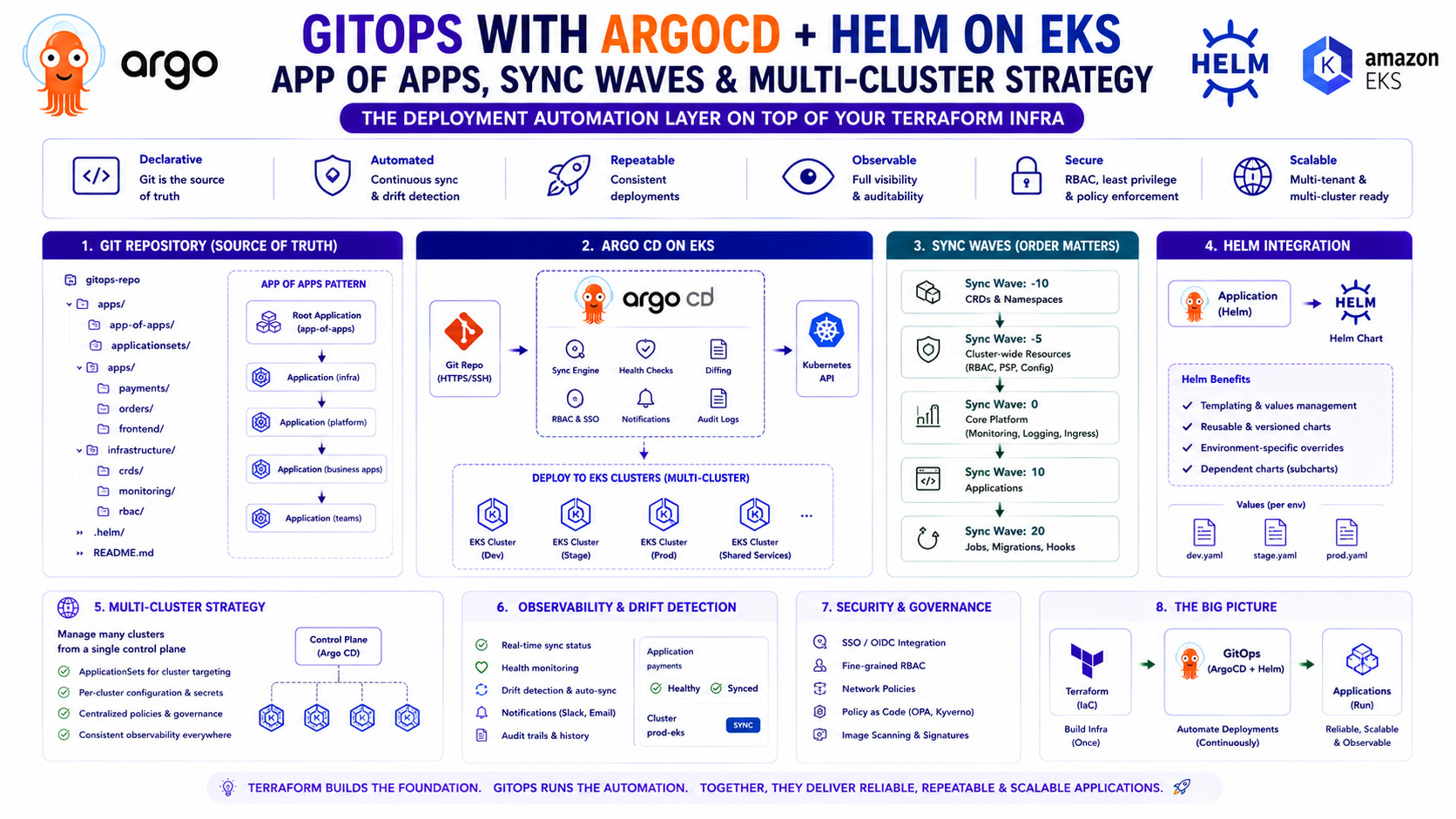
TL;DR
| Concept | What It Solves | When You Need It |
|---|---|---|
| ArgoCD Application | Deploys one service from Git | Every service |
| App of Apps | Bootstraps all Applications from one root App | Day 1 — before you have more than 3 services |
| ApplicationSet | Generates Applications dynamically — one template, many targets | Multi-env, multi-cluster, multi-service |
| Sync Waves | Orders resource creation within a sync — databases before apps | Any service with dependencies |
| Sync Hooks | Runs jobs at specific points — migrations, smoke tests | Database migrations, post-deploy validation |
| ArgoCD Projects | Scopes which repos/clusters/namespaces an Application can touch | Multi-team, RBAC, compliance |
| Multi-cluster | Manages applications across prod + dev clusters from one ArgoCD | Two+ clusters in your organisation |
| Notifications | Alerts on sync success/failure/degraded | Production — always |
Introduction — IaC Builds the Platform, GitOps Runs the Deployments
Blog 14 covered Terraform at scale — how to structure IaC that provisions the EKS cluster, VPC, IAM roles, and Karpenter. This post covers what runs on top of that infrastructure: the GitOps layer that deploys and manages your applications.
The distinction matters. Terraform is state-reconciliation — it runs when you tell it to. GitOps is continuous reconciliation — it runs forever, comparing your cluster's actual state to Git's desired state and correcting any drift automatically. Terraform builds the stage. ArgoCD manages what performs on it.
On the production EKS platform managing 33 microservices, ArgoCD is the single deployment mechanism for everything running in the cluster — applications, Helm releases, Karpenter NodePools, monitoring stack, cert configurations. Nothing is deployed via kubectl apply in production. Nothing is deployed via a Helm CLI command by hand. Every change is a Git commit. Every rollback is a Git revert. Every deployment has an author, a timestamp, and a diff.
This post covers the full ArgoCD production setup: App of Apps bootstrap, ApplicationSets for multi-environment deployments, Sync Waves for ordered rollout, multi-cluster management, RBAC with SSO, and notifications. Everything has working YAML.
1. ArgoCD Installation — Production-Grade Helm Setup
Why Helm for ArgoCD, Not the Raw Manifest
The official ArgoCD install.yaml is fine for getting started. For production, it gives you no control over resource requests, replica counts, HA configuration, or SSO integration. The Helm chart exposes all of these as values.
resource "helm_release" "argocd" {
  name             = "argocd"
  repository       = "https://argoproj.github.io/argo-helm"
  chart            = "argo-cd"
  version          = "7.3.11"
  namespace        = "argocd"
  create_namespace = true

  # Wait for all pods to be ready before Terraform marks the release healthy
  wait    = true
  timeout = 600

  values = [yamlencode({
    global = {
      # Image tag — pin to a specific version, not latest
      image = { tag = "v2.11.3" }
    }

    configs = {
      params = {
        # Disable insecure mode — always use TLS
        "server.insecure" = false
        # Enable exec into pods from ArgoCD UI
        "server.enable.gzip" = true
      }

      cm = {
        # Disable local admin user — SSO only in production
        "admin.enabled" = "false"

        # SSO via Okta/Azure AD
        "oidc.config" = yamlencode({
          name         = "Okta"
          issuer       = var.okta_issuer_url
          clientID     = var.okta_client_id
          clientSecret = "$oidc.okta.clientSecret"
          requestedScopes = ["openid", "profile", "email", "groups"]
          requestedIDTokenClaims = {
            groups = { essential = true }
          }
        })

        # Resource tracking — annotation-based (default, most compatible)
        "application.resourceTrackingMethod" = "annotation"

        # Status badge — allows embedding deployment status in GitHub PRs
        "statusbadge.enabled" = "true"

        # Timeout for resource health checks
        "timeout.reconciliation" = "180s"
      }

      # RBAC — maps SSO groups to ArgoCD roles
      rbac = {
        "policy.default" = "role:readonly"
        "policy.csv" = <<-EOT
          # Platform team — full admin
          g, platform-engineers, role:admin

          # Dev teams — can sync their own apps, cannot modify cluster-scoped resources
          g, orders-team, role:orders-deploy
          g, payments-team, role:payments-deploy

          # Custom role — deploy to orders namespace only
          p, role:orders-deploy, applications, get, orders/*, allow
          p, role:orders-deploy, applications, sync, orders/*, allow
          p, role:orders-deploy, applications, action/*, orders/*, allow
          p, role:orders-deploy, logs, get, orders/*, allow

          # Read-only for architects and auditors
          g, architects, role:readonly
        EOT
      }
    }

    # ArgoCD server — HA with 2 replicas
    server = {
      replicas = 2

      # Ingress — via Nginx Ingress Controller
      ingress = {
        enabled          = true
        ingressClassName = "nginx"
        annotations = {
          "nginx.ingress.kubernetes.io/ssl-passthrough"    = "true"
          "nginx.ingress.kubernetes.io/force-ssl-redirect" = "true"
        }
        hosts = ["argocd.internal.company.com"]
        tls = [{
          secretName = "argocd-tls"
          hosts      = ["argocd.internal.company.com"]
        }]
      }

      resources = {
        requests = { cpu = "100m", memory = "256Mi" }
        limits   = { cpu = "1000m", memory = "1Gi" }
      }
    }

    # Application controller — processes reconciliation
    controller = {
      replicas = 2   # HA — one per AZ

      resources = {
        requests = { cpu = "250m", memory = "512Mi" }
        limits   = { cpu = "2000m", memory = "2Gi" }
      }
    }

    # Repo server — clones and templates Git repos
    repoServer = {
      replicas = 2

      resources = {
        requests = { cpu = "100m", memory = "256Mi" }
        limits   = { cpu = "1000m", memory = "1Gi" }
      }
    }

    # Redis — ArgoCD state store, HA mode
    redis-ha = {
      enabled = true   # HA Redis for production — 3 replicas
    }

    # Run ArgoCD on the system node group — not on Karpenter-managed nodes
    global = {
      tolerations = [{
        key      = "node-role"
        value    = "system"
        operator = "Equal"
        effect   = "NoSchedule"
      }]
      affinity = {
        nodeAffinity = {
          requiredDuringSchedulingIgnoredDuringExecution = {
            nodeSelectorTerms = [{
              matchExpressions = [{
                key      = "node-role"
                operator = "In"
                values   = ["system"]
              }]
            }]
          }
        }
      }
    }
  })]
}
Why ArgoCD must run on the system node group: If ArgoCD runs on a Karpenter-managed node and Karpenter consolidates that node, ArgoCD goes down. With ArgoCD down, no deployments can happen — including the deployment that would fix the problem. Pin it to the system MNG permanently.
2. App of Apps — The Bootstrap Pattern
The Problem It Solves
When you have 33 microservices, you need 33 ArgoCD Application objects. You could apply them manually with kubectl — but then those Application objects themselves are unmanaged, untracked, and can drift from Git. The App of Apps pattern solves this: one root Application manages all other Application objects, which in turn manage your services.
Root App (managed by humans — applied once)
    ↓
Apps of Apps (managed by Root App)
    ├── platform-apps (manages platform-level Applications)
    │   ├── ArgoCD Notifications App
    │   ├── Karpenter App
    │   ├── Ingress Nginx App
    │   └── cert-manager App
    └── service-apps (manages service-level Applications)
        ├── orders-service App
        ├── payment-processing-service App
        ├── enrichment-service App
        └── ... (30 more)
The Root Application — Applied Once, Manages Everything
# root-app.yaml — applied manually ONCE during cluster bootstrap
# After this, everything is managed by ArgoCD
apiVersion: argoproj.io/v1alpha1
kind: Application
metadata:
  name: root
  namespace: argocd
  finalizers:
    # Cascade delete — deleting this app deletes all child apps
    # Remove this in production to prevent accidental mass deletion
    # - resources-finalizer.argocd.argoproj.io
spec:
  project: default

  source:
    repoURL: https://github.com/org/gitops-config
    targetRevision: main
    path: bootstrap/root   # Points to the apps-of-apps directory

  destination:
    server: https://kubernetes.default.svc
    namespace: argocd

  syncPolicy:
    automated:
      prune: false    # Never auto-delete Application objects — too risky
      selfHeal: true  # Revert manual changes to Application objects
    syncOptions:
      - CreateNamespace=true
The Apps of Apps Directory Structure
gitops-config/
├── bootstrap/
│   └── root/                          # Root app points here
│       ├── platform-apps.yaml         # Application for platform tooling
│       └── service-apps.yaml          # ApplicationSet for all services
│
├── apps/
│   ├── platform/                      # Platform-level Helm releases
│   │   ├── karpenter/
│   │   │   ├── Chart.yaml
│   │   │   └── values.yaml
│   │   ├── ingress-nginx/
│   │   └── argocd-notifications/
│   │
│   └── services/                      # Service Helm charts
│       ├── orders/
│       │   ├── Chart.yaml
│       │   ├── values.yaml
│       │   ├── values-dev.yaml
│       │   └── values-prod.yaml
│       └── payment-processing/
│
└── projects/                          # ArgoCD Project definitions
    ├── orders-project.yaml
    └── payments-project.yaml
Platform Apps — Managing Cluster Tooling via ArgoCD
# bootstrap/root/platform-apps.yaml
# ArgoCD manages its own add-ons — including Karpenter, Ingress, monitoring
apiVersion: argoproj.io/v1alpha1
kind: Application
metadata:
  name: platform-apps
  namespace: argocd
spec:
  project: platform

  source:
    repoURL: https://github.com/org/gitops-config
    targetRevision: main
    path: apps/platform

  destination:
    server: https://kubernetes.default.svc
    namespace: argocd

  syncPolicy:
    automated:
      prune: true
      selfHeal: true
    syncOptions:
      - CreateNamespace=true
      - ServerSideApply=true
3. ApplicationSet — One Template, All Environments
ApplicationSet is the most powerful ArgoCD feature for multi-environment, multi-cluster platforms. Instead of writing one Application per service per environment, you write one template and ArgoCD generates all the Applications automatically.
Generator Types — Choosing the Right One
| Generator | What It Does | Best For |
|---|---|---|
| List | Explicit list of environments/clusters | Fixed, known set of targets |
| Git | Discovers targets from directory structure in Git | Dynamic — new directory = new app |
| Matrix | Combines two generators (e.g., services × environments) | Large service counts × environment counts |
| Cluster | Generates one app per registered ArgoCD cluster | Multi-cluster deployments |
| SCM Provider | Discovers repos from GitHub/GitLab org | Large organisations with many repos |
Pattern 1 — List Generator: Multi-Environment Service Deployment
# bootstrap/root/service-apps.yaml
apiVersion: argoproj.io/v1alpha1
kind: ApplicationSet
metadata:
  name: orders-service
  namespace: argocd
spec:
  # Prevent accidental deletion of all generated apps
  preserveResourcesOnDeletion: true

  generators:
    - list:
        elements:
          - env:         dev
            cluster:     https://dev-cluster.example.com
            namespace:   orders-dev
            valuesFile:  values-dev.yaml
            autoSync:    "true"
            prune:       "true"

          - env:         staging
            cluster:     https://dev-cluster.example.com   # Shares dev cluster
            namespace:   orders-staging
            valuesFile:  values-staging.yaml
            autoSync:    "true"
            prune:       "true"

          - env:         prod
            cluster:     https://prod-cluster.example.com
            namespace:   orders
            valuesFile:  values-prod.yaml
            autoSync:    "false"   # Manual sync in production
            prune:       "false"   # Never auto-prune prod resources

  template:
    metadata:
      name: "orders-{env}"
      namespace: argocd
      labels:
        environment: "{env}"
        app: orders
    spec:
      project: "orders-{env}"

      source:
        repoURL:        https://github.com/org/gitops-config
        targetRevision: main
        path:           apps/services/orders
        helm:
          valueFiles:
            - values.yaml          # Base — always loaded first
            - "{valuesFile}"     # Environment-specific override

      destination:
        server:    "{cluster}"
        namespace: "{namespace}"

      syncPolicy:
        automated:
          prune:     "{prune}"
          selfHeal:  "{autoSync}"
        syncOptions:
          - CreateNamespace=true
          - ServerSideApply=true
          - PrunePropagationPolicy=foreground
        retry:
          limit: 3
          backoff:
            duration:    5s
            factor:      2
            maxDuration: 3m

      # Ignore differences that are managed externally
      ignoreDifferences:
        - group: apps
          kind:  Deployment
          jsonPointers:
- /spec/replicas # HPA manages replicas — ArgoCD must not revert HPA scalingCritical:ignoreDifferenceson/spec/replicasis essential when using HPA. Without it, ArgoCD continuously reverts the replica count to whatever is in your Helm values, overriding what HPA has set based on actual load. This causes a fight between ArgoCD and HPA that results in constant pod churn.
Pattern 2 — Git Generator: Auto-Discover Services from Directory Structure
For large platforms where new services are added frequently, the Git generator eliminates the need to update the ApplicationSet every time a new service appears:
# One ApplicationSet discovers ALL services automatically
apiVersion: argoproj.io/v1alpha1
kind: ApplicationSet
metadata:
  name: all-services-prod
  namespace: argocd
spec:
  generators:
    - git:
        repoURL:  https://github.com/org/gitops-config
        revision: main
        directories:
          - path: apps/services/*   # Every subdirectory = one Application

  template:
    metadata:
      name: "{path.basename}-prod"   # Directory name becomes app name
      namespace: argocd
    spec:
      project: services-prod

      source:
        repoURL:        https://github.com/org/gitops-config
        targetRevision: main
        path:           "{path}"   # Directory path is used as chart path
        helm:
          valueFiles:
            - values.yaml
            - values-prod.yaml

      destination:
        server:    https://prod-cluster.example.com
        namespace: "{path.basename}"   # Service name becomes namespace name

      syncPolicy:
        automated:
          prune:    false
          selfHeal: true
How adding a new service works:
- Create
apps/services/new-scoring-service/with Chart.yaml + values.yaml - Commit and push to main
- ArgoCD detects the new directory within ~3 minutes
- A new Application
new-scoring-service-prodis automatically created - ArgoCD syncs and deploys — no manual Application creation needed
Pattern 3 — Matrix Generator: All Services × All Environments
# The most powerful pattern — N services × M environments = N×M Applications
apiVersion: argoproj.io/v1alpha1
kind: ApplicationSet
metadata:
  name: all-services-all-envs
  namespace: argocd
spec:
  generators:
    - matrix:
        generators:
          # First dimension: discover services from Git
          - git:
              repoURL:  https://github.com/org/gitops-config
              revision: main
              directories:
                - path: apps/services/*

          # Second dimension: fixed list of environments
          - list:
              elements:
                - env:       dev
                  cluster:   https://dev-cluster.example.com
                  autoSync:  "true"
                - env:       prod
                  cluster:   https://prod-cluster.example.com
                  autoSync:  "false"

  template:
    metadata:
      name: "{path.basename}-{env}"
    spec:
      project: "services-{env}"
      source:
        repoURL:        https://github.com/org/gitops-config
        targetRevision: main
        path:           "{path}"
        helm:
          valueFiles:
            - values.yaml
            - "values-{env}.yaml"
      destination:
        server:    "{cluster}"
        namespace: "{path.basename}"
      syncPolicy:
        automated:
          selfHeal: "{autoSync}"
          prune:    "{autoSync}"
4. ArgoCD Projects — Scoping Access and Reducing Blast Radius
An ArgoCD Project defines boundaries — which source repos an Application can pull from, which destination clusters and namespaces it can deploy to, and which Kubernetes resources it can manage. Without Projects, every Application can theoretically deploy anywhere.
# projects/orders-project.yaml
apiVersion: argoproj.io/v1alpha1
kind: AppProject
metadata:
  name: orders-prod
  namespace: argocd
spec:
  description: "Order processing services — production cluster"

  # Only pull from the approved GitOps repo
  sourceRepos:
    - https://github.com/org/gitops-config
    - https://github.com/org/orders-service

  # Only deploy to the orders namespace in prod
  destinations:
    - server:    https://prod-cluster.example.com
      namespace: orders

  # Cluster-scoped resources this project CANNOT manage
  clusterResourceBlacklist:
    - group: ""
      kind:  Node
    - group: rbac.authorization.k8s.io
      kind:  ClusterRole
    - group: rbac.authorization.k8s.io
      kind:  ClusterRoleBinding

  # Namespace-scoped resources this project CAN manage
  namespaceResourceWhitelist:
    - group: apps
      kind:  Deployment
    - group: apps
      kind:  StatefulSet
    - group: ""
      kind:  Service
    - group: ""
      kind:  ConfigMap
    - group: autoscaling
      kind:  HorizontalPodAutoscaler
    - group: networking.k8s.io
      kind:  Ingress
    - group: policy
      kind:  PodDisruptionBudget

  # RBAC — which ArgoCD roles can do what in this project
  roles:
    - name: orders-deployer
      description: "Orders team — can sync and view, cannot delete"
      policies:
        - p, proj:orders-prod:orders-deployer, applications, get, *, allow
        - p, proj:orders-prod:orders-deployer, applications, sync, *, allow
        - p, proj:orders-prod:orders-deployer, applications, action/*, *, allow
        - p, proj:orders-prod:orders-deployer, logs, get, *, allow
      groups:
        - orders-team

    - name: platform-admin
      description: "Platform team — full access"
      policies:
        - p, proj:orders-prod:platform-admin, applications, *, *, allow
      groups:
        - platform-engineers

  # Sync windows — prevent deployments during business-critical hours
  syncWindows:
    - kind:         deny
      schedule:     "0 8 * * MON-FRI"   # Block syncs 8am–10am weekdays
      duration:     2h                   # Peak transaction processing window
      applications:
        - "*"
      namespaces:
        - orders
      manualSync: true   # Even manual syncs blocked during this window
Why sync windows matter in production: A deployment at 9am on a Monday during peak transaction load is the highest-risk time to introduce a change. Sync windows are the ArgoCD-native way to enforce deployment freeze periods without relying on human discipline. They are configured in Git, visible to the whole team, and enforced automatically.
5. Sync Waves — Ordered Deployment Within a Sync
Sync Waves solve the dependency ordering problem: a database schema migration must complete before the application that depends on the new schema starts. A ConfigMap must exist before the Deployment that mounts it.
Without Sync Waves, ArgoCD applies all resources simultaneously — which works for independent resources but fails silently for dependent ones.
How Waves Work
Resources are applied in ascending wave order. ArgoCD waits for all resources in wave N to be healthy before starting wave N+1.
Wave -1: Namespace, ResourceQuota (must exist before anything else)
Wave 0:  ConfigMaps, Secrets references (default — no annotation needed)
Wave 1:  Database migration Job (must complete before app starts)
Wave 2:  Service, ServiceAccount, PodDisruptionBudget
Wave 3:  Deployment (starts after migration is complete)
Wave 4:  HorizontalPodAutoscaler, Ingress (after pods are running)
Wave 5:  Smoke test Job (validates deployment succeeded)
# Namespace — applied first, before any other resource
apiVersion: v1
kind: Namespace
metadata:
name: orders
annotations:
argocd.argoproj.io/sync-wave: "-1"
---
# Database migration Job — must complete before app Deployment
apiVersion: batch/v1
kind: Job
metadata:
name: orders-db-migration
namespace: orders
annotations:
argocd.argoproj.io/sync-wave: "1"
argocd.argoproj.io/hook: Sync
argocd.argoproj.io/hook-delete-policy: BeforeHookCreation
spec:
backoffLimit: 3
activeDeadlineSeconds: 300 # Fail if migration takes more than 5 minutes
template:
spec:
restartPolicy: Never
containers:
- name: migration
image: 123456789012.dkr.ecr.eu-west-1.amazonaws.com/orders-db-migrator:latest
command: ["python", "manage.py", "migrate", "--no-input"]
env:
- name: DATABASE_URL
valueFrom:
secretKeyRef:
name: orders-db-credentials
key: url
---
# Service — wave 2, before Deployment
apiVersion: v1
kind: Service
metadata:
name: order-processor-service
namespace: orders
annotations:
argocd.argoproj.io/sync-wave: "2"
spec:
selector:
app: order-processor
ports:
- port: 8080
---
# Deployment — wave 3, after migration and Service exist
apiVersion: apps/v1
kind: Deployment
metadata:
name: order-processor
namespace: orders
annotations:
argocd.argoproj.io/sync-wave: "3"
spec:
replicas: 2
selector:
matchLabels:
app: order-processor
template:
metadata:
labels:
app: order-processor
spec:
containers:
- name: scoring
image: 123456789012.dkr.ecr.eu-west-1.amazonaws.com/order-processor:latest
---
# HPA — wave 4, after Deployment exists
apiVersion: autoscaling/v2
kind: HorizontalPodAutoscaler
metadata:
name: order-processor-hpa
namespace: orders
annotations:
argocd.argoproj.io/sync-wave: "4"
spec:
scaleTargetRef:
apiVersion: apps/v1
kind: Deployment
name: order-processor
minReplicas: 2
maxReplicas: 20
metrics:
- type: Resource
resource:
name: cpu
target:
type: Utilization
averageUtilization: 65
---
# Ingress — wave 4, after Deployment is healthy
apiVersion: networking.k8s.io/v1
kind: Ingress
metadata:
name: order-processor-ingress
namespace: orders
annotations:
argocd.argoproj.io/sync-wave: "4"
kubernetes.io/ingress.class: nginx
spec:
rules:
- host: orders-api.internal.company.com
http:
paths:
- path: /api/v1/score
pathType: Prefix
backend:
service:
name: order-processor-service
port:
number: 8080
---
# Post-sync smoke test — wave 5, validates deployment succeeded
apiVersion: batch/v1
kind: Job
metadata:
name: order-processor-smoke-test
namespace: orders
annotations:
argocd.argoproj.io/sync-wave: "5"
argocd.argoproj.io/hook: PostSync
argocd.argoproj.io/hook-delete-policy: HookSucceeded
spec:
backoffLimit: 2
activeDeadlineSeconds: 60
template:
spec:
restartPolicy: Never
containers:
- name: smoke-test
image: curlimages/curl:latest
command:
- /bin/sh
- -c
- |
response=$(curl -s -o /dev/null -w "%{http_code}" http://order-processor-service.orders.svc.cluster.local:8080/health)
if [ "$response" != "200" ]; then
echo "Smoke test failed — health check returned $response"
exit 1
fi
echo "Smoke test passed — service is healthy"Sync Hooks — Running Jobs at Specific Points
| Hook | When It Runs | Use Case |
|---|---|---|
PreSync |
Before any resources are applied | Drain connections, notify downstream |
Sync |
During the sync (respects wave order) | Database migrations |
PostSync |
After all resources are healthy | Smoke tests, notifications, cache warm |
SyncFail |
If the sync fails | Alert, rollback trigger, cleanup |
# SyncFail hook — alert when a production deployment fails
apiVersion: batch/v1
kind: Job
metadata:
  name: deployment-failure-alert
  annotations:
    argocd.argoproj.io/hook:             SyncFail
    argocd.argoproj.io/hook-delete-policy: BeforeHookCreation
spec:
  template:
    spec:
      restartPolicy: Never
      containers:
        - name: alert
          image: curlimages/curl:latest
          command:
            - /bin/sh
            - -c
            - |
              curl -X POST $SLACK_WEBHOOK_URL                 -H "Content-Type: application/json"                 -d '{"text": "🔴 DEPLOYMENT FAILED: orders-prod sync failed. Check ArgoCD immediately."}'
          env:
            - name: SLACK_WEBHOOK_URL
              valueFrom:
                secretKeyRef:
                  name: alerting-secrets
                  key:  slack-webhook
6. Multi-Cluster Strategy — Managing Dev and Prod from One ArgoCD
ArgoCD can manage multiple clusters from a single installation. This is the standard pattern for an organisation with a dedicated prod cluster and a shared dev/staging cluster.
Registering Clusters with ArgoCD
# Register the prod cluster with ArgoCD
argocd cluster add prod-eks-cluster   --name prod   --kubeconfig ~/.kube/prod-config   --in-cluster=false

# Verify registration
argocd cluster list
SERVER NAME VERSION STATUS
https://prod-cluster.example.com prod 1.30 Successful
https://kubernetes.default.svc dev 1.30 SuccessfulTerraform — Automating Cluster Registration
resource "kubernetes_secret" "argocd_prod_cluster" {
  metadata {
    name      = "prod-cluster"
    namespace = "argocd"
    labels = {
      "argocd.argoproj.io/secret-type" = "cluster"
    }
  }

  data = {
    name   = "prod"
    server = aws_eks_cluster.prod.endpoint
    config = jsonencode({
      bearerToken = data.aws_eks_cluster_auth.prod.token
      tlsClientConfig = {
        insecure = false
        caData   = aws_eks_cluster.prod.certificate_authority[0].data
      }
    })
  }

  type = "Opaque"
}
Network Connectivity Between Clusters
ArgoCD (running in the dev/platform cluster) must be able to reach the prod cluster's API server. Since the prod cluster has endpoint_public_access = false, traffic must route privately:
ArgoCD pod (dev cluster, eu-west-1)
    → Pod IP → Dev VPC
        → Transit Gateway
            → Prod VPC
                → Prod EKS API server (private endpoint: 10.x.x.x)
# TGW route — dev cluster pods can reach prod cluster API endpoint
resource "aws_ec2_transit_gateway_route" "dev_to_prod_api" {
destination_cidr_block = "10.1.0.0/16" # Prod VPC CIDR
transit_gateway_attachment_id = aws_ec2_transit_gateway_vpc_attachment.dev.id
transit_gateway_route_table_id = aws_ec2_transit_gateway_route_table.platform.id
}
# Security group rule — prod cluster API server accepts from dev cluster ArgoCD pods
resource "aws_security_group_rule" "argocd_to_prod_api" {
type = "ingress"
from_port = 443
to_port = 443
protocol = "tcp"
cidr_blocks = ["10.0.0.0/16"] # Dev VPC CIDR — ArgoCD pod IPs
security_group_id = aws_security_group.prod_eks_cluster.id
description = "ArgoCD from dev cluster to prod API server"
}7. ArgoCD Notifications — Know When Deployments Fail
ArgoCD without notifications is a black box. Engineers must manually check the UI to know if a deployment succeeded. In production, a failed deployment must trigger an immediate alert.
resource "helm_release" "argocd_notifications" {
  name       = "argocd-notifications"
  repository = "https://argoproj.github.io/argo-helm"
  chart      = "argocd-notifications"
  version    = "1.8.1"
  namespace  = "argocd"

  values = [yamlencode({
    tolerations = [{
      key = "node-role", value = "system",
      operator = "Equal", effect = "NoSchedule"
    }]
  })]
}
# argocd-notifications-cm ConfigMap — triggers and templates
apiVersion: v1
kind: ConfigMap
metadata:
name: argocd-notifications-cm
namespace: argocd
data:
# Notification triggers — when to notify
trigger.on-sync-failed: |
- when: app.status.operationState.phase in ['Error', 'Failed']
send: [app-sync-failed]
trigger.on-sync-succeeded: |
- when: app.status.operationState.phase in ['Succeeded']
send: [app-sync-succeeded]
trigger.on-deployed: |
- when: app.status.operationState.phase in ['Succeeded'] and app.status.health.status == 'Healthy'
send: [app-deployed]
trigger.on-health-degraded: |
- when: app.status.health.status == 'Degraded'
send: [app-health-degraded]
# Notification templates — what to send
template.app-sync-failed: |
slack:
attachments: |
[{
"title": "🔴 Deployment Failed: {{.app.metadata.name}}",
"color": "#E53E3E",
"fields": [
{"title": "Environment", "value": "{{.app.metadata.labels.environment}}", "short": true},
{"title": "Namespace", "value": "{{.app.spec.destination.namespace}}", "short": true},
{"title": "Error", "value": "{{.app.status.operationState.message}}", "short": false}
],
"actions": [{
"type": "button",
"text": "View in ArgoCD",
"url": "{{.context.argocdUrl}}/applications/{{.app.metadata.name}}"
}]
}]
template.app-sync-succeeded: |
slack:
attachments: |
[{
"title": "✅ Deployment Succeeded: {{.app.metadata.name}}",
"color": "#38A169",
"fields": [
{"title": "Environment", "value": "{{.app.metadata.labels.environment}}", "short": true},
{"title": "Revision", "value": "{{.app.status.sync.revision}}", "short": true}
]
}]
template.app-health-degraded: |
slack:
attachments: |
[{
"title": "⚠️ Application Degraded: {{.app.metadata.name}}",
"color": "#D69E2E",
"fields": [
{"title": "Health Status", "value": "{{.app.status.health.status}}", "short": true},
{"title": "Namespace", "value": "{{.app.spec.destination.namespace}}", "short": true}
]
}]
# Notification services — where to send
service.slack: |
token: $slack-token
---
# Subscribe Applications to notifications via annotations
# Add to each Application or ApplicationSet template
metadata:
annotations:
notifications.argoproj.io/subscribe.on-sync-failed.slack: "platform-alerts"
notifications.argoproj.io/subscribe.on-health-degraded.slack: "platform-alerts"
notifications.argoproj.io/subscribe.on-deployed.slack: "deployments"8. Image Updater — Automating Image Tag Updates
Without Image Updater, updating a service's image tag requires a Git commit to change image.tag in values.yaml — then waiting for ArgoCD to sync. With Image Updater, ArgoCD watches ECR for new image tags and automatically commits the update to Git.
# argocd-image-updater ConfigMap
apiVersion: v1
kind: ConfigMap
metadata:
  name: argocd-image-updater-config
  namespace: argocd
data:
  # ECR registry — authenticate via Pod Identity
  registries.conf: |
    registries:
      - name: ECR
        prefix: 123456789012.dkr.ecr.eu-west-1.amazonaws.com
        api_url: https://123456789012.dkr.ecr.eu-west-1.amazonaws.com
        credentials: ext:/scripts/ecr-login.sh
        default: true

---
# Annotate Application to enable Image Updater
apiVersion: argoproj.io/v1alpha1
kind: Application
metadata:
  name: orders-dev
  annotations:
    # Watch this image for new tags
    argocd-image-updater.argoproj.io/image-list: |
      scoring=123456789012.dkr.ecr.eu-west-1.amazonaws.com/order-processor

    # Update strategy — semver, latest, digest
    argocd-image-updater.argoproj.io/scoring.update-strategy: semver
    argocd-image-updater.argoproj.io/scoring.allow-tags: "regexp:^v[0-9]+\.[0-9]+\.[0-9]+$"

    # Write back to Git (not just in-memory)
    argocd-image-updater.argoproj.io/write-back-method: git
    argocd-image-updater.argoproj.io/git-branch: main

    # Which Helm value to update
    argocd-image-updater.argoproj.io/scoring.helm.image-name: image.repository
    argocd-image-updater.argoproj.io/scoring.helm.image-tag:  image.tag
Use Image Updater for dev only. In production, image tag updates should go through a PR review. Never enable Image Updater with autoSync: true in production — that is a direct pipeline from ECR to production with no human review.
9. The Production GitOps Workflow — End to End
Developer pushes code to feature branch
    ↓
CI pipeline runs (GitHub Actions):
  - Build Docker image
  - Run unit + integration tests
  - Push to ECR with semver tag (e.g., v1.4.2)
  - Run Terraform plan (infrastructure changes)
  - Run tfsec / Checkov security scan
  - Post results as PR comment
    ↓
PR opened → review by peer + platform team
    ↓
PR approved + merged to main
    ↓
CI pipeline runs on main:
  - Build and push release image to ECR
  - Update image tag in values-dev.yaml → commit to gitops-config repo
    ↓
ArgoCD detects change in gitops-config (within ~3 minutes)
    ↓
ArgoCD syncs orders-dev (autoSync: true)
  - Sync Wave 1: database migration Job runs and completes
  - Sync Wave 3: Deployment rolls out new image
  - Sync Wave 5: smoke test Job validates health
  - Notification → #deployments: "✅ orders-dev deployed v1.4.2"
    ↓
Staging sync (autoSync: true, same cluster as dev)
    ↓
QA validation on staging
    ↓
Platform team triggers MANUAL sync in ArgoCD UI for prod:
  - Reviews diff — exactly which resources change
  - Checks sync wave order — migration before deployment
  - Clicks Sync
    ↓
ArgoCD syncs orders-prod (manual)
  - Same wave sequence, same smoke test
  - Notification → #platform-alerts: "✅ orders-prod deployed v1.4.2"
    ↓
DORA audit trail:
  - Git commit: who changed what, when, PR review
  - ArgoCD sync history: what deployed, to which cluster, at what time
  - ECR image: immutable tag, digest verifiable
10. Common Mistakes & Anti-Patterns
Mistake 1: autoSync: true in Production With selfHeal: true
The most dangerous combination. A bad merge to main + autoSync = immediate production rollout. selfHeal = any manual emergency fix via kubectl is reverted within seconds. In production, autoSync: false is non-negotiable. selfHeal can be true — but only if autoSync is false (ArgoCD will revert manual changes but won't auto-deploy new commits).
Mistake 2: No ignoreDifferences for HPA-Managed Replicas
ArgoCD continuously reconciles /spec/replicas to match your Helm values. HPA continuously adjusts replicas based on load. The result is a constant fight — HPA scales to 8, ArgoCD reverts to 2, HPA scales back to 8. Add ignoreDifferences for /spec/replicas on every Deployment managed by HPA.
Mistake 3: Storing Secrets in the GitOps Repo
Values files in Git must never contain secrets. Use External Secrets Operator to pull from AWS Secrets Manager at sync time:
apiVersion: external-secrets.io/v1beta1
kind: ExternalSecret
metadata:
  name: orders-db-credentials
  namespace: orders
spec:
  refreshInterval: 1h
  secretStoreRef:
    name:  aws-secrets-manager
    kind:  ClusterSecretStore
  target:
    name:           orders-db-credentials
    creationPolicy: Owner
  data:
    - secretKey: url
      remoteRef:
        key:      prod/orders/db-credentials
        property: connection_url
Mistake 4: Sync Waves Without Health Checks
A Deployment in wave 3 is healthy when its pods are Running and Ready. A Job in wave 1 is complete when its status is Complete. A migration Job that hangs indefinitely will block the entire sync — always set activeDeadlineSeconds.
Mistake 5: No App of Apps — Managing Applications Manually
Manually applying Application YAML files means those Application objects themselves are not tracked in Git. An accidentally deleted Application takes down the service it manages with no record in Git of what it looked like. The App of Apps pattern ensures Application objects are themselves managed as code.
Mistake 6: One ArgoCD Project for Everything
A single default Project means every team can see, sync, and delete every other team's Applications. Projects are free to create and provide the namespace and cluster scoping that prevents accidental cross-team interference. Create one Project per team per environment.
Mistake 7: Not Pinning ArgoCD Version
ArgoCD upgrades can change behaviour — ApplicationSet generators, sync policies, health check logic. Pin the Helm chart version and the ArgoCD image tag in your Terraform/Helm values. Test upgrades in dev before upgrading prod.
Architecture Decision Matrix
| Pattern | Use Case | Complexity | When to Use |
|---|---|---|---|
| Single Application | One service, one environment | Low | Getting started, simple setups |
| App of Apps | Bootstrap all Applications from Git | Medium | Any production cluster |
| ApplicationSet (List) | Fixed set of envs per service | Low-Medium | Standard multi-env deployment |
| ApplicationSet (Git) | Auto-discover services from repo | Medium | Large platforms, frequent new services |
| ApplicationSet (Matrix) | N services × M environments | Medium-High | Enterprise platforms |
| Sync Waves | Ordered deployment — migrations first | Medium | Any service with DB dependencies |
| Sync Hooks | Pre/Post actions — smoke tests | Medium | Production deployments |
| Multi-cluster | Prod + dev from one ArgoCD | Medium | Two+ clusters in your organisation |
| Image Updater | Auto-update image tags in Git | Medium | Dev/staging continuous delivery |
The Golden Rule
“GitOps is not about the tool — it is about the discipline. ArgoCD is the enforcement mechanism, but the value comes from the commitment: Git is the only source of truth, every change is a pull request, every deployment has an author and a timestamp, and production syncs are always deliberate. App of Apps from Day 1 so your Application objects are themselves managed as code. Sync Waves for every service with dependencies. autoSync: false in production, always. And notifications on every sync outcome — because a deployment you don't know about is an incident you're not prepared for.”