AWS FinOps in Practice: Cost Optimisation Strategies from a Certified Practitioner
AWS Series | Part 17 — Building secure, cost-optimised, cloud-native infrastructure on AWS.
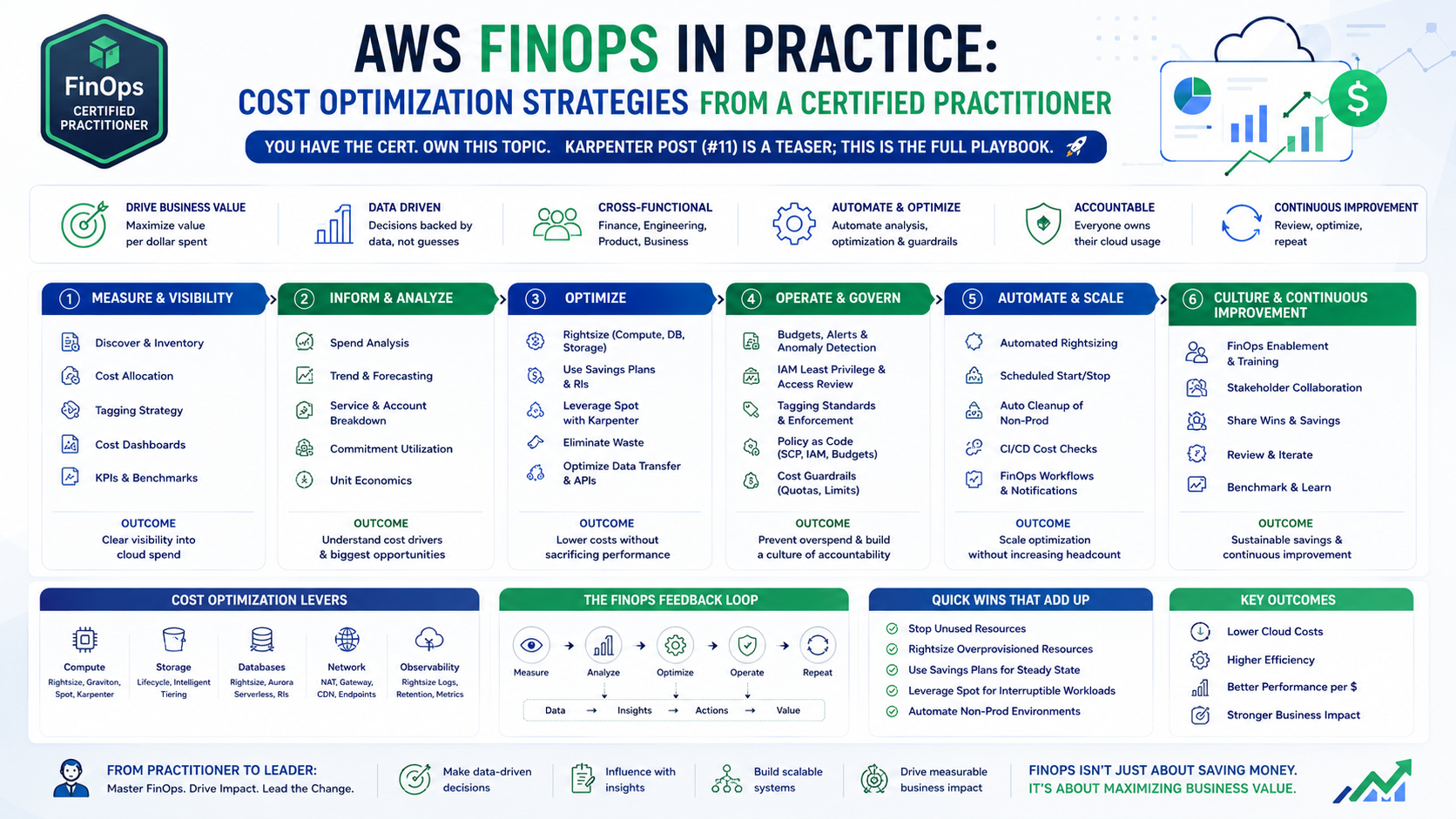
TL;DR
| Strategy | Where It Applies | Effort | Impact |
|---|---|---|---|
| Spot instances + Karpenter | EKS compute | Medium | High — 60-70% node cost reduction |
| Gateway Endpoints | S3 + DynamoDB access | Low | Free — eliminates NAT data processing |
| Fargate Spot | ECS batch workloads | Low | Up to 70% compute saving |
| Right-sizing | EC2, ECS, EKS nodes | Medium | 20-40% immediate reduction |
| Scheduled scaling | Non-prod environments | Low | Eliminates idle overnight spend |
| Savings Plans | Stable compute baseline | Low | 30-60% vs On-Demand |
| S3 storage tiering | S3 data lakes and archives | Low | 40-90% storage cost reduction |
| NAT Gateway optimisation | VPC egress traffic | Medium | Significant at data-heavy workloads |
| Cost allocation tags | All resources | Low | Visibility — prerequisite for everything |
| Budgets + anomaly detection | Account-wide | Low | Prevents surprise bills |
Introduction — FinOps Is Not Cost Cutting. It Is Cost Ownership.
The most common misunderstanding about FinOps is that it is a finance team's job. It is not. FinOps is an engineering discipline — the practice of making cloud costs visible, understandable, and actionable at the team level so that every engineer makes cost-aware decisions without waiting for a monthly bill to reveal what went wrong.
The FinOps Foundation defines three phases: Inform, Optimise, Operate. Most organisations get stuck in Inform — they can see the bill but cannot act on it because costs are not allocated to teams, workloads, or features. The engineering changes in this post address all three phases: how to tag and allocate costs accurately, how to optimise at the infrastructure layer, and how to build the operational habits that prevent cost regression.
This is not a theoretical overview. Every pattern here is grounded in the infrastructure patterns built across this series — EKS with Karpenter, ECS Fargate, VPC networking, S3 data layers, and multi-account AWS. The FinOps cert gave the framework. Production gave the context.
1. Cost Visibility — You Cannot Optimise What You Cannot See
Tagging Strategy — The Foundation of Everything
Before any optimisation, costs must be attributable to teams, services, and environments. Without tags, Cost Explorer shows you a total — not a breakdown. With tags, every engineer can see what their service costs.
# locals.tf — organisational tagging standard
# Applied to every resource via merge(local.common_tags, var.tags)
locals {
  common_tags = {
    # Required tags — Cost Explorer dimensions
    Environment  = var.environment           # prod, staging, dev
    Team         = var.team                  # platform, fraud, payments
    Service      = var.service_name          # scoring-service, enrichment
    CostCentre   = var.cost_centre           # RISK-001, PLATFORM-001
    ManagedBy    = "terraform"               # Drift detection signal
    Project      = var.project               # eks-platform, data-pipeline
    Owner        = var.owner_email           # who to contact for cost questions
    CreatedDate  = formatdate("YYYY-MM", timestamp())
  }
}

# Enforce tags via AWS Config rule
resource "aws_config_config_rule" "required_tags" {
  name = "required-tags-enforcement"

  source {
    owner             = "AWS"
    source_identifier = "REQUIRED_TAGS"
  }

  input_parameters = jsonencode({
    tag1Key   = "Environment"
    tag2Key   = "Team"
    tag3Key   = "CostCentre"
    tag4Key   = "Service"
  })
}
Cost Allocation Tags — Activate in AWS Console
Tagging resources is step one. Activating those tags as Cost Allocation Tags in the Billing console is step two — without activation, tags do not appear in Cost Explorer reports.
# Terraform cannot manage cost allocation tag activation directly
# One-time manual step per account — document it in your runbook:
#
# AWS Console → Billing → Cost Allocation Tags → User-Defined Tags
# Activate: Environment, Team, CostCentre, Service, Project

aws ce update-cost-allocation-tags-status \
  --cost-allocation-tags-status \
    TagKey=Environment,Status=Active \
    TagKey=Team,Status=Active \
    TagKey=CostCentre,Status=Active \
    TagKey=Service,Status=Active
AWS Budgets — Proactive Cost Guardrails
# Budget per team — alerts when spend exceeds threshold
resource "aws_budgets_budget" "team_budget" {
  for_each = {
    platform = { amount = "2000", email = "platform-team@company.com" }
    fraud    = { amount = "1500", email = "fraud-team@company.com"    }
    payments = { amount = "1000", email = "payments-team@company.com" }
  }

  name         = "monthly-budget-${each.key}"
  budget_type  = "COST"
  limit_amount = each.value.amount
  limit_unit   = "USD"
  time_unit    = "MONTHLY"

  cost_filters = {
    TagKeyValue = ["user:Team$${each.key}"]
  }

  notification {
    comparison_operator        = "GREATER_THAN"
    threshold                  = 80
    threshold_type             = "PERCENTAGE"
    notification_type          = "ACTUAL"
    subscriber_email_addresses = [each.value.email]
  }

  notification {
    comparison_operator        = "GREATER_THAN"
    threshold                  = 100
    threshold_type             = "PERCENTAGE"
    notification_type          = "FORECASTED"
    subscriber_email_addresses = [each.value.email]
  }
}

# Anomaly detection — catches unexpected spikes
resource "aws_ce_anomaly_monitor" "platform" {
  name              = "platform-anomaly-monitor"
  monitor_type      = "DIMENSIONAL"
  monitor_dimension = "SERVICE"
}

resource "aws_ce_anomaly_subscription" "platform_alert" {
  name      = "platform-anomaly-alert"
  frequency = "DAILY"

  monitor_arn_list = [aws_ce_anomaly_monitor.platform.arn]

  subscriber {
    type    = "EMAIL"
    address = "platform-team@company.com"
  }

  # Alert when anomalous spend exceeds $100 in a day
  threshold_expression {
    dimension {
      key           = "ANOMALY_TOTAL_IMPACT_ABSOLUTE"
      values        = ["100"]
      match_options = ["GREATER_THAN_OR_EQUAL"]
    }
  }
}
Why this matters in production: Anomaly detection caught a misconfigured NAT Gateway routing all S3 traffic via the internet instead of the Gateway Endpoint — a configuration regression after a Terraform change. The $340 single-day spike triggered an alert within 24 hours. Without anomaly detection, it would have appeared as a line item on the monthly bill three weeks later.
2. Compute Cost Optimisation — The Biggest Lever
Compute is typically 60-70% of an AWS bill for platform-heavy workloads. It is also the highest-impact optimisation target.
Karpenter + Spot — The EKS Cost Engine
Blog 13 covered the Karpenter architecture in detail. From a FinOps perspective, the three saving mechanisms are:
Spot discount: 60-70% vs On-Demand for equivalent instance types. Karpenter diversifies across instance families and sizes to maintain Spot availability — a wider diversification pool means lower interruption probability and more consistent Spot access.
Right-sizing: Karpenter provisions exactly the instance type that satisfies the pending pod's resource requests — not a pre-configured node group size. A pod requesting 1 vCPU and 2 GB gets a node sized for that, not a 4 vCPU node running at 25% utilisation.
Consolidation: Karpenter continuously evaluates whether pods from two underutilised nodes can fit on one. When they can, it evicts and terminates the spare node. This is the mechanism that improves utilisation from a typical 20-30% (Cluster Autoscaler) to 60-70% (Karpenter with consolidation).
# NodePool — FinOps-optimised configuration
apiVersion: karpenter.sh/v1
kind: NodePool
metadata:
  name: spot-general
spec:
  template:
    spec:
      requirements:
        # Spot with On-Demand fallback — never leave pods unscheduled
        - key: karpenter.sh/capacity-type
          operator: In
          values: ["spot", "on-demand"]
        # Wide instance family — improves Spot availability
        - key: karpenter.k8s.aws/instance-category
          operator: In
          values: ["c", "m", "r"]
        - key: karpenter.k8s.aws/instance-cpu
          operator: In
          values: ["2", "4", "8", "16", "32"]
        # Include Graviton — typically 10-20% cheaper for compute-bound workloads
        - key: kubernetes.io/arch
          operator: In
          values: ["amd64", "arm64"]
        - key: karpenter.k8s.aws/instance-generation
          operator: Gt
          values: ["4"]
  disruption:
    consolidationPolicy: WhenEmptyOrUnderutilized
    consolidateAfter: 30s   # Fast consolidation = lower idle spend
  limits:
    cpu: 500
    memory: 2000Gi
Fargate Spot — ECS Batch Workload Saving
For ECS Fargate workloads, the equivalent of Spot is Fargate Spot — up to 70% cheaper than standard Fargate for workloads that can tolerate a 2-minute interruption notice.
# ECS Cluster — Fargate Spot capacity provider
resource "aws_ecs_cluster_capacity_providers" "main" {
  cluster_name       = aws_ecs_cluster.main.name
  capacity_providers = ["FARGATE", "FARGATE_SPOT"]

  default_capacity_provider_strategy {
    base              = 1      # At least 1 task on standard Fargate
    weight            = 20     # 20% on standard Fargate (critical path)
    capacity_provider = "FARGATE"
  }

  default_capacity_provider_strategy {
    weight            = 80     # 80% on Fargate Spot (batch/background)
    capacity_provider = "FARGATE_SPOT"
  }
}

# Critical services — standard Fargate only
resource "aws_ecs_service" "scoring_critical" {
  # ...
  capacity_provider_strategy {
    capacity_provider = "FARGATE"
    weight            = 100
    base              = 2
  }
}

# Batch service — Spot-first, stateless and retry-capable
resource "aws_ecs_service" "enrichment_batch" {
  # ...
  capacity_provider_strategy {
    capacity_provider = "FARGATE_SPOT"
    weight            = 100
  }
}
Savings Plans — Committing to a Baseline
Spot and Fargate Spot handle variable workloads. Savings Plans handle the stable baseline — the compute that runs 24/7 regardless of demand.
| Savings Plan Type | Discount | Flexibility |
|---|---|---|
| Compute Savings Plan | Up to 66% | Any EC2, Fargate, Lambda — any region, any size |
| EC2 Instance Savings Plan | Up to 72% | Specific instance family + region — less flexible |
| SageMaker Savings Plan | Up to 64% | SageMaker only |
# 1-year Compute Savings Plan — covers EC2 + ECS Fargate + Lambda
resource "aws_savingsplans_savings_plan" "compute" {
  savings_plan_type        = "Compute"
  commitment               = 50.00   # $50/hour — based on your On-Demand baseline
  term_duration_in_seconds = 31536000   # 1 year
  payment_option           = "NoUpfront"
}
How to size a Savings Plan commitment correctly
1. Run On-Demand only for 30 days
2. Export Cost Explorer hourly EC2/Fargate spend
3. Find the minimum hourly spend — this is your guaranteed baseline
4. Commit 70-80% of that minimum (leave buffer for legitimate scale-down)
5. Let Spot and Fargate Spot handle everything above the baseline

Example:
  Minimum hourly On-Demand spend: $65/hour
  Savings Plan commitment:         $50/hour (77% of minimum)
  Discount at 1-year no-upfront:  ~42%
  Annual saving vs full On-Demand: ~$18,396
Architect's Rule: Never commit 100% of your baseline. A service migration, a feature shutdown, or an architectural change can legitimately reduce your compute baseline. Buffer at 70-80% and let Spot handle the rest. An unused Savings Plan commitment still costs money.
EC2 Right-Sizing — The Low-Hanging Fruit
# AWS Compute Optimizer — analyses and recommends right-sized instances
resource "aws_computeoptimizer_enrollment_status" "main" {
  status = "Active"
}

resource "aws_computeoptimizer_recommendation_preferences" "enhanced" {
  resource_type = "Ec2Instance"
  scope {
    name  = "AccountId"
    value = var.account_id
  }
  enhanced_infrastructure_metrics = "Active"
  # Collects 14 days of CloudWatch metrics — more accurate than 3-day default
}
Compute Optimizer recommendations arrive after 14 days. The typical finding is instances running at 8-15% average CPU — sized for peak that rarely occurs. Downsizing an m5.2xlarge (8 vCPU, 32 GB) to an m5.xlarge (4 vCPU, 16 GB) halves the compute cost with no application change.
3. Networking Cost Optimisation — The Hidden Bill
Network costs are the most commonly overlooked line item until they appear as a shock on the monthly bill.
VPC Endpoints — Eliminate NAT Gateway Data Processing
Without Gateway Endpoint:
  S3 traffic: Pod → NAT Gateway → Internet → S3
  Cost: $0.045/GB data processing on NAT Gateway

With Gateway Endpoint:
  S3 traffic: Pod → Gateway Endpoint → S3 (AWS backbone)
  Cost: $0.00

Monthly saving example — 10 TB S3 reads:
  Without: 10,000 GB × $0.045 = $450/month
  With:    $0.00
  Saving:  $450/month — permanent, with zero operational trade-off
# Always deploy these — free and eliminate NAT data processing charges
resource "aws_vpc_endpoint" "s3" {
vpc_id = aws_vpc.main.id
service_name = "com.amazonaws.${var.region}.s3"
vpc_endpoint_type = "Gateway"
route_table_ids = aws_route_table.private[*].id
tags = { Name = "s3-gateway-endpoint" }
}
resource "aws_vpc_endpoint" "dynamodb" {
vpc_id = aws_vpc.main.id
service_name = "com.amazonaws.${var.region}.dynamodb"
vpc_endpoint_type = "Gateway"
route_table_ids = aws_route_table.private[*].id
tags = { Name = "dynamodb-gateway-endpoint" }
}NAT Gateway — Per-AZ vs Shared
Shared NAT Gateway (single AZ):
  Fixed cost:   1 × $0.045/hr = $32.85/month
  Cross-AZ fee: $0.01/GB each direction (compounds quickly at scale)

Per-AZ NAT Gateway (3 AZs):
  Fixed cost:   3 × $0.045/hr = $98.55/month
  Cross-AZ fee: $0.00 (traffic stays in AZ)

Break-even: if cross-AZ traffic exceeds ~6.5 TB/month, per-AZ wins on cost
At 10+ TB/month cross-AZ traffic: per-AZ saves money AND improves resilience
Cross-AZ Data Transfer — The Silent Cost
Every time a pod in AZ-a calls a service in AZ-b, AWS charges $0.01/GB each direction. In a microservices architecture with frequent service-to-service calls, this accumulates quickly.
# Topology spread constraints — keep service-to-service calls within the same AZ
spec:
  template:
    spec:
      topologySpreadConstraints:
        - maxSkew:           1
          topologyKey:       topology.kubernetes.io/zone
          whenUnsatisfiable: ScheduleAnyway
          labelSelector:
            matchLabels:
              app: scoring-service
# NLB — disable cross-zone load balancing when AZ affinity is preferred
resource "aws_lb" "nlb" {
load_balancer_type = "network"
enable_cross_zone_load_balancing = false # Default off for NLB — costs money per GB
}4. Storage Cost Optimisation — S3 and EBS
S3 Intelligent-Tiering — Automatic Cost Optimisation
resource "aws_s3_bucket_intelligent_tiering_configuration" "logs" {
  bucket = aws_s3_bucket.platform_logs.bucket
  name   = "platform-logs-tiering"

  tiering {
    access_tier = "DEEP_ARCHIVE_ACCESS"
    days        = 180   # Move to Deep Archive after 180 days of no access
  }

  tiering {
    access_tier = "ARCHIVE_ACCESS"
    days        = 90
  }
}

# Lifecycle policy — explicit rules for known access patterns
resource "aws_s3_bucket_lifecycle_configuration" "logs" {
  bucket = aws_s3_bucket.platform_logs.bucket

  rule {
    id     = "cloudtrail-logs"
    status = "Enabled"
    filter { prefix = "cloudtrail/" }

    transition {
      days          = 30
      storage_class = "STANDARD_IA"
    }
    transition {
      days          = 90
      storage_class = "GLACIER_IR"
    }
    transition {
      days          = 365
      storage_class = "DEEP_ARCHIVE"
    }
    expiration {
      days = 2555   # Delete after 7 years (compliance retention)
    }
  }

  rule {
    id     = "application-logs"
    status = "Enabled"
    filter { prefix = "application-logs/" }

    transition {
      days          = 7
      storage_class = "STANDARD_IA"
    }
    expiration {
      days = 90   # Operational logs — no long-term value
    }
  }
}
Storage class cost comparison (eu-west-1)
| Storage Class | Cost per GB/month | Retrieval cost | Use case |
|---|---|---|---|
| Standard | $0.023 | Free | Frequently accessed |
| Standard-IA | $0.0125 | $0.01/GB | < 1x/month access |
| Glacier Instant | $0.004 | $0.03/GB | < 1x/quarter access |
| Glacier Flexible | $0.0036 | $0.01/GB (hours) | Archives |
| Deep Archive | $0.00099 | $0.02/GB | Compliance, 7yr+ |
EBS — gp3 Migration from gp2
gp3 is cheaper than gp2 and delivers better performance. Every gp2 volume that has not been migrated is an unnecessary cost.
# Always use gp3 — $0.08/GB/month vs gp2 $0.10/GB/month, same baseline IOPS
resource "aws_ebs_volume" "data" {
  availability_zone = var.az
  size              = 100
  type              = "gp3"
  iops              = 3000
  throughput        = 125   # gp3 includes configurable throughput; gp2 does not
  tags              = local.common_tags
}

# Migrate existing gp2 volumes to gp3 — no downtime required
# aws ec2 modify-volume --volume-id vol-xxx --volume-type gp3
# Karpenter EC2NodeClass — enforce gp3 for all provisioned nodes
apiVersion: karpenter.k8s.aws/v1
kind: EC2NodeClass
metadata:
name: default
spec:
blockDeviceMappings:
- deviceName: /dev/xvda
ebs:
volumeType: gp3
volumeSize: 50Gi
iops: 3000
throughput: 125
encrypted: true5. Non-Production Environment Cost Controls
Scheduled Shutdown — Eliminate Overnight Idle Spend
Blog 16 covers the full Step Functions + Lambda pattern for EKS. For simpler cases — RDS, EC2, ECS — scheduled scaling achieves the same result:
# RDS — stop non-prod databases overnight
resource "aws_cloudwatch_event_rule" "rds_stop" {
  name                = "stop-nonprod-rds"
  schedule_expression = "cron(0 20 ? * MON-FRI *)"   # 8pm weekdays
}

# EC2 — scale non-prod ASGs to zero overnight
resource "aws_autoscaling_schedule" "stop_nonprod" {
  for_each = toset(var.nonprod_asg_names)

  scheduled_action_name  = "stop-overnight"
  autoscaling_group_name = each.value
  recurrence            = "0 20 * * MON-FRI"
  min_size              = 0
  max_size              = 0
  desired_capacity      = 0
}

resource "aws_autoscaling_schedule" "start_nonprod" {
  for_each = toset(var.nonprod_asg_names)

  scheduled_action_name  = "start-morning"
  autoscaling_group_name = each.value
  recurrence            = "0 7 * * MON-FRI"
  min_size              = var.min_size
  max_size              = var.max_size
  desired_capacity      = var.desired_capacity
}
EC2 non-prod environment: 4 × m5.xlarge On-Demand ($0.192/hr)
Running hours saved per month:
Weeknights: 12h × 22 days = 264h
Weekends: 48h × 4 wknds = 192h
Total: 456h
Saving: 4 × $0.192 × 456h = $350/month per environment
For 3 non-prod environments: $1,050/month6. Multi-Account Cost Governance
# Cost and Usage Report — granular billing data, pre-formatted for Athena
resource "aws_cur_report_definition" "main" {
  report_name                = "org-cost-usage-report"
  time_unit                  = "HOURLY"
  format                     = "Parquet"
  compression                = "Parquet"
  additional_schema_elements = ["RESOURCES"]   # Line-item resource ARNs
  s3_bucket                  = aws_s3_bucket.cur_reports.bucket
  s3_region                  = var.region
  s3_prefix                  = "cur/"
  report_versioning          = "OVERWRITE_REPORT"
  refresh_closed_reports     = true
  additional_artifacts       = ["ATHENA"]
}

# Organisation-level budget — catches account-level anomalies
resource "aws_budgets_budget" "org_total" {
  name         = "org-monthly-total"
  budget_type  = "COST"
  limit_amount = "10000"
  limit_unit   = "USD"
  time_unit    = "MONTHLY"

  notification {
    comparison_operator        = "GREATER_THAN"
    threshold                  = 90
    threshold_type             = "PERCENTAGE"
    notification_type          = "ACTUAL"
    subscriber_email_addresses = ["finops@company.com"]
  }

  notification {
    comparison_operator        = "GREATER_THAN"
    threshold                  = 100
    threshold_type             = "PERCENTAGE"
    notification_type          = "FORECASTED"
    subscriber_email_addresses = ["finops@company.com", "cto@company.com"]
  }
}
7. The FinOps Operating Model — Making It Stick
Tooling and architecture changes produce one-time savings. The operating model produces ongoing savings.
Weekly Cost Review — 15 Minutes
Every Monday morning:
1. Cost Explorer: this week vs last week — any anomalies?
2. Budgets: any team approaching threshold?
3. Compute Optimizer: any new right-sizing recommendations?
4. Trusted Advisor: any new cost optimisation findings?
5. Action: one item per team to investigate before next review
FinOps Metrics to Track
# Custom CloudWatch dashboard — FinOps KPIs published weekly via Lambda
# Metric 1: Cost per microservice (target: visible per team)
# Metric 2: Spot coverage % (target: >70% of compute)
# Metric 3: Savings Plan utilisation % (target: >80%)
# Metric 4: Untagged resource % (target: <5%)
# Metric 5: Non-prod vs prod cost ratio (target: <30%)

resource "aws_cloudwatch_dashboard" "finops" {
  dashboard_name = "finops-weekly"

  dashboard_body = jsonencode({
    widgets = [
      {
        type = "metric"
        properties = {
          title   = "Spot Coverage % (target: >70%)"
          metrics = [["Custom/FinOps", "SpotCoveragePercent"]]
        }
      },
      {
        type = "metric"
        properties = {
          title   = "Savings Plan Utilisation %"
          metrics = [["Custom/FinOps", "SavingsPlanUtilisationPercent"]]
        }
      }
    ]
  })
}
The FinOps Conversation — Bringing Teams Along
Make costs visible at the team level. A team that sees their weekly spend, their Spot coverage, and their per-service cost breakdown will naturally start making cost-aware decisions. A team that receives a monthly report of aggregated costs will not.
Reward cost-aware decisions. When an engineer adds a Gateway Endpoint or migrates a gp2 volume to gp3, make it visible in the team's FinOps metrics. Small wins accumulate.
Connect cost to reliability. Over-provisioned, idle resources are not just expensive — they are hiding waste that could fund reliability improvements. The team that saves $500/month by right-sizing gets $500/month for additional observability tooling. Cost and quality are not in tension; they are funded from the same budget.
Common Mistakes & Anti-Patterns
These are the mistakes that appear repeatedly in real AWS environments — including during migrations, cost reviews, and post-incident analyses.
You cannot attribute costs to teams without tags. You cannot measure the impact of an optimisation without baseline visibility. Tag first, optimise second. A cost programme that starts with rightsizing before establishing tagging produces savings nobody can attribute or validate.
A Savings Plan commitment that matches your current baseline exactly leaves no room for legitimate scale-down — a service retirement, a migration, or an architectural simplification. Commit 70-80% and let Spot handle the rest. An over-committed Savings Plan still costs money even when your compute drops.
S3 and DynamoDB Gateway Endpoints are free. Every byte of S3 or DynamoDB traffic that routes through a NAT Gateway costs $0.045/GB for no reason. This is the most common and most avoidable networking cost mistake in every AWS account I have reviewed.
Non-production environments that run 24/7 On-Demand at full capacity cost nearly as much as production — without the justification. Scheduled shutdown, smaller instance types, Spot-only compute, and shared clusters are all appropriate for dev and staging environments.
A misconfiguration, a forgotten test run, or an unexpected traffic spike can generate hundreds of dollars in unexpected spend before anyone notices. Cost Explorer Anomaly Monitoring is a low-cost, high-value guardrail that catches these events within 24 hours rather than at month-end billing.
Data transfer is the stealth cost category — it accumulates quietly and compounds as traffic grows. Cross-AZ traffic, NAT Gateway processing, and inter-region replication all have per-GB charges. Architect to keep traffic within AZ boundaries where possible, and use Gateway Endpoints to avoid internet-routed AWS service traffic.
Architecture Decision Matrix
| Optimisation | Cost Saving | Effort | Risk | When to Apply |
|---|---|---|---|---|
| S3 + DynamoDB Gateway Endpoints | High (eliminates NAT cost) | Low | None | Immediately — always |
| Karpenter Spot NodePool | High (60-70% node cost) | Medium | Low (with PDB) | EKS workloads |
| Fargate Spot | High (up to 70%) | Low | Low (stateless tasks) | ECS batch workloads |
| Compute Savings Plan | Medium (30-60%) | Low | Low (commitment) | After 30 days baseline |
| gp3 migration from gp2 | Low-Medium (20%) | Low | None | All EBS volumes |
| S3 Intelligent-Tiering | Medium-High (50-90% archive) | Low | None | Infrequent access data |
| Non-prod scheduled shutdown | High (for idle environments) | Low | None | All non-prod environments |
| Karpenter consolidation | Medium (improved utilisation) | Low (config only) | Low | EKS with Karpenter |
| Right-sizing via Compute Optimizer | Medium (20-40%) | Medium | Low | After 14 days data |
| Per-AZ NAT Gateway | Neutral-Positive at scale | Low | None | >6TB/month cross-AZ traffic |
The Golden Rule
"FinOps is not a monthly cost review — it is an engineering practice. Tag everything before you optimise anything. Use Spot and Fargate Spot for workloads that can tolerate interruption, and commit a Savings Plan for the stable baseline that cannot. Eliminate NAT Gateway data processing charges with Gateway Endpoints — they are free. Stop non-production environments when nobody is using them. And make costs visible at the team level: engineers who see their weekly spend make cost-aware decisions without being told to. The cloud bill is not the CFO's problem. It is an engineering output, and it responds to engineering decisions."