Multi-Region High Availability on AWS: Active-Active vs Active-Passive Design
AWS Series | Part 18 — Building secure, cost-optimised, cloud-native infrastructure on AWS.
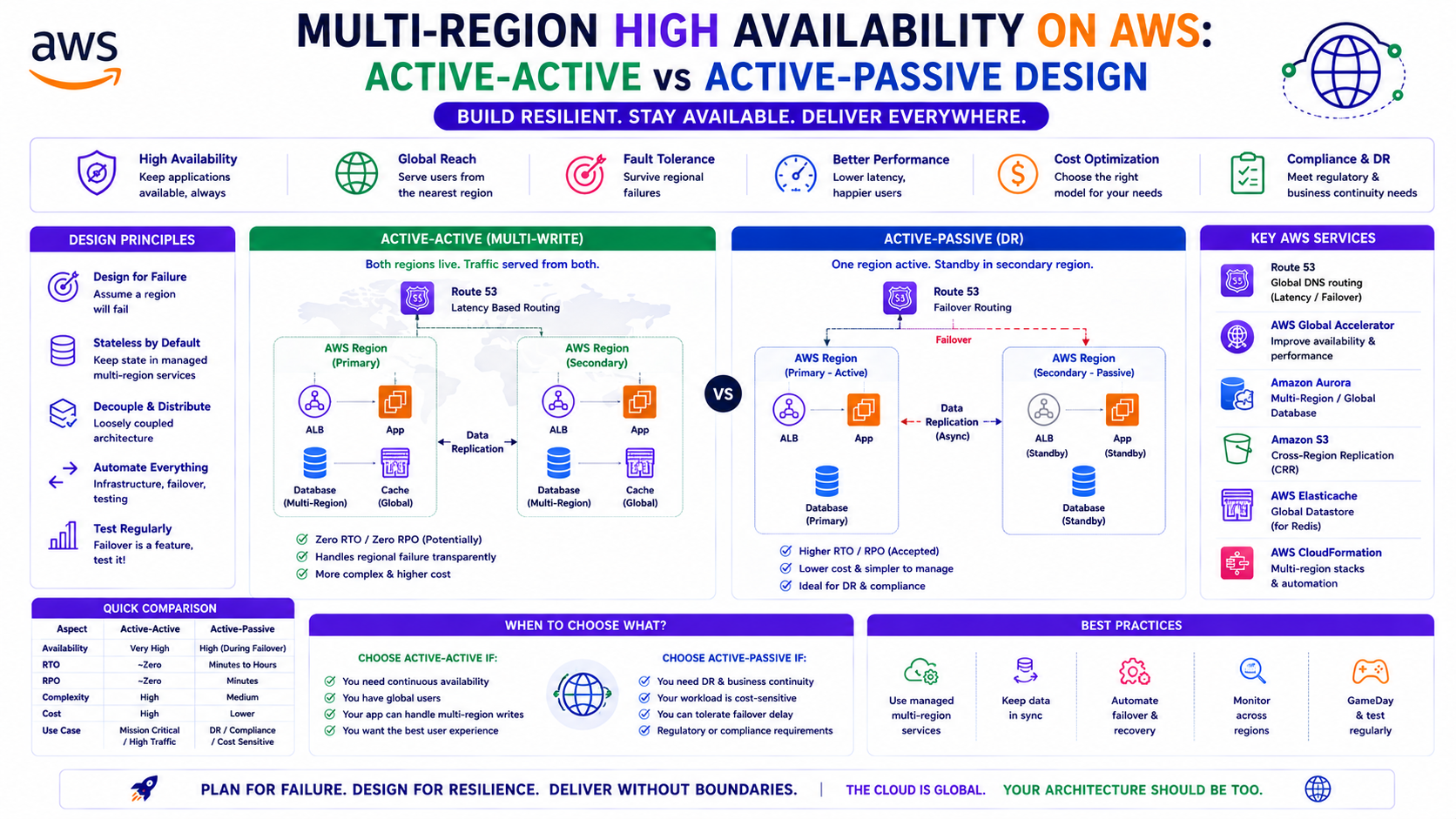
TL;DR Comparison
| Active-Passive | Active-Active | |
|---|---|---|
| Traffic distribution | All traffic to primary region, standby secondary | Traffic split across both regions simultaneously |
| RTO | Minutes (DNS failover + warm standby) | Near-zero (traffic reroutes instantly) |
| RPO | Seconds to minutes (replication lag) | Near-zero (synchronous or near-sync replication) |
| Cost | ~1.5× single-region (standby is scaled down) | ~2× single-region (full capacity in both) |
| Complexity | Medium | High |
| Data consistency | Eventual (async replication) | Strong or eventual depending on pattern |
| Best for | DR, regulated workloads, cost-sensitive HA | Global platforms, zero-tolerance downtime, latency-sensitive |
| Typical use case | Enterprise applications, financial services DR | Global APIs, gaming, real-time platforms |
Introduction — When Single-Region Is No Longer Enough
Every architecture in this series has been built within a single AWS region. Multi-AZ deployment, Karpenter across three availability zones, ALBs distributing traffic across zones — all of this protects against AZ-level failures. But an entire AWS region going down is not theoretical. It has happened. And when it does, a single-region architecture goes with it.
Multi-region is not just about disaster recovery. It is about latency, data residency, compliance, and the architecture decisions that determine whether your platform survives its worst day. A fraud detection platform processing transactions across Europe needs consistent sub-200ms response times regardless of where the transaction originates. A platform that fails for 40 minutes while DNS propagates during a region failover is not meeting its SLAs — even if it eventually recovers.
This post covers both patterns in depth — Active-Passive for controlled failover with lower cost, and Active-Active for zero-RPO, zero-RTO platforms — with the Terraform, Route 53 routing policies, database replication strategies, and operational considerations for each. Every pattern connects back to the infrastructure built across this series.
1. The Multi-Region Building Blocks
Before choosing Active-Passive or Active-Active, you need the same set of underlying components for both. These are the building blocks every multi-region architecture shares.
Multi-Region VPC and Networking
# Primary region — eu-west-1
module "vpc_primary" {
  source  = "../../modules/vpc"

  vpc_cidr    = "10.0.0.0/16"
  region      = "eu-west-1"
  environment = var.environment

  private_subnets = ["10.0.1.0/24", "10.0.2.0/24", "10.0.3.0/24"]
  public_subnets  = ["10.0.101.0/24", "10.0.102.0/24", "10.0.103.0/24"]

  tags = local.common_tags
}

# Secondary region — eu-central-1 (Frankfurt)
# Non-overlapping CIDR — critical for Transit Gateway peering
module "vpc_secondary" {
  source  = "../../modules/vpc"

  vpc_cidr    = "10.1.0.0/16"
  region      = "eu-central-1"
  environment = var.environment

  private_subnets = ["10.1.1.0/24", "10.1.2.0/24", "10.1.3.0/24"]
  public_subnets  = ["10.1.101.0/24", "10.1.102.0/24", "10.1.103.0/24"]

  tags = local.common_tags
}
Inter-Region Connectivity — TGW Peering
# Transit Gateway in primary region
resource "aws_ec2_transit_gateway" "primary" {
  provider    = aws.eu_west_1
  description = "Primary region TGW — eu-west-1"

  amazon_side_asn                 = 64512
  default_route_table_association = "disable"
  default_route_table_propagation = "disable"

  tags = { Name = "tgw-primary-eu-west-1" }
}

# Transit Gateway in secondary region
resource "aws_ec2_transit_gateway" "secondary" {
  provider    = aws.eu_central_1
  description = "Secondary region TGW — eu-central-1"

  amazon_side_asn                 = 64513
  default_route_table_association = "disable"
  default_route_table_propagation = "disable"

  tags = { Name = "tgw-secondary-eu-central-1" }
}

# TGW peering — cross-region private backbone
resource "aws_ec2_transit_gateway_peering_attachment" "primary_to_secondary" {
  provider = aws.eu_west_1

  transit_gateway_id      = aws_ec2_transit_gateway.primary.id
  peer_transit_gateway_id = aws_ec2_transit_gateway.secondary.id
  peer_region             = "eu-central-1"

  tags = { Name = "tgw-peering-eu-west-1-to-eu-central-1" }
}

# Accept the peering in the secondary region
resource "aws_ec2_transit_gateway_peering_attachment_accepter" "secondary" {
  provider = aws.eu_central_1

  transit_gateway_attachment_id = aws_ec2_transit_gateway_peering_attachment.primary_to_secondary.id

  tags = { Name = "tgw-peering-accepter-eu-central-1" }
}

# Static routes — propagation does not work across TGW peering
resource "aws_ec2_transit_gateway_route" "primary_to_secondary_cidrs" {
  provider = aws.eu_west_1

  destination_cidr_block         = "10.1.0.0/16"
  transit_gateway_attachment_id  = aws_ec2_transit_gateway_peering_attachment.primary_to_secondary.id
  transit_gateway_route_table_id = aws_ec2_transit_gateway_route_table.primary.id
}

resource "aws_ec2_transit_gateway_route" "secondary_to_primary_cidrs" {
  provider = aws.eu_central_1

  destination_cidr_block         = "10.0.0.0/16"
  transit_gateway_attachment_id  = aws_ec2_transit_gateway_peering_attachment.primary_to_secondary.id
  transit_gateway_route_table_id = aws_ec2_transit_gateway_route_table.secondary.id
}
Terraform Provider Configuration — Multi-Region
# providers.tf — multi-region provider setup
terraform {
  required_providers {
    aws = {
      source  = "hashicorp/aws"
      version = "~> 5.50"
    }
  }
}

provider "aws" {
  alias  = "eu_west_1"
  region = "eu-west-1"

  assume_role {
    role_arn = "arn:aws:iam::${var.account_id}:role/terraform-apply-role"
  }
}

provider "aws" {
  alias  = "eu_central_1"
  region = "eu-central-1"

  assume_role {
    role_arn = "arn:aws:iam::${var.account_id}:role/terraform-apply-role"
  }
}

# Route 53 and ACM validation always in us-east-1
provider "aws" {
  alias  = "us_east_1"
  region = "us-east-1"

  assume_role {
    role_arn = "arn:aws:iam::${var.account_id}:role/terraform-apply-role"
  }
}
2. Active-Passive — Controlled Failover with Lower Cost
Architecture Overview
Normal operation:
  Users → Route 53 → Primary ALB (eu-west-1) → EKS Cluster Primary
  Secondary region: warm standby — scaled down, receives no traffic

Failover:
  Route 53 health check detects primary unhealthy
  → DNS fails over to Secondary ALB (eu-central-1)
  → EKS Cluster Secondary scales up (if not already warm)
  → Traffic flows to secondary region
The secondary region is always running — but at reduced capacity. The minimum configuration that allows fast failover (within minutes, not hours) is:
- EKS cluster with system node group running (control plane warm)
- Minimum 1 On-Demand node per AZ (avoids cold bootstrap time)
- Application deployments present but scaled to minimum replicas
- Database in standby or read replica mode with promotion capability
- Route 53 health checks monitoring the primary ALB
Route 53 Failover Routing
# Health check — monitors the primary region ALB
resource "aws_route53_health_check" "primary" {
  fqdn              = aws_lb.primary.dns_name
  port              = 443
  type              = "HTTPS"
  resource_path     = "/health"
  failure_threshold = 3
  request_interval  = 10

  regions = [
    "eu-west-1",
    "eu-central-1",
    "us-east-1"
  ]

  tags = { Name = "primary-region-health-check" }
}

# Primary DNS record — eu-west-1
resource "aws_route53_record" "primary" {
  zone_id = aws_route53_zone.public.zone_id
  name    = "api.company.com"
  type    = "A"

  set_identifier = "primary"

  failover_routing_policy {
    type = "PRIMARY"
  }

  alias {
    name                   = aws_lb.primary.dns_name
    zone_id                = aws_lb.primary.zone_id
    evaluate_target_health = true
  }

  health_check_id = aws_route53_health_check.primary.id
}

# Secondary DNS record — eu-central-1
resource "aws_route53_record" "secondary" {
  provider = aws.eu_central_1

  zone_id = aws_route53_zone.public.zone_id
  name    = "api.company.com"
  type    = "A"

  set_identifier = "secondary"

  failover_routing_policy {
    type = "SECONDARY"
  }

  alias {
    name                   = aws_lb.secondary.dns_name
    zone_id                = aws_lb.secondary.zone_id
    evaluate_target_health = true
  }
  # No health_check_id on secondary — always available as fallback
}
Database Replication — RDS Multi-Region
# Primary RDS instance — eu-west-1
resource "aws_db_instance" "primary" {
  provider = aws.eu_west_1

  identifier        = "platform-db-primary"
  engine            = "postgres"
  engine_version    = "16.2"
  instance_class    = "db.r6g.xlarge"

  multi_az               = true
  storage_encrypted      = true
  deletion_protection    = true

  backup_retention_period = 7
  backup_window          = "03:00-04:00"

  monitoring_interval = 30
  monitoring_role_arn = aws_iam_role.rds_monitoring.arn

  tags = local.common_tags
}

# Cross-region read replica — eu-central-1
# Can be promoted to standalone primary during failover
resource "aws_db_instance" "secondary_replica" {
  provider = aws.eu_central_1

  identifier = "platform-db-secondary-replica"

  replicate_source_db = aws_db_instance.primary.arn

  instance_class = "db.r6g.large"

  multi_az            = false
  publicly_accessible = false
  storage_encrypted   = true
  deletion_protection = true

  tags = merge(local.common_tags, { Role = "read-replica" })
}

# CloudWatch alarm — replica lag exceeds RPO threshold
resource "aws_cloudwatch_metric_alarm" "replica_lag" {
  provider = aws.eu_central_1

  alarm_name          = "rds-replica-lag-exceeds-rpo"
  alarm_description   = "Replica lag exceeds RPO threshold — failover data loss risk"
  comparison_operator = "GreaterThanThreshold"
  evaluation_periods  = 2
  metric_name         = "ReplicaLag"
  namespace           = "AWS/RDS"
  period              = 60
  statistic           = "Maximum"
  threshold           = 30

  dimensions = {
    DBInstanceIdentifier = aws_db_instance.secondary_replica.id
  }

  alarm_actions = [aws_sns_topic.platform_alerts_secondary.arn]
}
Failover Runbook — Automated vs Manual
For Active-Passive, the failover itself can be automated (DNS health checks handle it) but the database promotion is typically manual in regulated environments because it is irreversible without re-establishing replication.
# EventBridge rule — detect primary region ALB alarm, trigger failover notification
resource "aws_cloudwatch_event_rule" "primary_unhealthy" {
  provider = aws.eu_west_1
  name     = "primary-region-health-failure"

  event_pattern = jsonencode({
    source      = ["aws.route53"]
    detail-type = ["Route 53 Health Check Status Change"]
    detail = {
      status          = ["ALARM"]
      health-check-id = [aws_route53_health_check.primary.id]
    }
  })
}

resource "aws_cloudwatch_event_target" "failover_notification" {
  provider = aws.eu_west_1
  rule     = aws_cloudwatch_event_rule.primary_unhealthy.name
  arn      = aws_sns_topic.failover_alerts.arn
}
Why manual database promotion in production: Automatic promotion of a read replica is irreversible — once promoted, it is a standalone instance. Re-establishing it as a replica requires a fresh backup restore which takes hours. In a regulated environment, this is a decision that requires a human to confirm the primary region is genuinely down and will not recover within the RTO window, before committing to promotion.
3. Active-Active — Zero-RPO, Zero-RTO Architecture
Architecture Overview
Normal operation:
  EU users   → Route 53 (latency routing) → eu-west-1 ALB  → eu-west-1 EKS
  DACH users → Route 53 (latency routing) → eu-central-1 ALB → eu-central-1 EKS

Both regions:
  - Full production capacity
  - Receiving live traffic simultaneously
  - Data writes synchronised in near-real-time

Region failure:
  Route 53 removes unhealthy region from DNS within ~30 seconds
  Remaining region absorbs all traffic
  No data loss (synchronous or near-synchronous replication)
Route 53 Latency-Based Routing with Health Checks
# Health checks — both regions monitored
resource "aws_route53_health_check" "eu_west_1" {
  fqdn              = aws_lb.eu_west_1.dns_name
  port              = 443
  type              = "HTTPS"
  resource_path     = "/health"
  failure_threshold = 3
  request_interval  = 10

  tags = { Name = "health-check-eu-west-1" }
}

resource "aws_route53_health_check" "eu_central_1" {
  fqdn              = aws_lb.eu_central_1.dns_name
  port              = 443
  type              = "HTTPS"
  resource_path     = "/health"
  failure_threshold = 3
  request_interval  = 10

  tags = { Name = "health-check-eu-central-1" }
}

# Latency routing — direct users to nearest healthy region
resource "aws_route53_record" "api_eu_west_1" {
  zone_id        = aws_route53_zone.public.zone_id
  name           = "api.company.com"
  type           = "A"
  set_identifier = "eu-west-1"

  latency_routing_policy {
    region = "eu-west-1"
  }

  alias {
    name                   = aws_lb.eu_west_1.dns_name
    zone_id                = aws_lb.eu_west_1.zone_id
    evaluate_target_health = true
  }

  health_check_id = aws_route53_health_check.eu_west_1.id
}

resource "aws_route53_record" "api_eu_central_1" {
  zone_id        = aws_route53_zone.public.zone_id
  name           = "api.company.com"
  type           = "A"
  set_identifier = "eu-central-1"

  latency_routing_policy {
    region = "eu-central-1"
  }

  alias {
    name                   = aws_lb.eu_central_1.dns_name
    zone_id                = aws_lb.eu_central_1.zone_id
    evaluate_target_health = true
  }

  health_check_id = aws_route53_health_check.eu_central_1.id
}
The Hard Problem — Data in Active-Active
Active-Active compute is straightforward. Active-Active data is the genuinely hard part. If a write happens in eu-west-1 and a read for the same record happens in eu-central-1 100ms later, does the read see the write? The answer depends entirely on your replication strategy. Three patterns:
Pattern 1 — Global Tables (DynamoDB)
Fully managed multi-region replication with eventual consistency. Writes in any region propagate to all regions, typically within 1 second. Best for use cases where eventual consistency is acceptable.
resource "aws_dynamodb_table" "global" {
  name         = "platform-sessions"
  billing_mode = "PAY_PER_REQUEST"
  hash_key     = "session_id"

  stream_enabled   = true
  stream_view_type = "NEW_AND_OLD_IMAGES"

  attribute {
    name = "session_id"
    type = "S"
  }

  replica {
    region_name = "eu-central-1"
    kms_key_arn = aws_kms_key.dynamodb_eu_central_1.arn
  }

  server_side_encryption {
    enabled     = true
    kms_key_arn = aws_kms_key.dynamodb_eu_west_1.arn
  }

  tags = local.common_tags
}
Pattern 2 — Aurora Global Database
Sub-second cross-region replication with the ability to promote the secondary in under 1 minute during failover. The best option for relational data with strong consistency requirements.
# Aurora Global Cluster
resource "aws_rds_global_cluster" "main" {
  global_cluster_identifier = "platform-global-db"
  engine                    = "aurora-postgresql"
  engine_version            = "16.2"
  database_name             = "platform"
  storage_encrypted         = true
}

# Primary cluster — eu-west-1
resource "aws_rds_cluster" "primary" {
  provider = aws.eu_west_1

  cluster_identifier        = "platform-primary-eu-west-1"
  global_cluster_identifier = aws_rds_global_cluster.main.id
  engine                    = "aurora-postgresql"
  engine_version            = "16.2"

  db_subnet_group_name   = aws_db_subnet_group.primary.name
  vpc_security_group_ids = [aws_security_group.rds_primary.id]

  master_username = var.db_username
  master_password = var.db_password

  backup_retention_period = 7

  tags = local.common_tags
}

# Secondary cluster — eu-central-1
# Replicates from primary with typical lag <1 second
resource "aws_rds_cluster" "secondary" {
  provider = aws.eu_central_1

  cluster_identifier        = "platform-secondary-eu-central-1"
  global_cluster_identifier = aws_rds_global_cluster.main.id
  engine                    = "aurora-postgresql"
  engine_version            = "16.2"

  db_subnet_group_name   = aws_db_subnet_group.secondary.name
  vpc_security_group_ids = [aws_security_group.rds_secondary.id]

  tags = local.common_tags
}
Pattern 3 — Write to Primary, Read from Local Replica
A hybrid approach where all writes go to one region (eliminating write conflicts) and reads are served from the nearest replica. Simpler consistency model, slightly higher write latency for the non-primary region.
import boto3
import os

class MultiRegionDBClient:
    def __init__(self):
        self.region = os.environ.get('AWS_REGION', 'eu-west-1')
        self.primary_region = 'eu-west-1'

        # Write endpoint — always primary region
        self.write_client = boto3.client(
            'rds-data',
            region_name=self.primary_region,
            endpoint_url=os.environ['AURORA_WRITE_ENDPOINT']
        )

        # Read endpoint — local region replica
        self.read_client = boto3.client(
            'rds-data',
            region_name=self.region,
            endpoint_url=os.environ['AURORA_READ_ENDPOINT']
        )

    def write(self, sql, parameters):
        # All writes go to primary — no conflict risk
        return self.write_client.execute_statement(
            resourceArn=os.environ['AURORA_CLUSTER_ARN_PRIMARY'],
            secretArn=os.environ['DB_SECRET_ARN'],
            sql=sql,
            parameters=parameters
        )

    def read(self, sql, parameters):
        # Reads from local replica — lower latency
        # Accept eventual consistency — replica lag is typically <1s
        return self.read_client.execute_statement(
            resourceArn=os.environ['AURORA_CLUSTER_ARN_LOCAL'],
            secretArn=os.environ['DB_SECRET_ARN'],
            sql=sql,
            parameters=parameters
        )
4. EKS Multi-Region — Deploying to Both Clusters
Part 15 covered multi-cluster ArgoCD. From a multi-region perspective, the ApplicationSet generator pattern handles deployment to both regional clusters automatically:
apiVersion: argoproj.io/v1alpha1
kind: ApplicationSet
metadata:
  name: platform-services-multiregion
  namespace: argocd
spec:
  generators:
    - matrix:
        generators:
          - git:
              repoURL:  https://github.com/org/gitops-config
              revision: main
              directories:
                - path: apps/services/*
          - list:
              elements:
                - region:    eu-west-1
                  cluster:   https://eks-primary.eu-west-1.eks.amazonaws.com
                  valuesFile: values-prod-eu-west-1.yaml
                - region:    eu-central-1
                  cluster:   https://eks-secondary.eu-central-1.eks.amazonaws.com
                  valuesFile: values-prod-eu-central-1.yaml

  template:
    metadata:
      name: "{{path.basename}}-{{region}}"
      namespace: argocd
    spec:
      project: services-prod
      source:
        repoURL:        https://github.com/org/gitops-config
        targetRevision: main
        path:           "{{path}}"
        helm:
          valueFiles:
            - values.yaml
            - values-prod.yaml
            - "{{valuesFile}}"
      destination:
        server:    "{{cluster}}"
        namespace: "{{path.basename}}"
      syncPolicy:
        automated:
          prune:    false
          selfHeal: true
Region-specific values provide different endpoints per cluster while sharing the same base configuration:
# values-prod-eu-west-1.yaml
database:
  writeEndpoint: platform-primary.cluster-xxx.eu-west-1.rds.amazonaws.com
  readEndpoint:  platform-primary.cluster-ro-xxx.eu-west-1.rds.amazonaws.com

region: eu-west-1
isPrimary: true

---
# values-prod-eu-central-1.yaml
database:
  writeEndpoint: platform-primary.cluster-xxx.eu-west-1.rds.amazonaws.com   # Still primary!
  readEndpoint:  platform-secondary.cluster-ro-xxx.eu-central-1.rds.amazonaws.com

region: eu-central-1
isPrimary: false
5. Global Accelerator — Improving Active-Active Performance
Standard Route 53 latency routing sends users to the nearest region based on measured network latency. AWS Global Accelerator improves this further: users connect to the nearest AWS edge location (anycast), and traffic travels over the AWS private backbone rather than the public internet for the entire journey to your ALB.
resource "aws_globalaccelerator_accelerator" "main" {
  name            = "platform-global-accelerator"
  ip_address_type = "IPV4"
  enabled         = true

  attributes {
    flow_logs_enabled   = true
    flow_logs_s3_bucket = aws_s3_bucket.ga_logs.bucket
    flow_logs_s3_prefix = "global-accelerator/"
  }
}

resource "aws_globalaccelerator_listener" "https" {
  accelerator_arn = aws_globalaccelerator_accelerator.main.id
  protocol        = "TCP"

  port_range {
    from_port = 443
    to_port   = 443
  }
}

# Endpoint group — eu-west-1
resource "aws_globalaccelerator_endpoint_group" "eu_west_1" {
  listener_arn = aws_globalaccelerator_listener.https.id

  endpoint_group_region         = "eu-west-1"
  traffic_dial_percentage       = 50

  health_check_path             = "/health"
  health_check_protocol         = "HTTPS"
  health_check_interval_seconds = 10
  threshold_count               = 3

  endpoint_configuration {
    endpoint_id                    = aws_lb.eu_west_1.arn
    weight                         = 100
    client_ip_preservation_enabled = true
  }
}

# Endpoint group — eu-central-1
resource "aws_globalaccelerator_endpoint_group" "eu_central_1" {
  listener_arn = aws_globalaccelerator_listener.https.id

  endpoint_group_region         = "eu-central-1"
  traffic_dial_percentage       = 50

  health_check_path             = "/health"
  health_check_protocol         = "HTTPS"
  health_check_interval_seconds = 10
  threshold_count               = 3

  endpoint_configuration {
    endpoint_id                    = aws_lb.eu_central_1.arn
    weight                         = 100
    client_ip_preservation_enabled = true
  }
}
Traffic dial percentage is the traffic shifting mechanism during deployments and incidents. Setting traffic_dial_percentage = 0 on a region removes it from rotation entirely without removing the endpoint group configuration — a safer, faster alternative to DNS TTL-based traffic shifting.
6. Data Residency and Compliance
For European workloads, data residency is not optional. GDPR requires that personal data of EU residents is stored within the EU. Multi-region architectures that include non-EU regions for DR must carefully separate data by type.
# SCP — prevent data from leaving EU regions
resource "aws_organizations_policy" "eu_data_residency" {
  name = "eu-data-residency"
  type = "SERVICE_CONTROL_POLICY"

  content = jsonencode({
    Version = "2012-10-17"
    Statement = [
      {
        Sid    = "DenyNonEUDataServices"
        Effect = "Deny"
        Action = [
          "s3:CreateBucket",
          "rds:CreateDBInstance",
          "dynamodb:CreateTable",
          "es:CreateDomain",
          "elasticache:CreateCacheCluster"
        ]
        Resource = "*"
        Condition = {
          StringNotEquals = {
            "aws:RequestedRegion" = [
              "eu-west-1",
              "eu-west-2",
              "eu-west-3",
              "eu-central-1",
              "eu-central-2",
              "eu-north-1",
              "eu-south-1",
              "eu-south-2"
            ]
          }
        }
      }
    ]
  })
}
7. Chaos Engineering — Testing Your HA Before You Need It
An HA architecture that has never been tested is a hypothesis. AWS Fault Injection Simulator (FIS) lets you run controlled failure scenarios in production to validate that failover actually works.
# FIS experiment — simulate AZ failure
resource "aws_fis_experiment_template" "az_failure" {
  description = "Simulate AZ failure — validate multi-AZ pod rescheduling"
  role_arn    = aws_iam_role.fis.arn

  stop_condition {
    source = "aws:cloudwatch:alarm"
    value  = aws_cloudwatch_metric_alarm.error_rate_critical.arn
  }

  action {
    name      = "terminate-az-a-instances"
    action_id = "aws:ec2:terminate-instances"

    parameter {
      key   = "startInstancesAfterDuration"
      value = "PT5M"
    }

    target {
      key   = "Instances"
      value = "nodegroup-az-a-instances"
    }
  }

  target {
    name           = "nodegroup-az-a-instances"
    resource_type  = "aws:ec2:instance"
    selection_mode = "ALL"

    resource_tag {
      key   = "kubernetes.io/cluster/${var.cluster_name}"
      value = "owned"
    }

    resource_tag {
      key   = "topology.kubernetes.io/zone"
      value = "${var.region}a"
    }
  }

  tags = { Name = "fis-az-failure-test" }
}
What to test and when:
| Test | Frequency | What it validates |
|---|---|---|
| AZ failure (FIS) | Quarterly | Pod rescheduling, Karpenter provisioning, no traffic drop |
| Route 53 failover (FIS or manual) | Quarterly | DNS failover time, secondary region warm-up speed |
| RDS replica lag under load | Monthly | RPO under realistic write volume |
| RDS failover (Multi-AZ) | Semi-annually | Failover time, connection pool recovery |
| Full region failover drill | Annually | Complete DR runbook validation end-to-end |
8. Cost — Multi-Region Is Not Free
Single region (Active):                            $X/month

Active-Passive (1 primary + 1 standby at 30% capacity):
  ~$X + $0.3X = 1.3× single-region
  Add: inter-region data transfer ($0.02/GB TGW peering)
  Add: Route 53 health checks ($0.50/check + $1/million queries)
  Add: RDS cross-region replica (instance + storage + transfer)

Active-Active (2 full regions):
  ~2× single-region compute
  + inter-region replication transfer
  + Global Accelerator ($0.025/hour + $0.015/GB)
  + Full redundant networking in both regions
The business case for Active-Passive: If your SLA allows for 10 minutes RTO and 60 seconds RPO, Active-Passive with a warm standby (scaled to 30% capacity) delivers that at ~1.3× cost. For a $5,000/month platform, that is $1,500/month for DR capability — far cheaper than the reputational and contractual cost of an unplanned outage.
The business case for Active-Active: If your SLA requires <30 second RTO and near-zero RPO — or if you have significant user populations in multiple European regions that benefit from latency routing — Active-Active is the correct answer. The 2× cost is the cost of the SLA.
9. The Decision Framework
What is your RTO requirement?
├── < 1 minute    → Active-Active (DNS failover alone cannot achieve this)
├── 1-15 minutes  → Active-Passive with warm standby
└── 15-60 minutes → Active-Passive with cold standby (lower cost)

What is your RPO requirement?
├── Zero (no data loss)  → Active-Active with synchronous replication
│                           or Aurora Global Database
├── < 30 seconds         → Active-Passive with Aurora Global Database
└── Minutes acceptable   → Active-Passive with RDS cross-region replica

Do you have users in multiple regions?
├── YES → Active-Active with latency routing (serving AND DR benefit)
└── NO  → Active-Passive (DR only — pay for standby, not serving)

What is your compliance requirement?
├── Data must stay in EU   → Both regions in EU — SCP to enforce
├── DR region can be non-EU → Consider us-east-1 as standby (lower cost)
└── Air-gapped requirement  → Private Direct Connect + no internet peering

What is your budget?
├── Minimal             → Active-Passive, cold standby, RDS replica
├── Moderate            → Active-Passive, warm standby, Aurora Global
└── Enterprise/SLA-driven → Active-Active, Aurora Global, Global Accelerator
10. Common Mistakes & Anti-Patterns
The most common multi-region networking mistake. If eu-west-1 uses 10.0.0.0/16 and eu-central-1 also uses 10.0.0.0/16, TGW peering cannot route between them — identical CIDRs are ambiguous. Plan your IP space org-wide from Day 1. Part 1 of this series covers CIDR planning in depth.
Route 53 health checks detect failure within 30 seconds (with 10-second interval and 3 failures threshold). DNS TTL determines how long clients cache the old record — typically 60 seconds. Total failover time: up to 90 seconds. For RTO requirements under 2 minutes, DNS failover alone is insufficient — use Global Accelerator which reroutes at the anycast layer within seconds.
An untested failover is a hypothesis. The first time you fail over under real pressure is not the time to discover that the secondary database has 10 minutes of replication lag or that the secondary EKS cluster's node group is at min_size = 0 and takes 8 minutes to provision capacity. Test quarterly. Document what broke.
Writing to two regions simultaneously without a conflict resolution strategy produces inconsistent data. Two users updating the same record in different regions within the replication window creates a conflict. Use last-write-wins (DynamoDB default), write to single primary with local reads, or application-level conflict detection depending on your consistency requirements.
Kubernetes deployments fail over easily — pods reschedule, Karpenter provisions new nodes. Databases, message queues, and caches do not. Multi-region failover planning that covers EKS but not RDS, Amazon MQ, and ElastiCache is incomplete. Every stateful component needs its own failover strategy.
A cold standby EKS cluster with min_size = 0 requires 8-12 minutes to provision EC2 nodes, bootstrap the kubelet, and schedule pods when failover occurs. A warm standby with min_size = 1 per AZ can absorb traffic within 2-3 minutes. The cost difference is typically 2-3 m5.large instances — approximately $130/month for the capability of meeting a 5-minute RTO.
Architecture Decision Matrix
| Requirement | Active-Passive Cold | Active-Passive Warm | Active-Active |
|---|---|---|---|
| RTO | 15-60 min | 2-10 min | < 30 sec |
| RPO | Minutes | Seconds | Near-zero |
| Cost vs single-region | ~1.1× | ~1.3× | ~2× |
| Traffic latency benefit | ❌ None | ❌ None | ✅ Regional routing |
| Data consistency | Eventual | Eventual | Configurable |
| Operational complexity | Low | Medium | High |
| Best for | Cost-constrained DR | Standard enterprise DR | Global platforms, zero-downtime SLAs |
| Database pattern | RDS read replica | Aurora Global | Aurora Global or DynamoDB Global Tables |
| DNS pattern | Failover routing | Failover routing | Latency routing + health checks |
The Golden Rule
"Multi-region is not a feature you add at the end — it is an architectural constraint you design for from the beginning. Non-overlapping CIDRs, stateless application tiers, externally replicable databases, and Route 53 health checks are all decisions that need to be made before you have traffic, not after your first outage. Choose Active-Passive when your RTO and RPO allow minutes of recovery and your budget does not justify double capacity. Choose Active-Active when your SLA demands near-zero recovery time or when you have real users in multiple regions who benefit from latency routing. And test your failover quarterly — an HA architecture that has never been exercised is a disaster plan nobody has read."