Multi-Account AWS Strategy: Landing Zones, Control Tower & Org-Level Networking
AWS Series | Part 19 — Building secure, cost-optimised, cloud-native infrastructure on AWS.
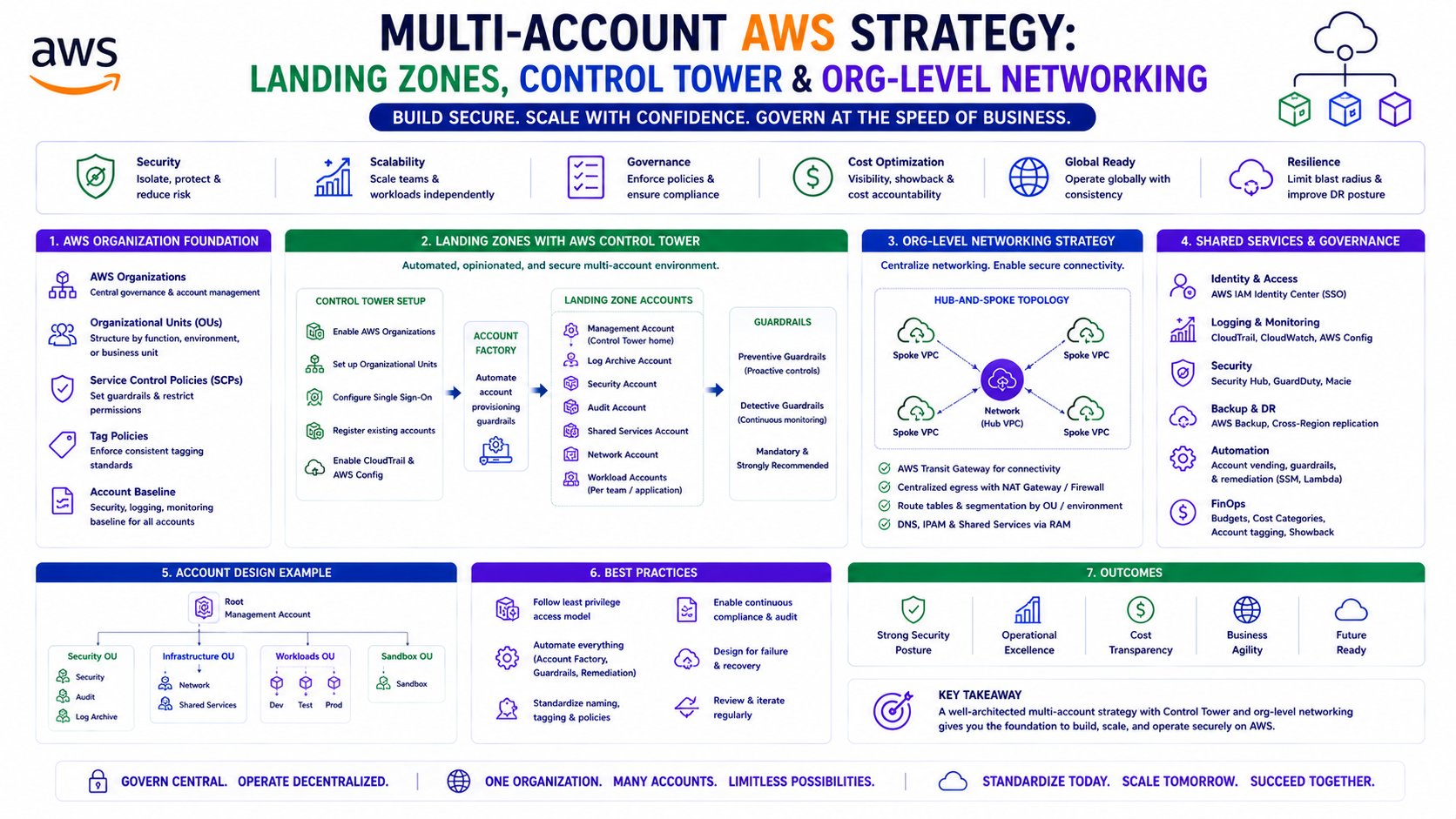
TL;DR
| Concept | What It Does | When You Need It |
|---|---|---|
| AWS Organizations | Groups accounts, enables consolidated billing, SCPs | From Day 1 — even with 2 accounts |
| Control Tower | Automated Landing Zone setup, guardrails, account vending | 3+ accounts, compliance requirements |
| Landing Zone | Baseline account structure with security, logging, networking pre-wired | Any production enterprise |
| Service Control Policies | Account-level permission guardrails — overrides everything | Compliance, governance, preventing privilege escalation |
| AWS SSO / IAM Identity Center | Centralised human access across all accounts | 3+ accounts — never manage IAM users per account |
| Transit Gateway + RAM | Shared networking hub across accounts | Multi-account VPC connectivity |
| Centralised Security Account | GuardDuty, Security Hub, CloudTrail aggregated here | Regulated environments |
| Account Factory | Automated new account provisioning with baseline config | Scaling beyond 5 accounts |
Introduction — Why One Account Is Never Enough
Every AWS journey starts with one account. It feels clean — one bill, one console, one set of credentials. Then the team grows. Dev and prod share the same account and a misconfigured IAM policy in a development script causes an outage in production. The security audit asks for proof that production data is isolated from development access. A new team needs their own environment but gets admin access to the whole account because nobody has time to scope permissions properly.
The move to multiple accounts is not a complexity choice — it is a security and governance choice. AWS accounts are the strongest isolation boundary available. A security incident in a dev account cannot affect production if they are separate accounts. A runaway cost spike in an experimentation account cannot affect the production budget if they have separate billing. An engineer with admin access in staging cannot accidentally modify production infrastructure if staging is a different account.
This post covers the complete multi-account strategy: how to structure an AWS Organisation, how to deploy a Landing Zone that pre-wires security, logging, and networking for every new account, how Control Tower automates this at scale, how to share networking across accounts via Transit Gateway and RAM, and how SCPs enforce governance that no IAM policy can override.
1. AWS Organizations — The Foundation
Account Structure — The OU Design
Organisational Units (OUs) are the grouping mechanism in AWS Organizations. OUs let you apply SCPs to groups of accounts rather than individual accounts — a policy attached to the Production OU applies to every account inside it automatically.
Root
├── Security OU
│   ├── Security-Tooling Account    (GuardDuty admin, Security Hub, Macie)
│   └── Log-Archive Account         (CloudTrail logs, Config records — immutable)
│
├── Infrastructure OU
│   ├── Networking Account          (TGW, Direct Connect, DNS)
│   └── Shared-Services Account     (ECR, Artifact Registry, tooling)
│
├── Workloads OU
│   ├── Production OU
│   │   ├── Production Account      (live workloads)
│   │   └── Production-DR Account   (disaster recovery — Blog 18)
│   └── Non-Production OU
│       ├── Development Account
│       ├── Staging Account
│       └── Sandbox Account         (experimental — no prod data allowed)
│
└── Management OU
    └── Management Account          (billing, Organizations, Control Tower)
Why this structure
The Security OU is isolated from everything else. Even if an attacker compromises a workload account, they cannot modify the security tooling or tamper with the log archive — those accounts have SCPs that deny all actions except from approved security roles.
The Networking account owns all shared connectivity (TGW, Direct Connect, Route 53). VPCs in workload accounts connect to the TGW via RAM-shared attachments. No workload account needs its own internet gateway or VPN connection.
The Production OU has stricter SCPs than Non-Production — production accounts cannot create public S3 buckets, cannot disable CloudTrail, and cannot deploy resources in non-EU regions.
Terraform — Organizations Structure
# Management account — creates the Organisation and OU structure
resource "aws_organizations_organization" "main" {
  aws_service_access_principals = [
    "cloudtrail.amazonaws.com",
    "config.amazonaws.com",
    "sso.amazonaws.com",
    "controltower.amazonaws.com",
    "guardduty.amazonaws.com",
    "securityhub.amazonaws.com",
    "macie.amazonaws.com",
    "ram.amazonaws.com",
    "cost-optimization-hub.bcm.amazonaws.com"
  ]

  feature_set = "ALL"   # Enables SCPs — do not use "CONSOLIDATED_BILLING" only
}

# Root OU — get the root ID
data "aws_organizations_organization" "main" {}

# Security OU
resource "aws_organizations_organizational_unit" "security" {
  name      = "Security"
  parent_id = data.aws_organizations_organization.main.roots[0].id
}

# Infrastructure OU
resource "aws_organizations_organizational_unit" "infrastructure" {
  name      = "Infrastructure"
  parent_id = data.aws_organizations_organization.main.roots[0].id
}

# Workloads OU
resource "aws_organizations_organizational_unit" "workloads" {
  name      = "Workloads"
  parent_id = data.aws_organizations_organization.main.roots[0].id
}

# Production OU — nested under Workloads
resource "aws_organizations_organizational_unit" "production" {
  name      = "Production"
  parent_id = aws_organizations_organizational_unit.workloads.id
}

# Non-Production OU — nested under Workloads
resource "aws_organizations_organizational_unit" "non_production" {
  name      = "Non-Production"
  parent_id = aws_organizations_organizational_unit.workloads.id
}

# Create accounts — vended into the correct OUs
resource "aws_organizations_account" "security_tooling" {
  name      = "security-tooling"
  email     = "aws-security-tooling@company.com"
  parent_id = aws_organizations_organizational_unit.security.id

  # Prevent accidental account closure
  close_on_deletion = false

  tags = { AccountType = "security", Environment = "all" }
}

resource "aws_organizations_account" "networking" {
  name      = "networking"
  email     = "aws-networking@company.com"
  parent_id = aws_organizations_organizational_unit.infrastructure.id

  close_on_deletion = false

  tags = { AccountType = "infrastructure", Environment = "all" }
}

resource "aws_organizations_account" "production" {
  name      = "production"
  email     = "aws-production@company.com"
  parent_id = aws_organizations_organizational_unit.production.id

  close_on_deletion = false

  tags = { AccountType = "workload", Environment = "prod" }
}
2. Service Control Policies — The Non-Overridable Guardrails
SCPs are the most powerful governance mechanism in AWS. They define the maximum permissions that any principal in an account can have — including the account root user. An explicit Deny in an SCP overrides every Allow in every IAM policy everywhere in that account.
Blog 8 covered SCPs in the context of IAM. This section covers the org-level SCP strategy.
SCP Architecture — Deny by Default vs Allow List
Two approaches:
- Deny List (recommended): Start with
FullAWSAccessmanaged policy at the root, then attach specific Deny SCPs at OU or account level. Simpler to manage — you only write rules for what you want to prevent. - Allow List: Remove
FullAWSAccess, attach explicit Allow policies. More restrictive but requires listing every permitted action — maintenance-intensive.
Most enterprises use Deny List with targeted denies for high-risk actions.
Production OU SCPs
# SCP — production security baseline
resource "aws_organizations_policy" "production_guardrails" {
  name        = "production-security-guardrails"
  description = "Non-overridable security controls for all production accounts"
  type        = "SERVICE_CONTROL_POLICY"

  content = jsonencode({
    Version = "2012-10-17"
    Statement = [

      # 1. Cannot leave the Organisation
      {
        Sid    = "DenyLeaveOrganization"
        Effect = "Deny"
        Action = ["organizations:LeaveOrganization"]
        Resource = "*"
      },

      # 2. Cannot disable or modify CloudTrail
      {
        Sid    = "DenyCloudTrailModification"
        Effect = "Deny"
        Action = [
          "cloudtrail:DeleteTrail",
          "cloudtrail:StopLogging",
          "cloudtrail:UpdateTrail",
          "cloudtrail:PutEventSelectors"
        ]
        Resource = "*"
        Condition = {
          # Security account can still manage CloudTrail
          StringNotEquals = {
            "aws:PrincipalAccount" = var.security_tooling_account_id
          }
        }
      },

      # 3. Cannot disable GuardDuty
      {
        Sid    = "DenyGuardDutyModification"
        Effect = "Deny"
        Action = [
          "guardduty:DeleteDetector",
          "guardduty:DisassociateFromMasterAccount",
          "guardduty:StopMonitoringMembers",
          "guardduty:UpdateDetector"
        ]
        Resource = "*"
        Condition = {
          StringNotEquals = {
            "aws:PrincipalAccount" = var.security_tooling_account_id
          }
        }
      },

      # 4. Cannot make S3 buckets public
      {
        Sid    = "DenyS3PublicAccess"
        Effect = "Deny"
        Action = [
          "s3:PutBucketPublicAccessBlock",
          "s3:DeletePublicAccessBlock"
        ]
        Resource = "*"
        Condition = {
          # Only security account can modify public access blocks
          StringNotEquals = {
            "aws:PrincipalAccount" = var.security_tooling_account_id
          }
        }
      },

      # 5. Cannot deploy outside EU regions
      {
        Sid    = "DenyNonEURegions"
        Effect = "Deny"
        NotAction = [
          # Global services — must be excluded from region restriction
          "iam:*",
          "sts:*",
          "organizations:*",
          "route53:*",
          "cloudfront:*",
          "waf:*",
          "wafv2:*",
          "shield:*",
          "support:*",
          "trustedadvisor:*",
          "account:*",
          "billing:*",
          "budgets:*",
          "ce:*",
          "cur:*"
        ]
        Resource = "*"
        Condition = {
          StringNotEquals = {
            "aws:RequestedRegion" = [
              "eu-west-1",
              "eu-west-2",
              "eu-west-3",
              "eu-central-1",
              "eu-central-2",
              "eu-north-1",
              "eu-south-1",
              "eu-south-2"
            ]
          }
        }
      },

      # 6. Cannot create IAM users (human access via SSO only)
      {
        Sid    = "DenyIAMUserCreation"
        Effect = "Deny"
        Action = [
          "iam:CreateUser",
          "iam:CreateAccessKey"
        ]
        Resource = "*"
        Condition = {
          # Break-glass emergency account is the only exception
          StringNotEquals = {
            "aws:PrincipalArn" = "arn:aws:iam::${var.management_account_id}:root"
          }
        }
      },

      # 7. Protect the Log Archive account data
      {
        Sid    = "DenyLogArchiveModification"
        Effect = "Deny"
        Action = [
          "s3:DeleteBucket",
          "s3:DeleteObject",
          "s3:PutBucketPolicy",
          "s3:PutLifecycleConfiguration"
        ]
        Resource = "arn:aws:s3:::org-log-archive-*"
        Condition = {
          StringNotEquals = {
            "aws:PrincipalAccount" = var.log_archive_account_id
          }
        }
      }
    ]
  })
}

# Attach to Production OU
resource "aws_organizations_policy_attachment" "production_guardrails" {
  policy_id = aws_organizations_policy.production_guardrails.id
  target_id = aws_organizations_organizational_unit.production.id
}
Non-Production Additional Restrictions
# Additional SCP for Non-Production — no production data
resource "aws_organizations_policy" "nonprod_data_restrictions" {
  name = "nonprod-data-restrictions"
  type = "SERVICE_CONTROL_POLICY"

  content = jsonencode({
    Version = "2012-10-17"
    Statement = [
      {
        # Prevent non-prod from accessing production S3 buckets
        Sid    = "DenyProductionDataAccess"
        Effect = "Deny"
        Action = ["s3:*"]
        Resource = [
          "arn:aws:s3:::*-prod-*",
          "arn:aws:s3:::*-prod-*/*"
        ]
      },
      {
        # Limit instance sizes in non-prod — cost control
        Sid    = "DenyLargeInstances"
        Effect = "Deny"
        Action = ["ec2:RunInstances"]
        Resource = "arn:aws:ec2:*:*:instance/*"
        Condition = {
          StringNotLike = {
            "ec2:InstanceType" = [
              "*.nano", "*.micro", "*.small",
              "*.medium", "*.large", "*.xlarge"
            ]
          }
        }
      }
    ]
  })
}

resource "aws_organizations_policy_attachment" "nonprod_restrictions" {
  policy_id = aws_organizations_policy.nonprod_data_restrictions.id
  target_id = aws_organizations_organizational_unit.non_production.id
}
3. AWS Control Tower — Automated Landing Zone
What Control Tower Does
Control Tower automates the creation and configuration of a multi-account Landing Zone — a pre-configured baseline that every new account inherits automatically. Without Control Tower, creating a new account that meets your security baseline requires a manual checklist: enable CloudTrail, enable GuardDuty, configure Security Hub, set up the networking, create the baseline IAM roles. With Control Tower, this happens automatically when a new account is vended.
Control Tower provides:
- Landing Zone: Baseline account structure with Management, Log Archive, and Audit accounts pre-created
- Guardrails: Pre-built SCPs and Config rules (proactive and detective controls)
- Account Factory: Vend new accounts via Service Catalog — new account ready in ~20 minutes with all baseline config applied
- Account Factory for Terraform (AFT): IaC-driven account vending via a Git pipeline
Control Tower Guardrails — Three Types
| Type | Mechanism | Example |
|---|---|---|
| Preventive | SCP | Cannot disable CloudTrail in any account |
| Detective | AWS Config Rule | Alert if MFA not enabled on root account |
| Proactive | CloudFormation hooks | Block non-compliant resources before creation |
Preventive guardrails are always enforced — they use SCPs under the hood. Detective guardrails report non-compliance but do not block. Proactive guardrails are the newest type — they evaluate resources before they are created.
Account Factory for Terraform (AFT)
AFT replaces the Service Catalog-based Account Factory with a Git-driven pipeline. A new account is requested by creating a Terraform file in a Git repository — the pipeline provisions the account, applies the baseline configuration, and runs customisations.
AFT Architecture:
Git PR: new account request
    ↓
AFT Pipeline (CodePipeline in Management account)
    ↓
Create AWS Account via Organizations
    ↓
Apply Account Baseline:
  - Enable CloudTrail
  - Enable GuardDuty (enrol in Security account)
  - Enable Security Hub
  - Create baseline IAM roles (AWSControlTowerExecution, etc.)
  - Apply account-level SCPs
    ↓
Apply Account Customisations:
  - VPC baseline (if networking customisation defined)
  - Tag policies
  - Team-specific IAM roles
    ↓
Account ready — team notified
# AFT account request — creates a new AWS account with full baseline
# Committed to the AFT account-requests repository
module "production_account" {
source = "./modules/aft-account-request"
control_tower_parameters = {
AccountEmail = "aws-new-service-prod@company.com"
AccountName = "new-service-production"
ManagedOrganizationalUnit = "Production"
SSOUserEmail = "platform-lead@company.com"
SSOUserFirstName = "Platform"
SSOUserLastName = "Team"
}
account_tags = {
Environment = "prod"
Team = "new-service"
CostCentre = "NEW-SVC-001"
}
# Run these customisations after account baseline is applied
account_customizations_name = "production-workload"
# Global customisations run in every account
# (applied from the AFT global-customizations repository)
}# AFT Global Customisation — runs in EVERY account that AFT provisions
# Stored in: aft-global-customizations/terraform/main.tf
# Enable Security Hub in every account
resource "aws_securityhub_account" "main" {}
resource "aws_securityhub_standards_subscription" "fsbp" {
depends_on = [aws_securityhub_account.main]
standards_arn = "arn:aws:securityhub:${data.aws_region.current.name}::standards/aws-foundational-security-best-practices/v/1.0.0"
}
# Default VPC — delete it from every new account
# The default VPC is a security risk — open default security groups, public subnets
resource "null_resource" "delete_default_vpc" {
provisioner "local-exec" {
command = <<-EOF
# Delete default VPC in all regions
for region in $(aws ec2 describe-regions --query 'Regions[].RegionName' --output text); do
vpc_id=$(aws ec2 describe-vpcs \
--region $region \
--filters "Name=isDefault,Values=true" \
--query 'Vpcs[0].VpcId' \
--output text 2>/dev/null)
if [ "$vpc_id" != "None" ] && [ -n "$vpc_id" ]; then
echo "Deleting default VPC $vpc_id in $region"
# Delete IGW, subnets, then VPC
aws ec2 delete-vpc --vpc-id $vpc_id --region $region 2>/dev/null || true
fi
done
EOF
}
}
# Require IMDSv2 on all new EC2 instances — account-level default
resource "aws_ec2_instance_metadata_defaults" "imdsv2" {
http_tokens = "required" # IMDSv2 required for all new instances
}Why delete the default VPC: The default VPC comes with a default security group that allows all inbound traffic from other resources in the same default security group, and all outbound traffic. It also has public subnets with internet access by default. Every new account starts with an open network — deleting it as part of account vending ensures every account starts with zero network exposure.
4. Centralised Networking — The Hub-and-Spoke Model
Blog 4 covered Transit Gateway architecture. In a multi-account context, the TGW lives in the Networking account and is shared to all workload accounts via RAM.
Networking Account (TGW owner)
├── Transit Gateway
├── Direct Connect / VPN (if hybrid connectivity needed)
├── Centralised Egress VPC (NAT Gateway for all spokes)
├── Centralised Inspection VPC (Network Firewall)
└── Route 53 Resolver Endpoints (hybrid DNS)

Workload Accounts (TGW consumers)
├── Production Account VPC → attached to TGW via RAM share
├── Staging Account VPC   → attached to TGW via RAM share
└── Dev Account VPC       → attached to TGW via RAM share
RAM — Share TGW Across the Organisation
# In the Networking account — share TGW with entire Organisation
resource "aws_ram_resource_share" "tgw" {
  name                      = "org-transit-gateway"
  allow_external_principals = false   # Organisation members only

  tags = { Name = "tgw-org-share" }
}

resource "aws_ram_resource_association" "tgw" {
  resource_arn       = aws_ec2_transit_gateway.main.arn
  resource_share_arn = aws_ram_resource_share.tgw.arn
}

resource "aws_ram_principal_association" "org" {
  principal          = data.aws_organizations_organization.main.arn
  resource_share_arn = aws_ram_resource_share.tgw.arn
}

# In each workload account — accept the RAM share and attach VPC
resource "aws_ec2_transit_gateway_vpc_attachment" "workload" {
  subnet_ids         = aws_subnet.private[*].id
  transit_gateway_id = var.shared_tgw_id   # From Networking account via RAM
  vpc_id             = aws_vpc.main.id

  tags = { Name = "tgw-attachment-${var.account_name}" }
}
Centralised Egress — All Internet Traffic Through One NAT Gateway
Without centralised egress, every account needs its own NAT Gateway. With centralised egress in the Networking account, all internet-bound traffic from all workload accounts flows through a single managed NAT Gateway fleet — easier to monitor, inspect, and control.
# In workload accounts — default route to TGW (not to local NAT GW)
resource "aws_route" "default_to_tgw" {
  route_table_id         = aws_route_table.private.id
  destination_cidr_block = "0.0.0.0/0"
  transit_gateway_id     = var.shared_tgw_id
  # Traffic goes to TGW → Networking account → Centralised NAT → Internet
}

# In Networking account — TGW route table sends 0.0.0.0/0 to Egress VPC
resource "aws_ec2_transit_gateway_route" "default_to_egress" {
  destination_cidr_block         = "0.0.0.0/0"
  transit_gateway_attachment_id  = aws_ec2_transit_gateway_vpc_attachment.egress.id
  transit_gateway_route_table_id = aws_ec2_transit_gateway_route_table.workloads.id
}
Centralised DNS — Route 53 Resolver in Networking Account
# In Networking account — Resolver Endpoints serve all accounts
resource "aws_route53_resolver_endpoint" "outbound" {
  name      = "org-outbound-resolver"
  direction = "OUTBOUND"

  security_group_ids = [aws_security_group.resolver.id]

  # One IP per AZ — deployed in the Networking account's VPC
  ip_address { subnet_id = aws_subnet.networking_private["eu-west-1a"].id }
  ip_address { subnet_id = aws_subnet.networking_private["eu-west-1b"].id }
  ip_address { subnet_id = aws_subnet.networking_private["eu-west-1c"].id }

  tags = { Name = "org-outbound-resolver" }
}

# Forwarding rule — shared to all accounts via RAM
resource "aws_route53_resolver_rule" "corp_forward" {
  domain_name          = "corp.company.com"
  name                 = "forward-to-onprem"
  rule_type            = "FORWARD"
  resolver_endpoint_id = aws_route53_resolver_endpoint.outbound.id

  target_ip { ip = "192.168.1.10" }
  target_ip { ip = "192.168.1.11" }
}

resource "aws_ram_resource_association" "resolver_rule" {
  resource_arn       = aws_route53_resolver_rule.corp_forward.arn
  resource_share_arn = aws_ram_resource_share.tgw.arn
}

# In each workload account — associate the shared resolver rule
resource "aws_route53_resolver_rule_association" "corp" {
  resolver_rule_id = var.shared_resolver_rule_id
  vpc_id           = aws_vpc.main.id
}
5. Centralised Security — The Security Account Model
All security tooling lives in the Security-Tooling account. Workload accounts enrol as members — they send findings to the central account but cannot modify the security configuration.
# In Security-Tooling account — delegate administration
resource "aws_guardduty_organization_admin_account" "security" {
  admin_account_id = data.aws_caller_identity.security.account_id
}

resource "aws_securityhub_organization_admin_account" "security" {
  admin_account_id = data.aws_caller_identity.security.account_id
}

# Organisation-wide GuardDuty — auto-enable in all accounts
resource "aws_guardduty_organization_configuration" "main" {
  auto_enable_organization_members = "ALL"
  detector_id                      = aws_guardduty_detector.main.id

  datasources {
    s3_logs { auto_enable = true }
    kubernetes { audit_logs { enable = true } }
    malware_protection {
      scan_ec2_instance_with_findings {
        ebs_volumes { auto_enable = true }
      }
    }
  }
}

# Organisation-wide CloudTrail — one trail, all accounts, all regions
resource "aws_cloudtrail" "org" {
  name                          = "org-audit-trail"
  s3_bucket_name                = aws_s3_bucket.log_archive.bucket   # Log Archive account
  include_global_service_events = true
  is_multi_region_trail         = true
  is_organization_trail         = true
  enable_log_file_validation    = true
  kms_key_id                    = aws_kms_key.cloudtrail.arn
  cloud_watch_logs_group_arn    = "${aws_cloudwatch_log_group.cloudtrail.arn}:*"
  cloud_watch_logs_role_arn     = aws_iam_role.cloudtrail_cw.arn

  tags = { Name = "org-audit-trail" }
}
Log Archive Account — Immutable Audit Logs
# S3 bucket in Log Archive account — receives CloudTrail logs from all accounts
resource "aws_s3_bucket" "log_archive" {
  provider = aws.log_archive

  bucket = "org-log-archive-${var.org_id}"

  lifecycle {
    prevent_destroy = true   # Never delete this bucket
  }
}

resource "aws_s3_bucket_object_lock_configuration" "log_archive" {
  provider = aws.log_archive
  bucket   = aws_s3_bucket.log_archive.bucket

  rule {
    default_retention {
      mode = "COMPLIANCE"   # Cannot be overridden — not even by root
      days = 2555           # 7 years — common compliance requirement
    }
  }
}

# Bucket policy — only CloudTrail service and Security account can write
# No account (including Log Archive itself) can delete objects
resource "aws_s3_bucket_policy" "log_archive" {
  provider = aws.log_archive
  bucket   = aws_s3_bucket.log_archive.bucket

  policy = jsonencode({
    Version = "2012-10-17"
    Statement = [
      {
        Sid    = "AllowCloudTrailWrite"
        Effect = "Allow"
        Principal = { Service = "cloudtrail.amazonaws.com" }
        Action    = ["s3:PutObject"]
        Resource  = "${aws_s3_bucket.log_archive.arn}/AWSLogs/*"
        Condition = {
          StringEquals = {
            "s3:x-amz-acl" = "bucket-owner-full-control"
          }
        }
      },
      {
        Sid    = "DenyDeleteForEveryone"
        Effect = "Deny"
        Principal = { AWS = "*" }
        Action    = ["s3:DeleteObject", "s3:DeleteObjectVersion"]
        Resource  = "${aws_s3_bucket.log_archive.arn}/*"
      }
    ]
  })
}
6. IAM Identity Center — Human Access Across All Accounts
Blog 8 covered IAM Identity Center in the context of single-account access. In a multi-account organisation, Identity Center becomes the single authentication point for all human access.
# Permission sets — define what a role can do in an account
resource "aws_ssoadmin_permission_set" "platform_engineer" {
  name             = "PlatformEngineer"
  instance_arn     = data.aws_ssoadmin_instances.main.arns[0]
  session_duration = "PT8H"
  description      = "Full access excluding IAM and billing — for platform team"
}

resource "aws_ssoadmin_managed_policy_attachment" "platform_poweruser" {
  instance_arn       = data.aws_ssoadmin_instances.main.arns[0]
  permission_set_arn = aws_ssoadmin_permission_set.platform_engineer.arn
  managed_policy_arn = "arn:aws:iam::aws:policy/PowerUserAccess"
}

resource "aws_ssoadmin_permission_set" "developer" {
  name             = "Developer"
  instance_arn     = data.aws_ssoadmin_instances.main.arns[0]
  session_duration = "PT8H"
}

resource "aws_ssoadmin_permission_set" "readonly" {
  name             = "ReadOnly"
  instance_arn     = data.aws_ssoadmin_instances.main.arns[0]
  session_duration = "PT4H"
}

resource "aws_ssoadmin_managed_policy_attachment" "readonly" {
  instance_arn       = data.aws_ssoadmin_instances.main.arns[0]
  permission_set_arn = aws_ssoadmin_permission_set.readonly.arn
  managed_policy_arn = "arn:aws:iam::aws:policy/ReadOnlyAccess"
}

# Account assignments — who gets what access in which account
# Platform team: full access to networking + security accounts
resource "aws_ssoadmin_account_assignment" "platform_networking" {
  instance_arn       = data.aws_ssoadmin_instances.main.arns[0]
  permission_set_arn = aws_ssoadmin_permission_set.platform_engineer.arn
  principal_type     = "GROUP"
  principal_id       = data.aws_identitystore_group.platform.group_id
  target_type        = "AWS_ACCOUNT"
  target_id          = aws_organizations_account.networking.id
}

# Developers: ReadOnly in production, Developer in non-production
resource "aws_ssoadmin_account_assignment" "dev_prod_readonly" {
  instance_arn       = data.aws_ssoadmin_instances.main.arns[0]
  permission_set_arn = aws_ssoadmin_permission_set.readonly.arn
  principal_type     = "GROUP"
  principal_id       = data.aws_identitystore_group.developers.group_id
  target_type        = "AWS_ACCOUNT"
  target_id          = aws_organizations_account.production.id
}

resource "aws_ssoadmin_account_assignment" "dev_nonprod_developer" {
  instance_arn       = data.aws_ssoadmin_instances.main.arns[0]
  permission_set_arn = aws_ssoadmin_permission_set.developer.arn
  principal_type     = "GROUP"
  principal_id       = data.aws_identitystore_group.developers.group_id
  target_type        = "AWS_ACCOUNT"
  target_id          = aws_organizations_account.development.id
}
7. Cross-Account Terraform — The IaC Pattern
Managing infrastructure across multiple accounts from a single Terraform codebase requires provider aliases and careful state separation (covered in Blog 14).
# providers.tf — one provider alias per account
provider "aws" {
  alias = "management"
  assume_role {
    role_arn = "arn:aws:iam::${var.management_account_id}:role/terraform-apply-role"
  }
  region = var.region
}

provider "aws" {
  alias = "networking"
  assume_role {
    role_arn = "arn:aws:iam::${var.networking_account_id}:role/terraform-apply-role"
  }
  region = var.region
}

provider "aws" {
  alias = "security"
  assume_role {
    role_arn = "arn:aws:iam::${var.security_account_id}:role/terraform-apply-role"
  }
  region = var.region
}

provider "aws" {
  alias = "production"
  assume_role {
    role_arn = "arn:aws:iam::${var.production_account_id}:role/terraform-apply-role"
  }
  region = var.region
}

# Terraform apply role — exists in every account
# Created by Control Tower / AFT baseline customisation
# Trusted by the Management account's Terraform CI/CD role
resource "aws_iam_role" "terraform_apply" {
  for_each = toset([
    var.management_account_id,
    var.networking_account_id,
    var.security_account_id,
    var.production_account_id
  ])

  name = "terraform-apply-role"

  assume_role_policy = jsonencode({
    Version = "2012-10-17"
    Statement = [{
      Effect = "Allow"
      Principal = {
        AWS = "arn:aws:iam::${var.management_account_id}:role/terraform-ci-role"
      }
      Action    = "sts:AssumeRole"
      Condition = {
        StringEquals = {
          "sts:ExternalId" = var.terraform_external_id
        }
      }
    }]
  })
}
8. The Landing Zone Checklist
Every new account vended by AFT should arrive with this baseline applied automatically:
Account Baseline — applied by AFT Global Customisations:
  ✅ Default VPC deleted in all regions
  ✅ IMDSv2 required on all new EC2 instances
  ✅ S3 Block Public Access enabled at account level
  ✅ EBS encryption by default enabled
  ✅ GuardDuty enrolled in Security account
  ✅ Security Hub enrolled + FSBP standard enabled
  ✅ CloudTrail Organisation trail covering this account
  ✅ AWS Config recorder enabled
  ✅ Cost allocation tags activated
  ✅ Budget alert at $X (configurable per account)
  ✅ Baseline IAM roles created (terraform-apply, read-only, break-glass)
  ✅ SSO permission sets assigned to correct groups
  ✅ VPC baseline (if networking customisation requested)
  ✅ TGW attachment (if networking customisation requested)

Account-Specific Customisations (per team):
  - Additional IAM roles for workloads
  - ECR repositories
  - Secrets Manager baseline secrets
  - Service-specific Config rules
9. Common Mistakes & Anti-Patterns
The most common starting mistake. Dev and prod sharing an account means a developer with sufficient IAM permissions can accidentally or intentionally affect production. AWS accounts are the strongest isolation boundary — use them.
SCPs that deny specific actions without excluding the AWS service principals that need them to operate break services silently. For example, denying iam:PassRole without excluding ec2.amazonaws.com breaks EC2 instance launch. Always test SCP changes in a non-production OU before applying to production.
Every new account comes with a default VPC with public subnets, an internet gateway, and a permissive default security group. Engineers who deploy into the default VPC accidentally expose resources to the internet. Delete it as part of account vending.
The Management account has elevated privileges — it can see and affect every account in the organisation. Running production workloads in the Management account means a security incident in your production application has access to Organisation-level APIs. The Management account should contain only: Organizations, Control Tower, SSO, consolidated billing, and Terraform state for org-level infrastructure.
SSO is the correct access mechanism for daily work. But SSO depends on your identity provider being available. If your Okta tenant has an incident at the same time as an AWS production incident, you cannot access your AWS accounts to respond. Maintain one IAM user per account (or a cross-account break-glass role from the Management account) for emergency access — documented, MFA-protected, and audited in CloudTrail.
A badly written SCP can deny actions required by AWS-managed services, breaking services like Config, Security Hub, or ECS. Always test new SCPs in the Sandbox OU first, run a Terraform plan to see what would change, then promote to Non-Production, then Production.
A Transit Gateway shared to all accounts via RAM that uses a single default route table means every account can route to every other account — dev can reach production. Apply the route table isolation pattern from Blog 4: separate route tables per OU, Production VPCs only propagate to Production route tables.
Architecture Decision Matrix
| Capability | Single Account | Multi-Account (Manual) | Multi-Account + Control Tower |
|---|---|---|---|
| Blast radius isolation | ❌ None | ✅ Account boundary | ✅ Account + SCP boundary |
| Compliance audit trail | ⚠️ Per-account | ⚠️ Per-account | ✅ Org-wide CloudTrail |
| New account provisioning | N/A | Manual (~2 days) | Automated via AFT (~20 min) |
| Centralised security findings | ❌ | ❌ | ✅ GuardDuty + Security Hub |
| Human access management | Per-account IAM users | Per-account IAM users | ✅ IAM Identity Center (SSO) |
| Network governance | ❌ | Per-account | ✅ Centralised TGW + Networking account |
| Cost allocation | ❌ All in one bill | ⚠️ Account-level | ✅ Account + tag-level |
| SCP governance | ❌ | Manual | ✅ OU-based, automated |
| Operational complexity | Low | High (manual) | Medium (automated) |
| Recommended for | POC, personal projects | Small teams (<5 accounts) | Any production organisation |
The Golden Rule
"A single AWS account is a starting point, not a destination. Move to multiple accounts the moment you have a team, a regulatory requirement, or a distinction between production and non-production that you need to enforce structurally — not just by convention. Use the OU structure to group accounts by function and risk level, not by team name. Apply SCPs at the OU level so governance is automatic, not manual. Centralise security tooling in a dedicated Security account that no workload team can modify. Share networking through a Networking account's Transit Gateway so every workload account gets private connectivity without owning its own NAT Gateways. And vend every new account with a complete, automated baseline — delete the default VPC, enable IMDSv2, enrol in GuardDuty and Security Hub — before any human ever logs in."