AWS IAM Deep Dive — Roles, Policies, and Zero-Trust Identity at Scale
AWS Series | Part 8 — Building secure, cost-optimised, cloud-native infrastructure on AWS
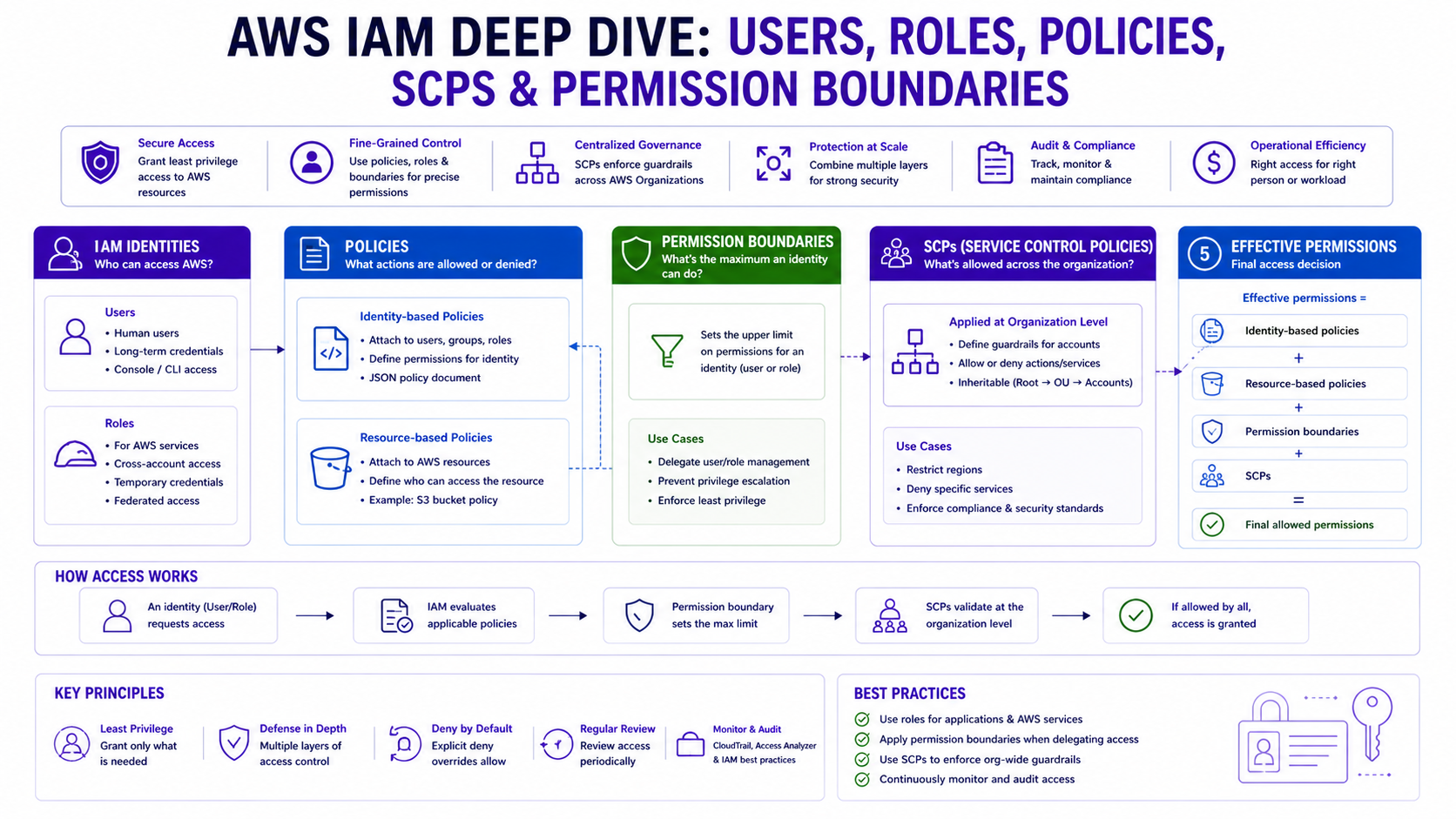
TL;DR Comparison
| Concept | IAM Users | IAM Roles | IAM Groups |
|---|---|---|---|
| Identity type | Human or service | AWS service or federated identity | Collection of users |
| Credentials | Long-term (access keys) | Short-term (STS tokens, 1h–12h) | Inherited from group policies |
| Best for | Break-glass emergency access | EC2, Lambda, ECS, CI/CD, SSO | Organising human users |
| MFA support | ✅ Yes | ✅ Via assume-role condition | ✅ Per user |
| Cross-account | ❌ Not directly | ✅ Native | ❌ No |
| Rotation required | ✅ Manual rotation needed | ✅ Automatic (STS) | N/A |
| Recommended | Minimal use | Always preferred | For human users only |
IAM is the most powerful — and most dangerous — service in AWS. Every action in your entire AWS estate flows through IAM. A misconfigured S3 bucket policy is a data leak. A misconfigured IAM role is a full account takeover.
Yet IAM is also one of the most poorly understood services. Engineers create overly permissive roles "just to make it work," attach AdministratorAccess to Lambda functions, store long-term access keys in environment variables, and wonder why their security audit comes back with 47 critical findings.
In this post we go end-to-end: how IAM policy evaluation actually works, how to build least-privilege roles for every AWS service, how to implement cross-account access safely, how to federate your corporate identity into AWS, and how to build a Zero Trust IAM posture at enterprise scale. Every concept has working Terraform.
1. How IAM Policy Evaluation Actually Works
Before writing a single policy, you need to understand how AWS evaluates them. The evaluation logic is more nuanced than most engineers realise.
The Evaluation Order
When an IAM principal makes an API call, AWS evaluates policies in this exact order:
1. Explicit DENY in any policy?          → DENY (immediately, no exceptions)
2. SCPs (Service Control Policies)?      → If SCP denies → DENY
3. Resource-based policy allows?         → ALLOW (for cross-account, this is sufficient)
4. Identity-based policy allows?         → ALLOW
5. Permissions boundary allows?          → Must also allow if boundary exists
6. Session policy allows?               → Must also allow if session policy exists
7. Nothing matched?                      → Implicit DENY
The most important rule: An explicit Deny overrides every Allow in every policy, everywhere. This is why the aws:sourceVpce bucket policy from Blog 3 works — a single Deny statement beats any number of Allow statements from any identity.
Policy Types — Know All Six
| Policy Type | Attached to | Controls | Overrides |
|---|---|---|---|
| Identity-based | IAM user/role/group | What the identity can do | Subject to SCPs, boundaries |
| Resource-based | S3, SQS, KMS, etc. | Who can access the resource | Can grant cross-account |
| Permission Boundary | IAM user/role | Maximum permissions ceiling | Cannot exceed boundary |
| SCP | AWS account/OU | Maximum permissions for entire account | Overrides everything in account |
| Session Policy | AssumeRole call | Restrict assumed role session | Cannot exceed role's policies |
| ACL | S3, VPC | Cross-account access (legacy) | Avoid — use resource policies |
The Confused Deputy Problem
This is the most dangerous IAM vulnerability in cross-account architectures. It occurs when a trusted service is tricked into using its permissions on behalf of an attacker.
Attacker's account → Tricks your Lambda → Lambda uses its role → Accesses your S3
The fix is aws:SourceAccount and aws:SourceArn conditions on trust policies:
{
  "Version": "2012-10-17",
  "Statement": [
    {
      "Effect": "Allow",
      "Principal": { "Service": "lambda.amazonaws.com" },
      "Action": "sts:AssumeRole",
      "Condition": {
        "StringEquals": {
          "aws:SourceAccount": "123456789012"
        },
        "ArnLike": {
          "aws:SourceArn": "arn:aws:lambda:eu-west-1:123456789012:function:my-function"
        }
      }
    }
  ]
}
Why this matters in production: An explicit Deny in an SCP overrides every Allow in every identity policy in every account — including the account root. If an SCP denies ec2:TerminateInstances in prod, no IAM policy, no matter how permissive, can override it. Engineers who discover this during an emergency termination of a compromised instance learn it the hard way. Map your SCPs before assuming you can do something with admin credentials.
2. IAM Roles — Always Prefer Over Users
Why Roles Are Safer Than Users
IAM Users have long-term credentials — access keys that never expire unless you manually rotate them. These keys get committed to git repositories, hardcoded in application configs, and leaked in CloudTrail logs. The Verizon 2024 Data Breach Report found that 77% of cloud breaches involved compromised credentials.
IAM Roles use short-term STS tokens that expire automatically (15 minutes to 12 hours). There's nothing to rotate, nothing to leak long-term, and nothing to forget.
IAM User:  Access Key ID + Secret → Valid forever until manually rotated
IAM Role:  AssumeRole → STS Token (expires in 1h) → Refresh automatically
# IAM Role for EC2 — never use access keys on EC2 instances
resource "aws_iam_role" "ec2_app" {
name = "ec2-app-role"
assume_role_policy = jsonencode({
Version = "2012-10-17"
Statement = [{
Effect = "Allow"
Principal = { Service = "ec2.amazonaws.com" }
Action = "sts:AssumeRole"
}]
})
}
resource "aws_iam_policy" "ec2_app_policy" {
name = "ec2-app-permissions"
policy = jsonencode({
Version = "2012-10-17"
Statement = [
{
Sid = "ScopedSSMAccess"
Effect = "Allow"
Action = ["ssm:GetParameter*", "ssm:DescribeParameters"]
Resource = "arn:aws:ssm:eu-west-1:123456789012:parameter/app/prod/*"
},
{
Sid = "SecretsManagerAccess"
Effect = "Allow"
Action = ["secretsmanager:GetSecretValue"]
Resource = "arn:aws:secretsmanager:eu-west-1:123456789012:secret:app/prod/*"
},
{
Sid = "CloudWatchLogging"
Effect = "Allow"
Action = ["logs:CreateLogStream", "logs:PutLogEvents"]
Resource = "arn:aws:logs:eu-west-1:123456789012:log-group:/aws/ec2/app/*"
}
]
})
}
resource "aws_iam_instance_profile" "ec2_profile" {
name = "ec2-app-instance-profile"
role = aws_iam_role.ec2_app.name
}
resource "aws_iam_role_policy_attachment" "ec2_attach" {
role = aws_iam_role.ec2_app.name
policy_arn = aws_iam_policy.ec2_app_policy.arn
}Lambda Execution Role
Similar to EC2, Lambda requires a trust policy for the service to assume the role, combined with confused deputy protection.
resource "aws_iam_role" "lambda_processor" {
  name = "lambda-processor-role"

  assume_role_policy = jsonencode({
    Version = "2012-10-17"
    Statement = [{
      Effect    = "Allow"
      Principal = { Service = "lambda.amazonaws.com" }
      Action    = "sts:AssumeRole"
      Condition = {
        StringEquals = { "aws:SourceAccount" = "123456789012" }
        ArnLike      = { "aws:SourceArn" = "arn:aws:lambda:eu-west-1:123456789012:function:processor-*" }
      }
    }]
  })
}

resource "aws_iam_policy" "lambda_processor_policy" {
  name = "lambda-processor-permissions"

  policy = jsonencode({
    Version = "2012-10-17"
    Statement = [
      {
        Sid    = "SQSConsume"
        Effect = "Allow"
        Action = ["sqs:ReceiveMessage", "sqs:DeleteMessage", "sqs:GetQueueAttributes"]
        Resource = "arn:aws:sqs:eu-west-1:123456789012:app-inbound-queue"
      },
      {
        Sid    = "DynamoDBWrite"
        Effect = "Allow"
        Action = ["dynamodb:PutItem", "dynamodb:UpdateItem"]
        Resource = "arn:aws:dynamodb:eu-west-1:123456789012:table/AppProcessing"
      },
      {
        Sid    = "KMSDecrypt"
        Effect = "Allow"
        Action = ["kms:Decrypt"]
        Resource = "arn:aws:kms:eu-west-1:123456789012:key/app-processing-key"
      }
    ]
  })
}
ECS Task Role vs Task Execution Role
This is one of the most confused distinctions in AWS. They are two completely different roles:
| Task Execution Role | Task Role | |
|---|---|---|
| Used by | ECS agent (control plane) | Your application container |
| Purpose | Pull image from ECR, write logs | What your app code can do in AWS |
| Who assumes it | AWS ECS service | Your application via AWS SDK |
| Typical permissions | ECR pull, CloudWatch Logs | S3, DynamoDB, SQS, Secrets Manager |
# 1. Task Execution Role — for the ECS Platform
resource "aws_iam_role" "ecs_execution" {
  name = "ecs-task-execution-role"

  assume_role_policy = jsonencode({
    Version = "2012-10-17"
    Statement = [{
      Action = "sts:AssumeRole"
      Effect = "Allow"
      Principal = { Service = "ecs-tasks.amazonaws.com" }
    }]
  })
}

# 2. Task Role — for the Application Logic
resource "aws_iam_role" "ecs_task" {
  name = "ecs-app-task-role"

  assume_role_policy = jsonencode({
    Version = "2012-10-17"
    Statement = [{
      Action = "sts:AssumeRole"
      Effect = "Allow"
      Principal = { Service = "ecs-tasks.amazonaws.com" }
    }]
  })
}
3. Cross-Account IAM — The Enterprise Pattern
How Cross-Account Role Assumption Works
Cross-account access involves a source account principal assuming a role in a target account. This requires a trust policy in the target and an identity policy in the source using sts:AssumeRole.
# 1. In Account B — the role being assumed
resource "aws_iam_role" "cross_account" {
  name = "cross-account-access-role"

  assume_role_policy = jsonencode({
    Version = "2012-10-17"
    Statement = [{
      Effect = "Allow"
      Principal = { AWS = "arn:aws:iam::111111111111:role/app-role" }
      Action = "sts:AssumeRole"
      Condition = {
        StringEquals = { "sts:ExternalId" = "enterprise-shared-id-123" }
      }
    }]
  })
}

# 2. In Account A — The Terraform Provider Alias Pattern
provider "aws" {
  alias  = "account_b"
  region = "eu-west-1"
  assume_role {
    role_arn     = "arn:aws:iam::222222222222:role/cross-account-access-role"
    external_id  = "enterprise-shared-id-123"
    session_name = "terraform-deployment"
  }
}

# Resource deployed into Account B using the alias
resource "aws_s3_bucket" "shared_data" {
  provider = aws.account_b
  bucket   = "enterprise-shared-data-b"
}
4. Permission Boundaries — Delegating Safely
What They Are
This is the mechanism that allows you to safely delegate IAM role creation to developers without giving them the ability to escalate their own privileges.
resource "aws_iam_policy" "developer_boundary" {
  name = "developer-iam-boundary"

  policy = jsonencode({
    Version = "2012-10-17"
    Statement = [
      {
        Sid    = "AllowCommonServices"
        Effect = "Allow"
        Action = ["s3:*", "ec2:*", "lambda:*", "dynamodb:*"]
        Resource = "*"
      },
      {
        Sid    = "DenyPrivilegeEscalation"
        Effect = "Deny"
        Action = [
          "iam:CreatePolicyVersion",
          "iam:SetDefaultPolicyVersion",
          "iam:PassRole"
        ]
        Resource = "*"
        Condition = {
          StringNotLike = { "iam:PermissionsBoundary" = "arn:aws:iam::*:policy/developer-iam-boundary" }
        }
      }
    ]
  })
}
Why this matters in production: Without permissions boundaries, a developer who can create IAM roles can create a role with AdministratorAccess and use it to escape all controls. The boundary is the safety net. At scale, the boundary is also what lets you safely delegate IAM role creation to development teams — without it you must centralise all IAM changes, which creates a bottleneck. Put boundaries in place before you delegate, not after a privilege escalation incident.
5. Service Control Policies — Account-Level Guardrails
SCPs are attached to AWS accounts or OUs in AWS Organizations. They define the maximum permissions for every IAM principal in that account — including the root user.
Critical: SCPs do not grant permissions. They only restrict them. Even if an SCP allows s3:*, an IAM role still needs an identity policy that allows s3:GetObject.
# SCP — Enterprise Security Guardrails
resource "aws_organizations_policy" "security_guardrails" {
  name = "enterprise-security-guardrails"
  type = "SERVICE_CONTROL_POLICY"

  content = jsonencode({
    Version = "2012-10-17"
    Statement = [
      {
        Sid    = "PreventLeavingOrg"
        Effect = "Deny"
        Action = ["organizations:LeaveOrganization"]
        Resource = "*"
      },
      {
        Sid    = "ProtectCloudTrail"
        Effect = "Deny"
        Action = ["cloudtrail:StopLogging", "cloudtrail:DeleteTrail"]
        Resource = "*"
      },
      {
        Sid    = "RegionRestriction"
        Effect = "Deny"
        NotAction = ["iam:*", "organizations:*", "route53:*", "cloudfront:*"]
        Resource = "*"
        Condition = {
          StringNotEquals = { "aws:RequestedRegion" = ["eu-west-1", "us-east-1"] }
        }
      }
    ]
  })
}
For enterprise organisations with 10+ AWS accounts, managing individual IAM Users per account is unsustainable. IAM Identity Center provides centralised SSO via identity providers like Okta or Azure AD.
# 1. Permission Set — defines what users can do
resource "aws_ssoadmin_permission_set" "admin" {
  name             = "AdministratorAccess"
  instance_arn     = tolist(data.aws_ssoadmin_instances.main.arns)[0]
  session_duration = "PT2H"
}

# 2. Account Assignment — assigns user/group to account with permission set
resource "aws_ssoadmin_account_assignment" "admin_assignment" {
  instance_arn       = aws_ssoadmin_permission_set.admin.instance_arn
  target_id          = "123456789012"  # Target Account ID
  target_type        = "AWS_ACCOUNT"
  permission_set_arn = aws_ssoadmin_permission_set.admin.arn
  principal_id       = "9067b5c2-b0d1-706d-e061-0734a974d092" # Group/User ID from IdP
  principal_type     = "GROUP"
}
7. CI/CD IAM — The Most Dangerous Attack Surface
# 1. Trust Policy scoped to GitHub Repo & Branch
resource "aws_iam_role" "github_actions" {
  name = "github-actions-deploy-role"

  assume_role_policy = jsonencode({
    Version = "2012-10-17"
    Statement = [{
      Effect = "Allow"
      Principal = { Federated = aws_iam_openid_connect_provider.github.arn }
      Action = "sts:AssumeRoleWithWebIdentity"
      Condition = {
        StringLike = {
          "token.actions.githubusercontent.com:sub" = "repo:ankushpanday/infrastructure:ref:refs/heads/main"
        }
      }
    }]
  })
}

# 2. Deployment Policy (Least Privilege)
resource "aws_iam_role_policy" "deploy_policy" {
  role = aws_iam_role.github_actions.id
  policy = jsonencode({
    Version = "2012-10-17"
    Statement = [{
      Effect = "Allow"
      Action = ["s3:*", "ec2:*", "rds:*", "iam:PassRole"]
      Resource = "*"
    }]
  })
}

# 3. GitHub Actions YAML (.github/workflows/deploy.yml)
jobs:
  deploy:
    environment: production
    permissions:
      id-token: write
      contents: read
    steps:
      - name: Configure AWS Credentials
        uses: aws-actions/configure-aws-credentials@v4
        with:
          role-to-assume: arn:aws:iam::123456789012:role/github-actions-deploy-role
          aws-region: eu-west-1
The Azure DevOps Pattern (Enterprise Standard)
Since many enterprises (like Rabobank or WCC) utilize Azure DevOps, the OIDC pattern remains the same but uses Workload Identity Federation via Service Connections.
# 1. Trust Policy scoped to ADO Service Connection
resource "aws_iam_role" "ado_deploy" {
  name = "azure-devops-deploy-role"
  assume_role_policy = jsonencode({
    Version = "2012-10-17"
    Statement = [{
      Effect = "Allow"
      Principal = { Federated = aws_iam_openid_connect_provider.azure_devops.arn }
      Action = "sts:AssumeRoleWithWebIdentity"
      Condition = {
        StringEquals = {
          "oidc.azuredevops.com:sub" = "sc://ankush-org/aws-projects/aws-main-connection"
        }
      }
    }]
  })
}

# 2. Azure Pipelines YAML (azure-pipelines.yml)
jobs:
- job: Deploy
  pool: { vmImage: 'ubuntu-latest' }
  steps:
  - task: AWSCLI@1
    inputs:
      awsCredentials: 'aws-main-connection' # Federated Service Connection
      regionName: 'eu-west-1'
      awsCommand: 's3'
      awsSubCommand: 'sync'
      addSpacedArguments: 'dist/ s3://my-prod-bucket'
IAM Access Analyzer automatically scans your resource policies and identifies any resource accessible from outside your AWS account or Organisation — without you having to audit them manually.
# 1. Enable the Analyzer
resource "aws_accessanalyzer_analyzer" "main" {
  analyzer_name = "organization-security-analyzer"
  type          = "ORGANIZATION"
}

# 2. Archive Rule for Trusted Partners
resource "aws_accessanalyzer_archive_rule" "trusted_account" {
  analyzer_name = aws_accessanalyzer_analyzer.main.analyzer_name
  rule_name     = "archive-trusted-partner-access"
  filter {
    criteria = "principal.AWS"
    contains = ["111122223333"] # Partner Account ID
  }
}

# 3. Real-time Alerting via CloudWatch Event
resource "aws_cloudwatch_event_rule" "analyzer_finding" {
  name = "iam-access-analyzer-finding"
  event_pattern = jsonencode({
    source      = ["aws.access-analyzer"]
    detail-type = ["Access Analyzer Finding"]
  })
}
Why this matters in production: Long-term AWS access keys stored in GitHub Secrets are a breach waiting to happen. Keys get rotated inconsistently, reused across repositories, and occasionally committed to code. OIDC tokens expire after one hour and are cryptographically bound to a specific repository and branch — a leaked OIDC token from a workflow run is useless to an attacker 61 minutes later. Migrate all CI/CD pipelines to OIDC before a key rotation reminder becomes a security incident report.
9. Cost Consideration
IAM itself is free. However, poor IAM hygiene creates indirect costs:
| Bad Practice | Cost Impact |
|---|---|
| Overly permissive roles → data breach | Average breach cost: $4.88M (IBM 2024) |
| No OIDC for CI/CD → leaked key compromise | Incident response + remediation: $50K–$500K |
| Too broad SCPs → blocks legitimate usage | Engineering time lost debugging: High |
| No Access Analyzer → undetected public resources | Compliance fines (GDPR: up to 4% annual revenue) |
10. The Decision Framework
Does the identity need to access AWS?
- A human user? → Use
IAM Identity Center(SSO). - An
AWSservice? → UseIAM Roleswith instance profiles / task roles. - A CI/CD pipeline? → Use
OIDC(no long-term keys). - Another
AWSaccount? → UseCross-account IAM RolewithExternalId.
11. Common Mistakes & Anti-Patterns
Mistake 1: AdministratorAccess on Lambda Functions
Lambda only needs access to the specific services it calls. AdministratorAccess means a single vulnerability is a full account takeover.
Mistake 2: Wildcard Resources in Production Policies
Grants access to ALL resources (e.g., all S3 buckets) instead of just the ones needed. Always scope to specific ARNs.
Mistake 3: Hardcoding Credentials in App Configs
Never store AWS_ACCESS_KEY_ID in web.config or .env files. Use IAM Roles for services and AWS Secrets Manager for third-party keys.
Mistake 4: Missing MFA on Sensitive Role Assumption
Highly privileged roles (e.g., NetworkAdmin) should always require MFA. Add the aws:MultiFactorAuthPresent condition to the trust policy.
Mistake 5: Overly Broad iam:PassRole Permissions
Allowing iam:PassRole on * is a massive security hole. It allows a developer to pass the AdministratorAccess role to an EC2 instance they control.
Mistake 6: Using the Root User for Daily Tasks
The root user has absolute power and cannot be restricted by SCPs. Create an Administrator role via SSO and lock the root credentials in a physical vault.
Mistake 7: Stagnant IAM Access Keys
If you must use keys, rotate them every 90 days. Undetected leaked keys from 2 years ago are the #1 cause of "unexpected" account takeovers.
Architecture Decision Matrix
| Requirement | IAM Users | IAM Roles | IAM Identity Center | SCPs |
|---|---|---|---|---|
| Human console access | ⚠️ Legacy | ❌ Wrong tool | ✅ Best choice | ❌ N/A |
| EC2 / ECS / Lambda access | ❌ Never | ✅ Instance profile | ❌ N/A | ❌ N/A |
| CI/CD pipeline access | ❌ Never (no keys) | ✅ OIDC | ❌ N/A | ❌ N/A |
| Zero long-term credentials | ❌ Has keys | ✅ STS tokens | ✅ STS tokens | N/A |
| Cross-Account Governance | ❌ Hard to manage | ✅ ExternalId pattern | ✅ Centralised | ✅ Enforces limits |
| Multi-Account Scale | ❌ Unsustainable | ⚠️ Manual effort | ✅ Native scale | ✅ Bulk protection |
| Privilege Escalation Prevention | ❌ Not natively | ✅ Permissions Boundaries | ✅ Centralised control | ✅ Hard ceiling |
| Compliance Auditability | ⚠️ Hard (key usage) | ✅ CloudTrail / Access Analyzer | ✅ Centralised logs | ✅ Enforced standards |
| Developer Self-Service | ❌ Dangerous | ✅ With Boundaries | ✅ Managed access | ✅ Guardrails in place |
The Golden Rule
"Never use IAM Users for workloads — always roles. Never use wildcard resources in production — always scope to specific ARNs. Never store access keys anywhere — use OIDC for CI/CD and instance profiles for compute. Apply Permissions Boundaries when delegating IAM to developers. Use SCPs as the non-negotiable floor of your security posture."