AWS Network Firewall vs Security Groups vs NACLs — Layered Network Security Done Right
AWS Networking Series | Part 7 — Building secure, cost-optimised, cloud-native infrastructure on AWS
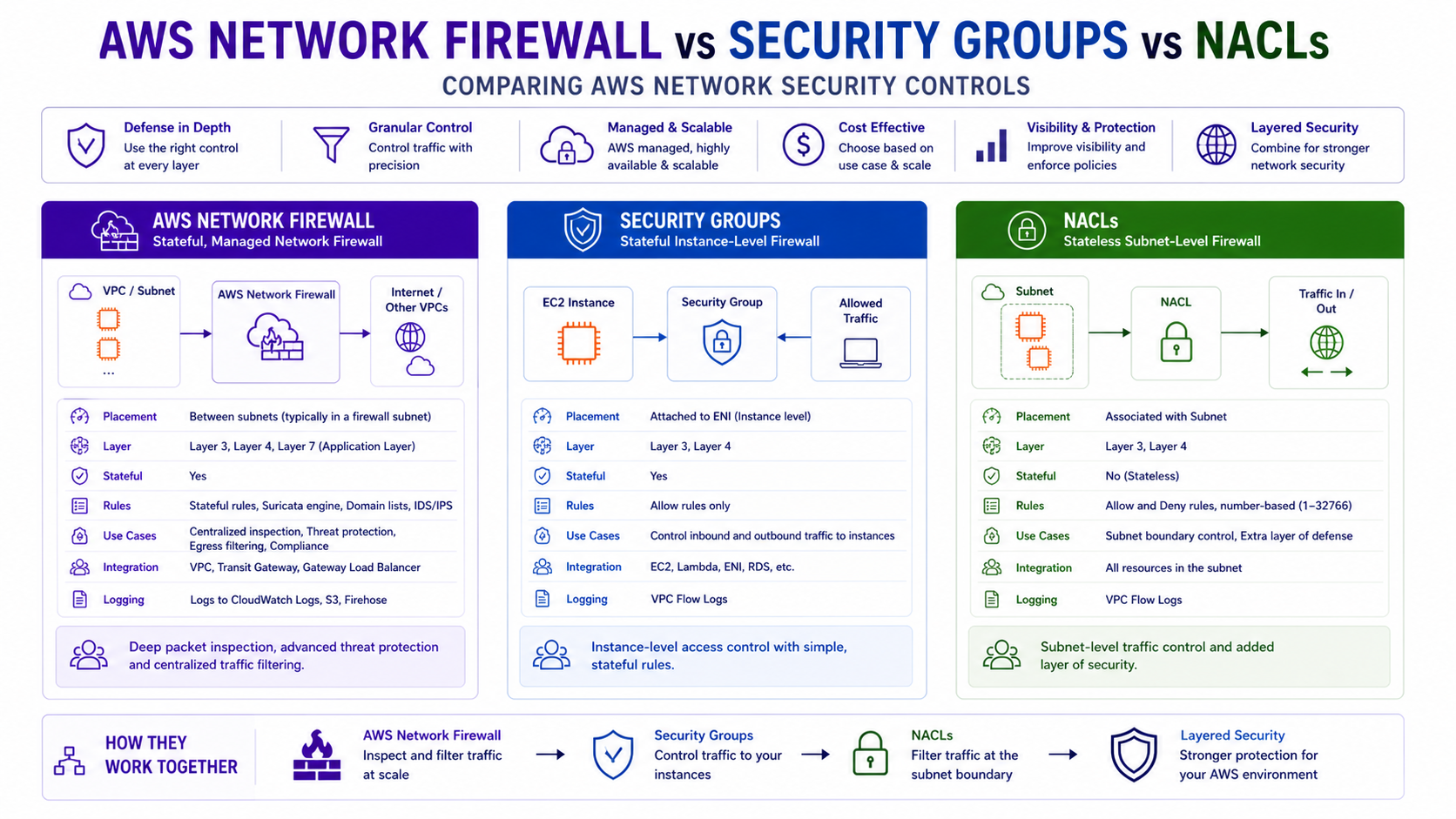
TL;DR Comparison
| Feature | Security Groups | Network ACLs | AWS Network Firewall |
|---|---|---|---|
| Operates at | Instance / ENI level | Subnet level | VPC / TGW level |
| State | Stateful | Stateless | Stateful + Stateless |
| Traffic direction | Inbound + Outbound | Inbound + Outbound | Inbound + Outbound + East-West |
| Rule types | Allow only | Allow + Deny | Allow, Deny, Drop, Alert |
| Protocol inspection | Layer 4 (port/protocol) | Layer 4 (port/protocol) | Layer 3–7 (deep packet) |
| Domain filtering | ❌ No | ❌ No | ✅ Yes (FQDN rules) |
| IDS / IPS | ❌ No | ❌ No | ✅ Suricata-based |
| TLS inspection | ❌ No | ❌ No | ✅ Yes |
| Scope | Per resource | Per subnet | Per VPC / centralised |
| Cost | Free | Free | $0.395/hour + $0.065/GB |
| Managed by | Dev teams | Platform teams | Security / Network teams |
Introduction
Security Groups and NACLs ship with every VPC. They are free, familiar, and solve 80% of use cases. But in regulated industries — financial services, healthcare, government — they leave critical gaps: no deep packet inspection, no domain-based filtering, no IDS/IPS, no TLS decryption.
AWS Network Firewall fills those gaps. But it is not a replacement for Security Groups and NACLs — it is a third, complementary layer. The mistake most teams make is treating these as alternatives when they should be used together, each doing the job it is best suited for.
In this post we go deep on all three layers — how each works, what it can and cannot do, how to build each in Terraform, and how to architect a genuinely layered defence-in-depth model that satisfies even the strictest compliance requirements. This is the DevSecOps post the series has been building toward.
1. Security Groups — Your First Line of Defence
How They Work
Security Groups are stateful, instance-level firewalls. They are attached to ENIs (Elastic Network Interfaces) — which means they protect individual EC2 instances, Lambda functions, RDS instances, ECS tasks, and any other resource with a network interface.
Stateful means: if you allow inbound traffic on port 443, the return traffic is automatically allowed without an explicit outbound rule. The connection tracking table handles this transparently.
Internet → [Security Group — inbound rules evaluated] → EC2 Instance
EC2 Instance → [return traffic automatically allowed] → Internet
What Security Groups Can and Cannot Do
Can do:
- Allow or deny by IP address, CIDR, or another Security Group ID
- Filter by protocol (TCP, UDP, ICMP) and port
- Reference other Security Groups as sources — the most powerful feature
- Apply to multiple instances simultaneously
- Be modified without restarting instances — changes apply immediately
Cannot do:
- Create explicit Deny rules — every rule is an Allow. Anything not matched is implicitly denied
- Filter by domain name or hostname
- Inspect packet contents
- Log individual connection decisions (only VPC Flow Logs can approximate this)
Full Security Group Terraform — Three-Tier Architecture
# ALB Security Group — public facing
resource "aws_security_group" "alb" {
  name        = "alb-sg"
  description = "Allow HTTPS from internet to ALB"
  vpc_id      = aws_vpc.main.id

  ingress {
    from_port   = 443
    to_port     = 443
    protocol    = "tcp"
    cidr_blocks = ["0.0.0.0/0"]
    description = "HTTPS from internet"
  }

  ingress {
    from_port   = 80
    to_port     = 80
    protocol    = "tcp"
    cidr_blocks = ["0.0.0.0/0"]
    description = "HTTP — redirect to HTTPS only"
  }

  egress {
    from_port   = 0
    to_port     = 0
    protocol    = "-1"
    cidr_blocks = ["0.0.0.0/0"]
    description = "Allow all outbound"
  }

  tags = { Name = "alb-sg" }
}

# Application Security Group — only accepts traffic from ALB
resource "aws_security_group" "app" {
  name        = "app-sg"
  description = "Allow traffic from ALB only"
  vpc_id      = aws_vpc.main.id

  ingress {
    from_port       = 8080
    to_port         = 8080
    protocol        = "tcp"
    security_groups = [aws_security_group.alb.id]   # ← SG reference, not CIDR
    description     = "App port from ALB only"
  }

  egress {
    from_port   = 0
    to_port     = 0
    protocol    = "-1"
    cidr_blocks = ["0.0.0.0/0"]
  }

  tags = { Name = "app-sg" }
}

# Database Security Group — only accepts traffic from App tier
resource "aws_security_group" "rds" {
  name        = "rds-sg"
  description = "Allow PostgreSQL from app tier only"
  vpc_id      = aws_vpc.main.id

  ingress {
    from_port       = 5432
    to_port         = 5432
    protocol        = "tcp"
    security_groups = [aws_security_group.app.id]   # ← Only app SG
    description     = "PostgreSQL from app tier only"
  }

  # No egress rule — RDS doesn't initiate outbound connections

  tags = { Name = "rds-sg" }
}
Security Group Chaining — The Most Powerful Pattern
Referencing Security Groups as sources instead of CIDR blocks is the key architectural pattern. It means:
- You don't need to know or manage IP addresses
- When you scale horizontally (new EC2 instances added to the app tier), they automatically inherit the
app-sgand immediately get DB access — no rule changes needed - When you deprovision instances, access is automatically removed
- Security is tied to identity (what role the resource plays) not location (what IP it has)
# Cross-account Security Group reference (peered VPCs, same region)
resource "aws_security_group_rule" "cross_account_app" {
  type                     = "ingress"
  from_port                = 443
  to_port                  = 443
  protocol                 = "tcp"
  source_security_group_id = "sg-0abc123def456"   # SG in peered VPC
  security_group_id        = aws_security_group.app.id
  description              = "Allow from partner account app tier"
}
Security Group Best Practices
# Use specific descriptions on every rule — without this, auditing is painful
ingress {
  from_port   = 443
  to_port     = 443
  protocol    = "tcp"
  cidr_blocks = ["10.0.0.0/8"]
  description = "HTTPS from all internal RFC1918 — required for ALB health checks"
  # Bad: description = "" — no description = no audit trail
}

# Never use 0.0.0.0/0 on sensitive ports
# This is what compliance scanners flag first
ingress {
  from_port   = 22     # ← NEVER open to 0.0.0.0/0
  to_port     = 22
  protocol    = "tcp"
  cidr_blocks = ["10.0.0.0/8"]   # Internal only, or use SSM Session Manager instead
  description = "SSH from internal network — prefer SSM Session Manager"
}
2. Network ACLs — Subnet-Level Guardrails
How They Work
Network ACLs (NACLs) are stateless, subnet-level firewalls. Unlike Security Groups which protect individual resources, NACLs protect entire subnets — every resource in a subnet is subject to the same NACL rules.
Stateless means: return traffic is not automatically allowed. You must explicitly permit both the inbound request and the outbound response. This catches engineers who configure inbound rules but forget ephemeral ports on outbound.
Internet → [NACL inbound rules — subnet boundary] → Resource
Resource → [NACL outbound rules — must be explicitly allowed] → Internet
Ephemeral Ports — The Most Common NACL Mistake
When a client connects to your server, it uses a random high-numbered ephemeral port (1024-65535) as its source port. The return traffic from your server goes back to that ephemeral port. Because NACLs are stateless, you must explicitly allow outbound traffic to the entire ephemeral range:
# Correct NACL for a public subnet — both inbound and return traffic
resource "aws_network_acl" "public" {
  vpc_id     = aws_vpc.main.id
  subnet_ids = aws_subnet.public[*].id

  # Allow HTTPS inbound
  ingress {
    rule_no    = 100
    action     = "allow"
    protocol   = "tcp"
    from_port  = 443
    to_port    = 443
    cidr_block = "0.0.0.0/0"
  }

  # Allow HTTP inbound (for redirect)
  ingress {
    rule_no    = 110
    action     = "allow"
    protocol   = "tcp"
    from_port  = 80
    to_port    = 80
    cidr_block = "0.0.0.0/0"
  }

  # Allow return traffic for outbound connections (ephemeral ports)
  # Without this — your instances can't receive responses to outbound requests
  ingress {
    rule_no    = 120
    action     = "allow"
    protocol   = "tcp"
    from_port  = 1024
    to_port    = 65535
    cidr_block = "0.0.0.0/0"
    # This is the ephemeral port range — required for stateless operation
  }

  # Allow HTTPS outbound (to ALB, internet)
  egress {
    rule_no    = 100
    action     = "allow"
    protocol   = "tcp"
    from_port  = 443
    to_port    = 443
    cidr_block = "0.0.0.0/0"
  }

  # Allow ephemeral ports outbound — return traffic for inbound connections
  egress {
    rule_no    = 110
    action     = "allow"
    protocol   = "tcp"
    from_port  = 1024
    to_port    = 65535
    cidr_block = "0.0.0.0/0"
  }

  tags = { Name = "public-nacl" }
}
When NACLs Add Real Value
NACLs have one capability Security Groups don't: explicit Deny rules. This makes them useful in specific scenarios:
# Block a known malicious IP range — explicit deny before any allow rules
resource "aws_network_acl_rule" "block_malicious" {
  network_acl_id = aws_network_acl.public.id
  rule_number    = 50      # Lower number = evaluated first
  egress         = false   # Inbound
  protocol       = "-1"    # All protocols
  rule_action    = "deny"
  cidr_block     = "198.51.100.0/24"   # Known bad actor range
}

# Block all traffic from a specific country CIDR range
resource "aws_network_acl_rule" "block_country" {
  network_acl_id = aws_network_acl.public.id
  rule_number    = 60
  egress         = false
  protocol       = "-1"
  rule_action    = "deny"
  cidr_block     = "203.0.113.0/24"
}
Architect's Rule: Don't over-engineer NACLs. They are coarse-grained subnet-level guardrails, not fine-grained security tools. Use them for: blocking known bad CIDR ranges, isolating subnets during incident response, and enforcing hard network boundaries between environments (e.g., deny all traffic from dev subnet CIDR to prod subnet CIDR at the NACL level). Leave granular access control to Security Groups.
NACL Rule Evaluation Order
Rules are evaluated in ascending numerical order — lowest rule number wins. Rule evaluation stops at the first match. Always leave gaps between rule numbers for future insertions:
Rule 50  → DENY  198.51.100.0/24 (malicious range — checked first)
Rule 100 → ALLOW tcp/443 0.0.0.0/0
Rule 110 → ALLOW tcp/80  0.0.0.0/0
Rule 120 → ALLOW tcp/1024-65535 0.0.0.0/0 (ephemeral)
Rule *   → DENY  all (implicit — always last)
3. AWS Network Firewall — Deep Packet Inspection at Scale
What It Is and Where It Sits
AWS Network Firewall is a managed, stateful network firewall and intrusion detection/prevention system. It operates at the VPC level — typically in a dedicated Inspection VPC — and uses Gateway Load Balancer to transparently redirect traffic through a firewall fleet without changing your application architecture.
Unlike Security Groups and NACLs which operate at Layer 4 (ports and protocols), Network Firewall operates at Layers 3-7:
Layer 3 — IP addresses and routing
Layer 4 — TCP/UDP ports and protocols
Layer 5 — Connection state
Layer 7 — HTTP headers, TLS SNI, DNS queries, application payloads
It is built on Suricata — the open-source intrusion detection engine — which means you can write custom Suricata-compatible rules and use any existing Suricata rule sets.
Where It Fits in Your Architecture
Spoke VPC (no direct internet)
    → TGW
        → Inspection VPC
            → AWS Network Firewall
                → Stateless rule groups (fast path — IP/port filtering)
                → Stateful rule groups (deep inspection — domain, IPS, TLS)
            → NAT Gateway (for allowed internet-bound traffic)
                → Internet Gateway
                    → Internet
Full Network Firewall Terraform
# Stateless Rule Group — fast path, evaluated first
# Drop obvious threats before they reach stateful inspection
resource "aws_networkfirewall_rule_group" "stateless_block" {
  capacity = 100
  name     = "stateless-block-rules"
  type     = "STATELESS"

  rule_group {
    rules_source {
      stateless_rules_and_custom_actions {

        # Drop all traffic from known malicious IPs (fast, no state tracking)
        stateless_rule {
          priority = 1
          rule_definition {
            actions = ["aws:drop"]
            match_attributes {
              sources {
                address_definition = "198.51.100.0/24"
              }
            }
          }
        }

        # Pass SSH only from known management ranges (fast allow)
        stateless_rule {
          priority = 10
          rule_definition {
            actions = ["aws:pass"]
            match_attributes {
              sources {
                address_definition = "10.0.0.0/8"
              }
              destination_ports {
                from_port = 22
                to_port   = 22
              }
              protocols = [6]   # TCP
            }
          }
        }

        # Forward everything else to stateful inspection
        stateless_rule {
          priority = 100
          rule_definition {
            actions = ["aws:forward_to_sfe"]   # Send to Stateful Engine
            match_attributes {
              sources {
                address_definition = "0.0.0.0/0"
              }
            }
          }
        }
      }
    }
  }

  tags = { Name = "stateless-block-rules" }
}

# Stateful Rule Group — domain filtering (Layer 7)
# Block all domains except explicit allowlist — zero-trust egress
resource "aws_networkfirewall_rule_group" "domain_allowlist" {
  capacity = 100
  name     = "domain-allowlist"
  type     = "STATEFUL"

  rule_group {
    rule_variables {
      ip_sets {
        key = "HOME_NET"
        ip_set {
          definition = ["10.0.0.0/8", "172.16.0.0/12", "192.168.0.0/16"]
        }
      }
    }

    rules_source {
      rules_source_list {
        generated_rules_type = "ALLOWLIST"
        target_types         = ["HTTP_HOST", "TLS_SNI"]   # HTTP + HTTPS domains

        # Only these domains can be reached from your VPC
        targets = [
          ".amazonaws.com",        # AWS services
          ".docker.io",            # Docker Hub
          ".github.com",           # GitHub
          ".pypi.org",             # Python packages
          ".npmjs.com",            # Node packages
          "updates.company.com",   # Internal update server
        ]
      }
    }
  }

  tags = { Name = "domain-allowlist" }
}

# Stateful Rule Group — Suricata IPS rules
# Block known CVEs, C2 callbacks, and malware signatures
resource "aws_networkfirewall_rule_group" "ips_rules" {
  capacity = 1000
  name     = "suricata-ips-rules"
  type     = "STATEFUL"

  rule_group {
    rules_source {
      # Suricata rule format — same syntax as on-premises Suricata
      rules_string = <<-EOT
        # Block Cobalt Strike default beacon (C2 callback)
        alert http $HOME_NET any -> $EXTERNAL_NET any (msg:"Cobalt Strike Beacon";
          content:"Accept: */*"; http_header;
          content:!"Referer"; http_header;
          threshold: type limit, track by_src, count 1, seconds 60;
          sid:9000001; rev:1;)

        # Block DNS queries to known malware C2 domains
        drop dns $HOME_NET any -> any 53 (msg:"Known C2 Domain Query";
          dns.query; content:"malware-c2.example.com"; nocase;
          sid:9000002; rev:1;)

        # Alert on SSH brute force (>10 attempts/minute)
        alert tcp $EXTERNAL_NET any -> $HOME_NET 22 (msg:"SSH Brute Force Attempt";
          threshold: type threshold, track by_src, count 10, seconds 60;
          sid:9000003; rev:1;)

        # Block outbound traffic on non-standard ports (data exfiltration indicator)
        drop tcp $HOME_NET any -> $EXTERNAL_NET ![$HTTP_PORTS,443,22,53]
          (msg:"Non-standard outbound port"; sid:9000004; rev:1;)
      EOT
    }
  }

  tags = { Name = "suricata-ips-rules" }
}

# Firewall Policy — combines all rule groups
resource "aws_networkfirewall_firewall_policy" "main" {
  name = "org-firewall-policy"

  firewall_policy {
    # Default actions for traffic not matched by any rule
    stateless_default_actions          = ["aws:forward_to_sfe"]
    stateless_fragment_default_actions = ["aws:drop"]   # Drop all IP fragments

    # Stateless rules — evaluated first, in order
    stateless_rule_group_reference {
      priority     = 1
      resource_arn = aws_networkfirewall_rule_group.stateless_block.arn
    }

    # Stateful rules — evaluated after stateless pass-through
    stateful_rule_group_reference {
      resource_arn = aws_networkfirewall_rule_group.domain_allowlist.arn
    }

    stateful_rule_group_reference {
      resource_arn = aws_networkfirewall_rule_group.ips_rules.arn
    }

    # Stateful default — drop everything not explicitly allowed
    stateful_default_actions = ["aws:drop_strict"]
  }

  tags = { Name = "org-firewall-policy" }
}

# The Firewall Instance — deployed into inspection subnets
resource "aws_networkfirewall_firewall" "main" {
  name                = "inspection-firewall"
  firewall_policy_arn = aws_networkfirewall_firewall_policy.main.arn
  vpc_id              = aws_vpc.inspection.id

  # Deploy one endpoint per AZ for high availability
  dynamic "subnet_mapping" {
    for_each = aws_subnet.firewall_subnets[*].id
    content {
      subnet_id = subnet_mapping.value
    }
  }

  tags = { Name = "inspection-firewall" }
}

# Firewall Logging — critical for auditing and IR
resource "aws_networkfirewall_logging_configuration" "main" {
  firewall_arn = aws_networkfirewall_firewall.main.arn

  logging_configuration {
    # Flow logs: metadata about every connection
    log_destination_config {
      log_destination = {
        logGroup = "/aws/network-firewall/flow"
      }
      log_destination_type = "CloudWatchLogs"
      log_type             = "FLOW"
    }

    # Alert logs: details about blocked or flagged traffic
    log_destination_config {
      log_destination = {
        bucketName = "security-logs-firewall-alerts"
      }
      log_destination_type = "S3"
      log_type             = "ALERT"
    }
  }
}
TLS Inspection — Decrypting Encrypted Traffic
The most powerful and most complex Network Firewall capability. Without TLS inspection, ~90% of internet traffic is opaque to your firewall — attackers know this and use HTTPS for C2 callbacks and data exfiltration.
# TLS Inspection Configuration
resource "aws_networkfirewall_tls_inspection_configuration" "main" {
  name        = "tls-inspection"
  description = "Decrypt and inspect HTTPS traffic"

  tls_inspection_configuration {
    # Outbound inspection — decrypt traffic leaving your VPC
    server_certificate_configurations {
      certificate_authority_arn = aws_acm_certificate.inspection_ca.arn

      # Re-encrypt with inspection CA — clients must trust this CA
      check_certificate_revocation_status {
        revoked_status_action  = "DROP"
        unknown_status_action  = "PASS"
      }

      scopes {
        protocols = [443]   # HTTPS only

        # Inspect traffic to all external destinations
        destination_ports {
          from_port = 443
          to_port   = 443
        }
      }
    }
  }
}
Important: TLS inspection requires your internal clients to trust the inspection CA certificate. For managed fleets (EC2, ECS), push the CA via Systems Manager. For BYOD or contractor devices, this requires MDM (Mobile Device Management) distribution. Never enable TLS inspection without planning the CA distribution first.
4. The Layered Defence-in-Depth Architecture
This is the production pattern that satisfies PCI-DSS, HIPAA, SOC 2 Type II, and ISO 27001 requirements. Each layer has a distinct responsibility:
Internet
    ↓
[AWS Shield + WAF]              ← Layer 0: DDoS + L7 protection (CloudFront/ALB)
    ↓
[Network ACL]                   ← Layer 1: Subnet boundary, block known bad CIDRs
    ↓
[AWS Network Firewall]          ← Layer 2: Deep inspection, IPS, domain filtering, TLS
    ↓
[Security Group — ALB]          ← Layer 3: Allow HTTPS/HTTP from internet only
    ↓
[Security Group — App]          ← Layer 4: Allow only from ALB SG
    ↓
[Security Group — RDS]          ← Layer 5: Allow only from App SG
    ↓
[Resource-level encryption]     ← Layer 6: KMS encryption at rest (EBS, RDS, S3)
Each layer is independent. Compromise of one layer does not bypass the others. This is genuine defence in depth — not security theatre.
Routing Traffic Through the Firewall — The Missing Piece
The firewall only inspects traffic that is routed through it. This is where most implementations fail — the firewall is deployed but traffic bypasses it because routing wasn't updated:
# In the Inspection VPC — route table for firewall subnet
# Traffic from TGW → Firewall → NAT GW → Internet
resource "aws_route_table" "firewall" {
  vpc_id = aws_vpc.inspection.id

  # Return traffic: after firewall inspection, route to TGW for delivery
  route {
    cidr_block         = "10.0.0.0/8"   # All spoke VPC CIDRs
    transit_gateway_id = aws_ec2_transit_gateway.main.id
  }

  # Internet-bound traffic after inspection goes to NAT GW
  route {
    cidr_block     = "0.0.0.0/0"
    nat_gateway_id = aws_nat_gateway.inspection.id
  }

  tags = { Name = "firewall-rt" }
}
Critical: The firewall endpoint ID is per-AZ. For production deployments, use a for_each loop to create per-AZ route table entries — never use a single AZ's endpoint ID in all route tables, as this creates asymmetric routing that breaks stateful inspection.
5. AWS Network Firewall — Managed Rule Groups
Instead of writing Suricata rules from scratch, AWS offers managed rule groups maintained by AWS Threat Intelligence:
# Subscribe to AWS managed rule groups
resource "aws_networkfirewall_firewall_policy" "with_managed_rules" {
  name = "policy-with-managed-rules"

  firewall_policy {
    stateless_default_actions          = ["aws:forward_to_sfe"]
    stateless_fragment_default_actions = ["aws:drop"]

    # AWS managed — blocks known botnet C2 and malware domains
    stateful_rule_group_reference {
      resource_arn = "arn:aws:network-firewall:eu-west-1:aws-managed:stateful-rulegroup/AbusedLegitMalwareDomainsActionOrder"
      priority     = 1
    }

    # AWS managed — blocks known malware domains
    stateful_rule_group_reference {
      resource_arn = "arn:aws:network-firewall:eu-west-1:aws-managed:stateful-rulegroup/MalwareDomainsActionOrder"
      priority     = 2
    }
  }
}
6. Cost Deep-Dive
Security Groups and NACLs are completely free. AWS Network Firewall is not:
| Component | Cost (eu-west-1) |
|---|---|
| Firewall endpoint (per AZ) | $0.395/hour (~$288/month per AZ) |
| Data processed | $0.065/GB |
| TLS inspection | Additional $0.01/GB |
Cost example — 3 AZ deployment, 10 TB/month traffic:
Firewall endpoints:   3 × $0.395 × 730h        = $865.35/month
Data processed:       10,000 GB × $0.065        = $650.00/month
Total:                                           ~$1,515/month
7. The Decision Framework
What are you protecting against?

Known bad IPs / port scans?
└── Network ACL (deny rules, free, subnet-level)

Unauthorised access between application tiers?
└── Security Groups (SG chaining, free, instance-level)

Outbound traffic to malicious domains / C2 callbacks?
└── AWS Network Firewall (domain allowlist + IPS rules)

Encrypted C2 / data exfiltration over HTTPS?
└── AWS Network Firewall + TLS Inspection

Known vulnerability exploits (CVEs)?
└── AWS Network Firewall + Suricata IPS rules or managed rule groups

L7 attacks (SQLi, XSS, bot traffic)?
└── AWS WAF (not covered in this post — next layer up)

Do you need compliance (PCI-DSS, HIPAA, ISO 27001)?
└── All three layers + WAF + Shield Advanced + CloudTrail
8. Common Mistakes & Anti-Patterns
- Mistake 1: Opening Port 22 or 3389 to 0.0.0.0/0 — This is the fastest way to get your instances brute-forced. Use AWS Systems Manager Session Manager instead, which requires no open inbound ports.
# BAD: Open to the world ingress { from_port = 22 to_port = 22 protocol = "tcp" cidr_blocks = ["0.0.0.0/0"] } # GOOD: No inbound ports, access via IAM and SSM # Use the 'AmazonSSMManagedInstanceCore' policy on the EC2 IAM Role - Mistake 2: Deploying Network Firewall Without Updating Routes — Traffic will bypass the firewall entirely.
- Mistake 3: Forgetting Ephemeral Ports in NACLs — Return traffic will be dropped, failing all connections.
- Mistake 4: Using NACLs as a Primary Security Tool — NACLs are stateless and limited; use SGs for granular control.
- Mistake 5:
stateful_default_actions = ["aws:drop_strict"]Without Testing — Usealert_strictfirst to avoid breaking production. - Mistake 6: No Security Group Descriptions — Without descriptions, security audits become a nightmare.
# BAD: No context
ingress {
  from_port = 443
  to_port   = 443
  protocol  = "tcp"
  cidr_blocks = ["10.0.0.0/8"]
}

# GOOD: Audit-ready
ingress {
  from_port   = 443
  to_port     = 443
  protocol    = "tcp"
  cidr_blocks = ["10.0.0.0/8"]
  description = "Allow HTTPS from corporate VPC for internal API access"
}
Architecture Decision Matrix
| Requirement | Primary Tool | Why? |
|---|---|---|
| Micro-segmentation between containers | Security Groups | ENI-level enforcement, zero performance penalty. |
| Environment isolation (Prod vs Dev) | Network ACLs | Stateless, coarse-grained block at the subnet boundary. |
| Blocking malicious country CIDRs | Network ACLs | Explicit DENY support evaluated before ALLOW rules. |
| DPI (Deep Packet Inspection) | Network Firewall | Suricata engine inspects L7 payloads and TLS SNI. |
| Centralised Egress Control | Network Firewall | FQDN/Domain filtering to prevent data exfiltration. |
| Intrusion Prevention (IPS) | Network Firewall | Automated blocking of known CVE exploits and C2 beacons. |
The Golden Rule
"Security Groups for everything — they are free, precise, and should be applied to every resource with a network interface, always following least privilege. NACLs as a coarse safety net — explicit deny rules for known bad actors, hard isolation between environments. AWS Network Firewall when you need Layer 7 visibility, domain-based egress control, IDS/IPS, or regulatory compliance that requires deep packet inspection. Never skip the first two layers thinking the third covers everything — and never skip the third layer in a regulated environment thinking the first two are enough."